
The short version
Redesigning your yard with AI is free, but the free render comes out small, watermarked and silent about every plant in it. On August 12, 2026 we opened, one by one, the pages of the twelve services that show up on this search.
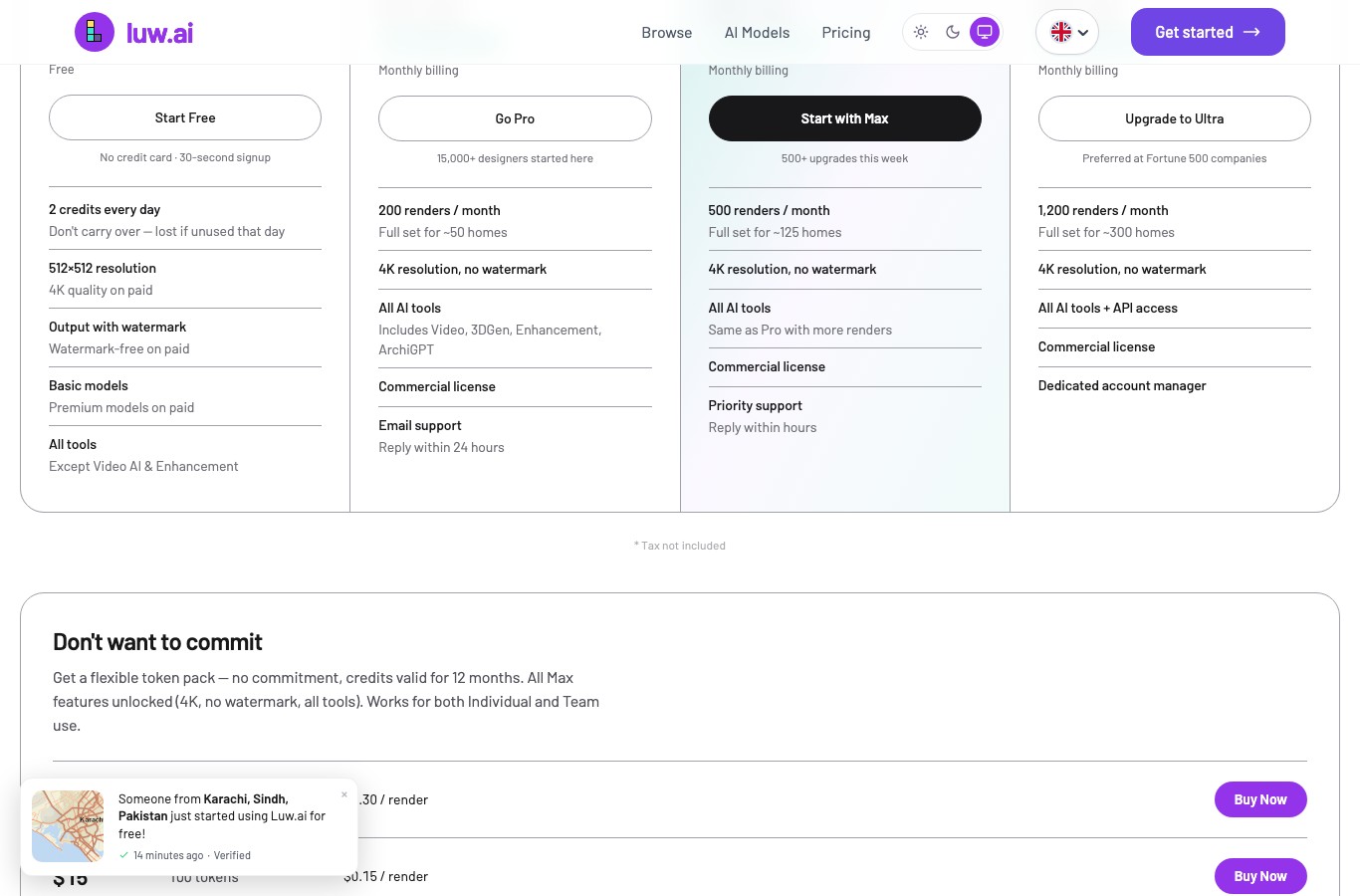
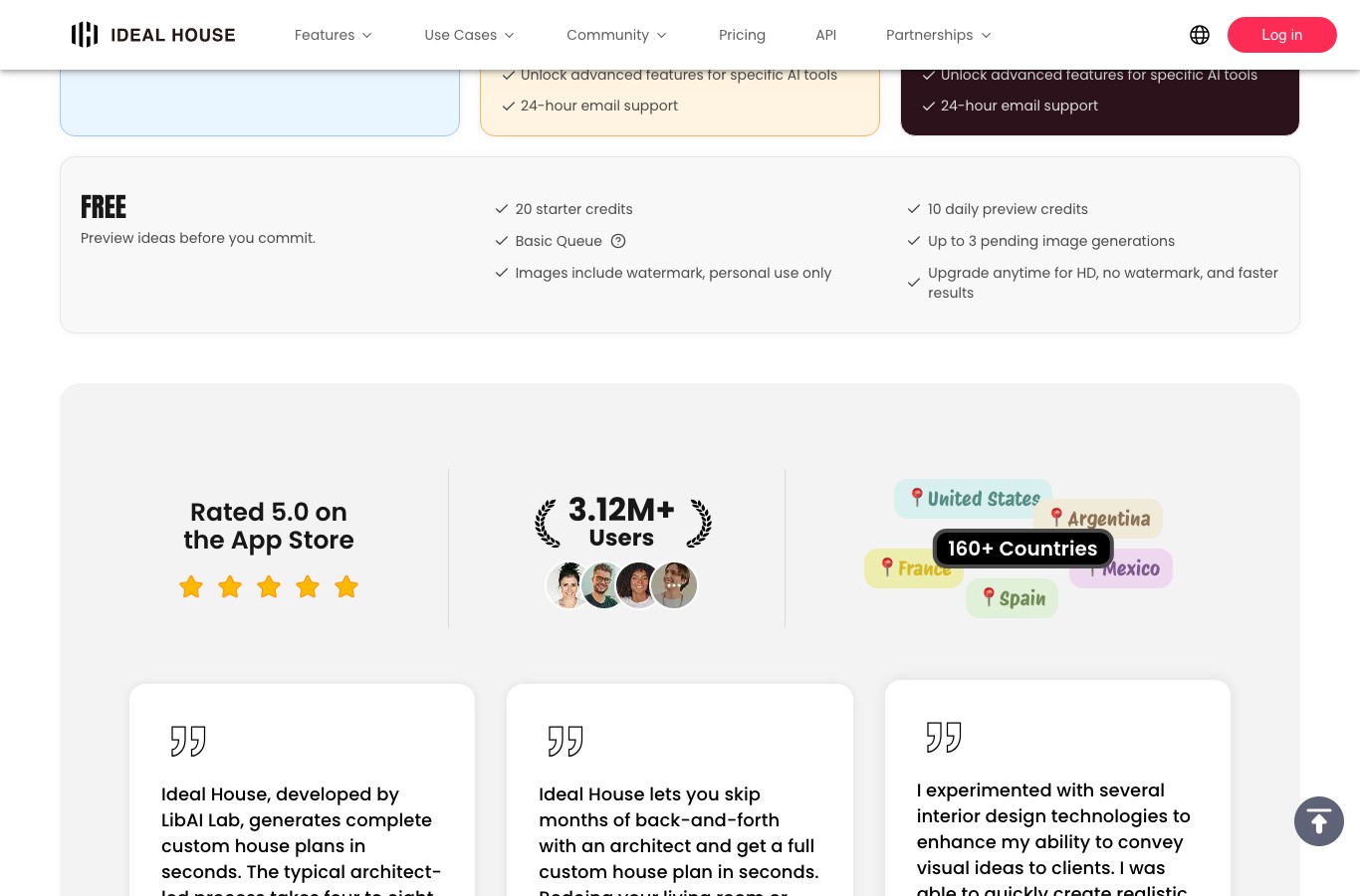
Luw.ai gives “2 credits every day” on its free plan, at “512×512 resolution”, with “Output with watermark”. A commercial license starts at $19 a month.
Neighborbrite, the number one organic result, charges for naming plants: “Select plants in a photo and get their names” carries the Pro tag, as does its library of “5,000+ plants”.
iScape puts “Upload your own images” behind its $29.99 a month plan, so its free tier cannot start from a photo of your yard at all.
RoomsGPT is the only one in the panel that advertises “Free Daily Credits” and “No Signup Required” on the tool page itself.
You have a photo of your yard, a vague idea of what you want to do with it, and no interest in paying a designer before you even know what you like. AI sounds perfect for that, and the first page of Google is packed with services with the word “free” in the title. We opened them one by one and wrote down, line by line, what each pricing page actually allows. The conclusion fits in one sentence: free is real, it gives you a mood image, and it stops exactly where a garden project starts.
- What free actually gives you, service by service
- The tools Google’s AI overview recommends
- An image is not a plant list
- The starting photo decides everything
- Build the prompt for your garden
- What the render ignores: utilities and permits
- Where the photo of your house ends up
- Frequently asked questions
What free actually gives you, service by service
The search “free ai garden design” returns about 234 million results, and the first page is almost entirely tool landing pages: a design app in first place, two roundups, two app store listings, a Reddit thread, a YouTube video and a long line of services promising the same thing. None of them is exactly lying. The word “free” simply covers five different things across them. For the plant list the renders leave out, a ChatGPT online chat can suggest species suited to your sun and soil.
A service can let you make the image for nothing and then brand the result. It can hand you a one-time credit balance that never renews. It can hand you credits every day, with no rollover. It can allow everything except commercial use. And it can, in the most radical case, put uploading your own photo behind the paywall, which empties the whole promise.
The full rundown
Every line comes from the pricing page or the public listing of the service, opened in English on August 12, 2026. Quotation marks reproduce the wording on screen, with no rewriting.
| Service | Rank | What the free tier gives | The wall |
|---|---|---|---|
| Neighborbrite | 1st organic | One free tool, “Choose a style”, “Guided plan from a ready-made look” | Six features tagged Pro or Business, including “Identify plants”; no public pricing page |
| Ideal House | 10th | “20 starter credits” then “10 daily preview credits” | “Images include watermark, personal use only”; commercial rights on the $39 a month plan |
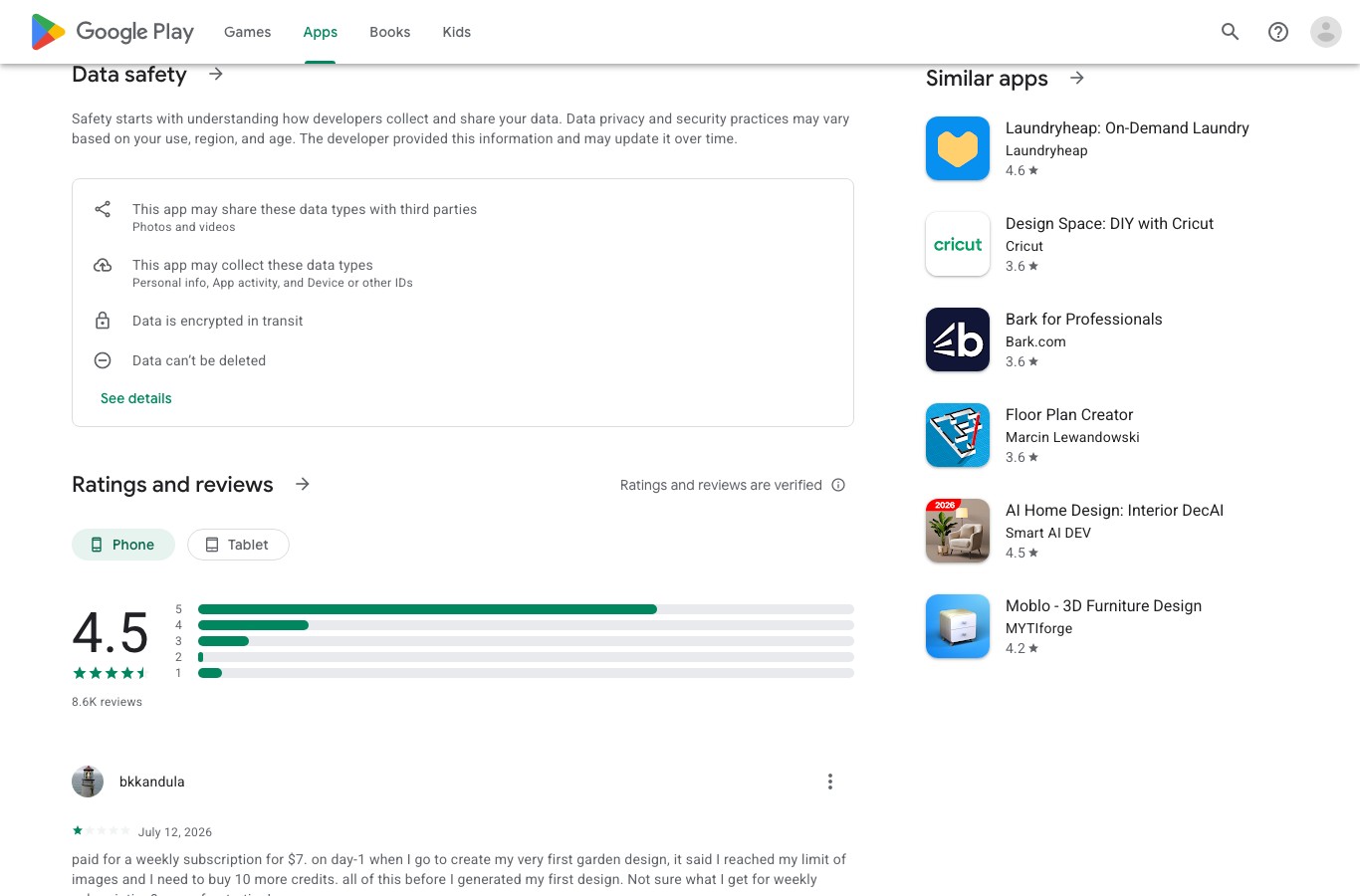
| Garden AI (Android) | 13th | Free install, “In-app purchases” | No quota published on the listing; the Data safety card says it may share “Photos and videos” with third parties |
| RoomsGPT | 18th | “Free Daily Credits”, “No Signup Required”, “61+ Styles” | No number attached to the daily credits, and a “Remove ads” link sits under the upload box |
| Luw.ai | outside the top 20 | “2 credits every day”, no rollover, no card | “512×512 resolution”, “Output with watermark”, commercial license from $19 a month |
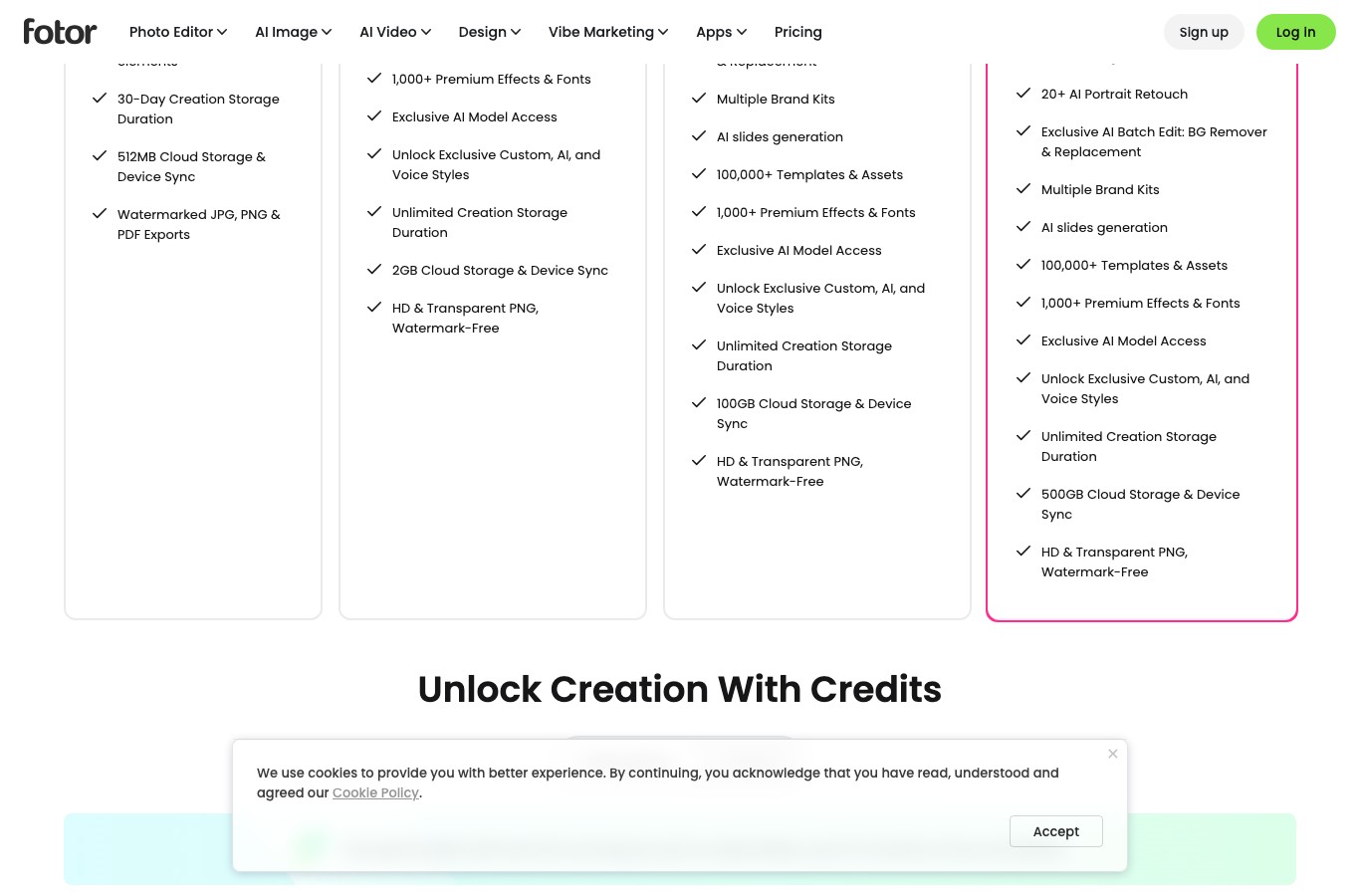
| Fotor | outside the top 20 | “Limited Free credits”, with no figure at all | “Watermarked JPG, PNG & PDF Exports”, “30-Day Creation Storage Duration” |
| Easy-Peasy.ai | outside the top 20 | “1 image credit”, no card | “Generated images are public”: free-plan renders are visible to everyone |
| Homiwork | outside the top 20 | Starter credits, no figure given | Pricing page returns a 404; warning that “we automatically delete old content” |
| YouCam | outside the top 20 | “Sign up for 5 credits”, per its comparison table | “Save image with watermark”; “Commercial use allowed” only on the Pro plan, shown at €5.58 a month from our connection |
| ReimagineHome | outside the top 20 | “All new users get 5 free designs”, no card | No other plan at $0: the first subscription is $19 a month for 30 credits, or $0.63 per credit |
| iScape | cited by the AI overview | “Free to Download & Trial (Note: Limited Features)”, “2D & 3D design (iOS only)” | “Reduced access to plants, hardscapes & products”, and above all “Upload your own images” from the $29.99 a month plan |
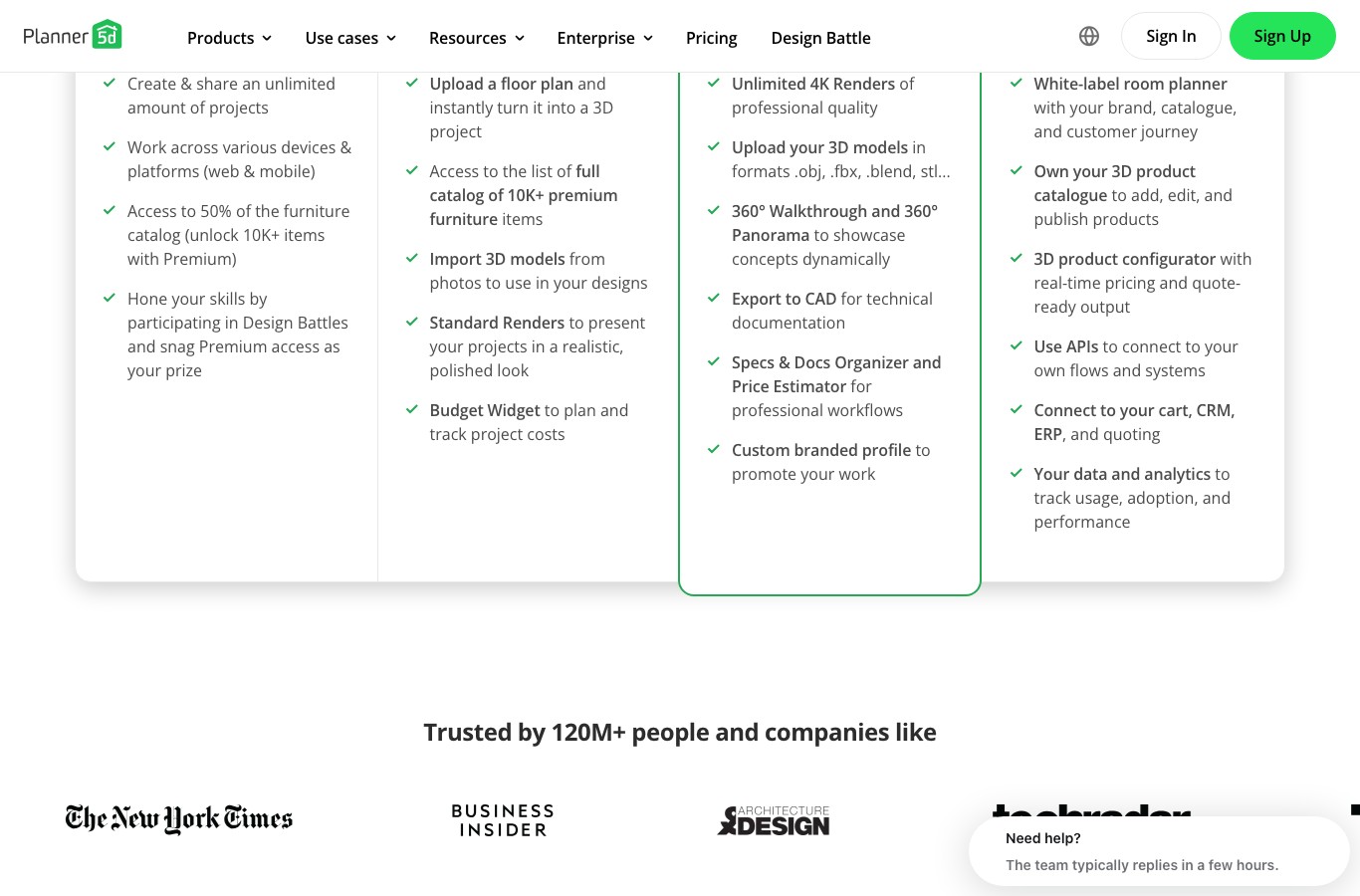
| Planner 5D | outside the top 20 | “Unlimited amount of projects” and “Access to 50% of the furniture catalog” | The floor plan upload, the full “10K+ premium furniture” catalog and the standard renders all sit in Premium, at €4.99 a month billed yearly |

Why 512 pixels changes everything in a yard An image 512 pixels on a side is roughly a thumbnail. On a portrait, that is enough to judge a mood. On a garden, it makes it impossible to tell one foliage from another, to count pavers, or to show anything to a contractor. The free render is there to pick between two directions, not to decide.
The tools Google’s AI overview recommends
On this search Google shows an AI generated panel above the classic results. It names Neighborbrite, Remodel AI, Gendo and RoomsGPT, and the French version of the same search adds ReImagine Home, iScape and Kozikaza. We opened them all. Three surprises came out of it.
The first is in the shape of these offers. ReimagineHome announces “All new users get 5 free designs” and has no other plan at $0: the first subscription is $19 a month for 30 credits, that is $0.63 per credit, a unit price the company publishes itself. Everything after those five designs is metered.

RoomsGPT is the only one that asks for nothing
RoomsGPT, 18th on this search, is the odd one out, and worth naming for it. Its garden page leads with three claims side by side: “Free Daily Credits”, “No Signup Required” and “61+ Styles”, and the upload box is right there on the page, above a small “Remove ads” link that tells you how the free tier is funded. It is the only service in the panel that puts “no signup” in writing next to the upload field rather than in a FAQ. What it does not publish is the number: “daily credits” is never turned into a figure, so you find out how many you get by using them.
iScape will not let you upload your photo for free
iScape is the most counter-intuitive case in the panel. The app calls itself the “#1 Landscape Design App” and claims close to four million users. Its pricing table is perfectly clear, and it says the opposite of what you expect from a free garden tool. The FREE column reads “2D & 3D design (iOS only)”, “Limited access to database & features” and “Reduced access to plants, hardscapes & products”. The line “Upload your own images” only appears from the PRO plan at $29.99 a month, or $299.99 a year.
Put another way: the service Google’s AI recommends to someone who wants to redesign a yard from a photo does not allow a photo on its free tier. And you need an iPhone or an iPad for the 3D part.

Neighborbrite sells the plant labels
Neighborbrite, the 1st organic result on this search, is the most transparent of the group, and that is what makes it interesting. Its home page shows a toolbox where every feature carries its plan tag. Tagged Pro: “Describe your dream yard”, “Magic edit”, “Erase elements”, “Add elements” which unlocks “5,000+ plants”, and above all “Identify plants”, described as “Select plants in a photo and get their names”. Tagged Business: “High resolution” and “Auto enhance”. Exactly one entry stays free: “Choose a style”, a guided plan from a ready-made look.
Naming the plants somebody drew for you is therefore a paid line at the one company in the panel that offers the feature explicitly. It publishes no pricing table either: /pricing returns a 404 and the app pricing page redirects to a sign-in screen, which makes any reading impossible without creating an account. We did not create one, and we publish no price for this service.

Planner 5D, the reverse case
Planner 5D shows the other way of charging. Its free tier is wide on paper: “Create & share an unlimited amount of projects”, work across devices, “Access to 50% of the furniture catalog”. But “Upload a floor plan and instantly turn it into a 3D project”, the full “10K+ premium furniture” catalog, the standard renders and the budget widget all sit in the Premium column at €4.99 a month billed yearly. Two things only show up when you compare languages: its English plan comparison never mentions an AI design generator at all, and the French version of the very same page puts those four lines inside the free plan. Measured the same day, from the same connection.
An image is not a plant list
This is the real difference between a yard and a living room, and every one of these tools skates over it. When an AI restyles your living room it shows you a couch: you can go looking for a similar couch, and it will fit the room. When it restyles your yard it shows you a green mass. Nothing tells you whether that shrub is evergreen or deciduous, whether it tops out at three feet or thirteen, whether it takes limestone, frost or deep shade, and above all whether it is still alive in three years at your address.

Three services in the panel do promise to account for climate. Luw.ai writes on its product page that it gives “personalized plant recommendations, seasonal planning, and beautiful garden visualizations optimized for your climate zone”. Garden AI’s Play Store listing runs a whole section titled “Smart Plant Selection for Your Climate”. Ideal House offers to “Discover low-maintenance layouts, drought-tolerant plants, and eco-friendly ideas”. None of the three says what data it leans on: no zone, no weather station, no botanical reference, not even a question asked of the user about their region. These are home page arguments, and we did not put them to the test, since testing them means creating an account.

Only two services have an identified plant library in their offer: iScape, which mentions access to “Thousands of plants”, and Neighborbrite, with its “5,000+ plants”. Both keep it behind the paywall. Across the twelve services reviewed, not one publishes a species list on its free tier.
The habit that changes the result Ask for the list at the same time as the image, and ask for it in plain words. A conversational model that accepts a photo can return the render and the names of what it drew, with the mature height and light requirements of each plant. That is exactly what the last sentence of the prompt built further down this page does.
The starting photo decides everything
With this kind of tool, render quality depends far more on the photo than on which service you pick. A yard shot into the sun, in portrait, from the doorstep, will give you nothing good anywhere. Five minutes of preparation beat three services tried in a row.
- Shoot on an overcast day. A veiled sky kills hard shadows and blown highlights. Noon sun is the worst possible moment.
- Frame in landscape, at eye level, standing as far back as you can. The render can only redesign what it sees. If the back fence is out of frame, it will be invented.
- Get a scale reference in the shot. A door, a step, a patio table: those are the only elements that let the model, and you, judge distances.
- Take the same view twice, once as is and once with the furniture and clutter removed. The second one almost always renders better.
- Keep the full resolution original. You will need it for quotes, and for an honest before and after.
The rest is in the prompt. An image generator obeys what you describe: if you do not say to keep the shared wall, it will swap it for a hedge; if you say nothing about sun, it will plant a full-sun bed in a corner that never sees daylight. That is what the tool below is for. For the general principles of writing an image prompt, our guide to image prompts covers the full method.
Build the prompt for your garden
Four choices, a prompt ready to paste into any generator that accepts a photo, and the warning that matches your type of space. Nothing is sent anywhere: the tool simply assembles sentences you can also copy by hand from the table below.
The garden prompt builder
Quatre choix, une consigne prête à coller, avec la phrase qui oblige l’IA à nommer les végétaux qu’elle dessine.
Your prompt
This is a photo of my garden. Keep the framing, the buildings and the property lines, and propose a realistic redesign.
Redesign this small city garden of about 400 square feet, keeping the existing walls, fence and house facade. The space is in full sun for most of the day: choose plants that take the heat and add a shaded spot to sit. Natural cottage style: loose beds, ornamental grasses, pollinator perennials, soft edges. Constraint: the least upkeep possible, no frequent pruning, mulch on every bed.
Return a sharp photographic image, taken at eye level, in full daylight. Then, below the image, list the plants you drew with their common and botanical names, their mature height and their light requirements, and flag any that would not suit my region.
Check before you dig
The hedge the render presses against the property line: setbacks and maximum heights are set by your city or your HOA, not by the software.
Paste it into a generator that accepts a photo. Nation AI edits the image you send instead of inventing a new one.
The sentence library
These are the nineteen sentences the tool assembles. Each one is a complete imperative sentence, written in the form that gives the most stable results. They are reusable as they are, with or without the tool.
| Setting | Choice | The sentence the tool inserts |
|---|---|---|
| Space | Small city garden | Redesign this small city garden of about 400 square feet, keeping the existing walls, fence and house facade. |
| Space | Large garden | Redesign this large garden, keeping the house, the mature trees and the slope of the land. |
| Space | Deck or balcony | Redesign this deck, keeping the railing, the floor and the facade. |
| Space | Front yard | Redesign this front yard, keeping the facade, the gate, the driveway and the walkway to the door. |
| Space | Vegetable garden | Lay this space out as a vegetable garden, with raised beds, paths that stay walkable in the rain and a water point. |
| Space | Pool surround | Redesign the area around this pool, keeping its shape and position, with a non-slip deck and clear circulation. |
| Light | Full sun | The space is in full sun for most of the day: choose plants that take the heat and add a shaded spot to sit. |
| Light | Part shade | The space is in part shade, with only a few hours of direct sun a day. |
| Light | Full shade | The space stays in shade almost all day: choose shade plants and skip a classic lawn. |
| Light | Wind or coastal | The space is very exposed to wind: add a planted windbreak and keep planting low and flexible. |
| Style | Natural and cottage | Natural cottage style: loose beds, ornamental grasses, pollinator perennials, soft edges. |
| Style | Clean contemporary | Clean contemporary style: straight lines, clipped plants, pale hard landscaping, restrained palette. |
| Style | Mediterranean | Mediterranean style: pale gravel, grey and silver foliage, sculptural shapes, very little lawn. |
| Style | Japanese and zen | Japanese zen style: mostly stone, mosses, maples, stepping stone path, asymmetric composition. |
| Style | Family friendly | Family style: one open lawn area, a shaded dining spot, closed storage, simple circulation. |
| Constraint | The least upkeep | Constraint: the least upkeep possible, no frequent pruning, mulch on every bed. |
| Constraint | Tight budget | Constraint: tight budget, keep the existing grading and favour young plants and common materials. |
| Constraint | Kids and pets | Constraint: kids and pets, no toxic or thorny plants, soft surfacing in the play area. |
| Constraint | Water saving | Constraint: water saving, drought tolerant plants, grouped irrigation and no large lawn. |
The warnings, by type of space
The second field of the tool does not come out of nowhere: it repeats the matching line of this table. These are the six checks that cost the most when you discover them after the work is done.
| Space | What to check before you dig |
|---|---|
| Small city garden | The hedge the render presses against the property line: setbacks and maximum heights are set by your city or your HOA, not by the software. |
| Large garden | The trees added near a boundary, and the shade they will cast on your neighbour in ten years, which the render never shows. |
| Deck or balcony | A ground level deck is usually the easy case, but a raised deck, a railing or a roofed pergola changes the permit picture. |
| Front yard | Anything visible from the street is where local rules bite hardest: fence height, gate, driveway material, and any HOA architectural review. |
| Vegetable garden | Real sun hours and access to water: a vegetable garden drawn in a shaded corner looks lovely and grows nothing. |
| Pool surround | A pool means excavation, so a locate request comes first, and barrier rules apply in most places. |
What the render ignores: utilities and permits
None of the twelve services reviewed mentions a single rule. That is fair enough, they are not design firms. It is also the most expensive hole in the whole exercise, because an AI render happily plants a hedge on the property line and drops a pool wherever there is room. Here is the floor, and the one rule that is genuinely national.

Call 811 before you dig, every time
This is the one step that applies everywhere in the United States, that costs nothing and that no render will ever mention. In the words of the service itself, 811 is “the free national before-you-dig service”, and its own guidance is explicit about who it concerns: “You should contact 811 or use your state 811 center’s website a few business days before you begin any digging, including common projects like planting trees and shrubs or installing fences and mailboxes.”
Planting a tree, setting a fence post and digging a pool are exactly what an AI render invites you to do, and all three are named in that sentence. The scale of the problem is published on the same site: damage to buried utilities costs the country roughly “$30 Billion in damages annually”. A locate request is free, it takes a few business days, and it is the only line of this article that can protect you from a gas line rather than from a bad plant choice.
Permits are local, and the render says nothing
For everything that gets built, the rules are set by your city, your county and, very often, your HOA, so there is no single national table to copy. What is constant is the list of things an AI render draws without ever mentioning that they carry a permit or a review. Take the measurements off your own photo, then make the calls.
| Item | What to measure on the render | Who to ask |
|---|---|---|
| Shed, cabin, pool house | Footprint, height, and distance to the property line | City or county building department, plus HOA architectural review |
| In-ground pool | Surface, depth, setbacks, and barrier or fence requirements | Building department, and your insurer |
| Fence or wall | Total height and the difference between front and back yard limits | Zoning code and HOA rules |
| Deck or patio | Whether it is at grade or raised, and whether it gets a roof | Building department |
| Trees and hedges | Mature height, distance to the line, and any protected species | City arborist or urban forestry office |
General information, to be checked with your own city Contacting 811 before digging applies nationwide, and it is free. Everything else on this page about permits varies by state, county, city and HOA, and the thresholds change often. One call to your building department costs five minutes and settles the question for your address.
Where the photo of your house ends up
A photo of a yard is not a neutral image: it shows a facade, a fence, sometimes a house number and the furniture on the patio. Four lines from the panel are worth reading before you upload anything.
Easy-Peasy.ai
Free column of the pricing page
“Generated images are public”
Garden AI
Data safety card on the Google Play listing
May share “Photos and videos” with third parties, and “Data can’t be deleted”
Homiwork
Notice shown inside the tool
“To keep generation costs low, we automatically delete old content”
Fotor
Line of the Basic plan
“30-Day Creation Storage Duration”
The first two are a privacy question, the next two a retention question, and they are opposite problems. At Easy-Peasy and Garden AI, the risk is that the image exists somewhere other than your device. At Homiwork and Fotor, that it disappears without notice: download your renders systematically, watermark and all, rather than trusting the service gallery.

This question of what happens to an uploaded file is not specific to gardens: we already measured it across every generator that accepts a photo in our article on the AI image generator from photo. The habit is the same: open the privacy policy before you send a picture of your home.
What Nation AI does here
Our image generator takes a file as input: the interface explicitly offers to edit or modify a photo you already have by selecting your file, which is exactly the move this topic needs. The menu also carries a “Gardener” assistant, useful for the part no image generator covers: naming plants, talking through sun exposure and correcting a proposal.
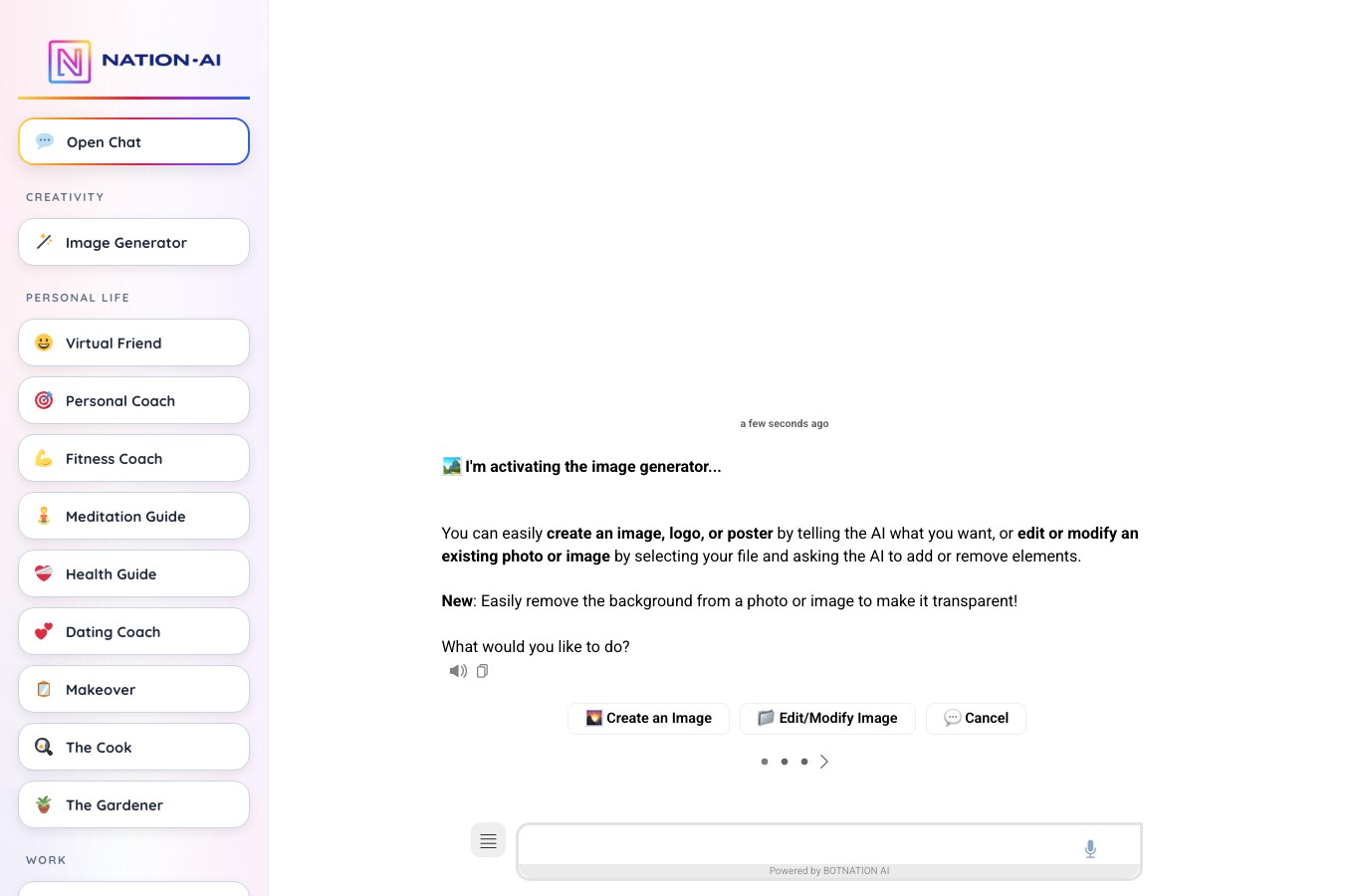
Redesign your yard from your own photo
Nation AI takes the image you send and edits it instead of inventing a new one. Paste the prompt you just built, then ask for the plant list right after.
Frequently asked questions
Can you really design a garden with AI for free?
Yes, if what you want is a mood image. Five of the twelve services reviewed put a number on their free tier, ranging from “1 image credit” at Easy-Peasy to “2 credits every day” at Luw.ai. The result, though, almost always comes out watermarked, at low resolution and under a personal license. For a clean, usable, reusable render you have to pay, between $4.99 and $29.99 a month depending on the service.
Can ChatGPT design my garden?
A conversational assistant that accepts images can repaint a photo of a yard, just like a dedicated generator. It even has an advantage the specialised tools do not: it returns text alongside the image, so it can name what it drew, explain why a plant does not suit an exposure, and revise its own proposal on request. That is why the prompt built on this page ends with a request for a list. On the other hand it does not know the real dimensions of your lot and has no product catalog to sell you.
How do you design a garden from a photo?
The principle is the same everywhere: you upload a photo, pick a style, and the tool repaints the image while keeping more or less the structure. Result quality depends on three things, in this order: the photo, the prompt, the service. Shoot in landscape on an overcast day, standing as far back as you can, then say explicitly what must be kept. Careful though, not every service allows it for free: at iScape, “Upload your own images” is reserved for the paid plan.
Is there a free AI garden designer with no sign-up?
One in this panel says so on the tool page itself: RoomsGPT displays “No Signup Required” right next to its upload box. Elsewhere, the phrase almost always means no credit card rather than no account. Luw.ai shows “No credit card” and “30-second signup”, Easy-Peasy “No credit card required”, ReimagineHome “No card required for free trial”: in all three you still need an account, you are just spared the card.
Can AI pick plants that suit my region?
Three services advertise it on their home page, without ever saying what data they use: no declared climate zone, no weather station, no botanical reference. An image generator, on top of that, picks nothing: it draws what statistically looks like a garden in the requested style. The only reliable method is still to make it name the species, then check each one with a local nursery or your county extension office, who know your soil and your last frost date.
Can an AI render work as a plan for a landscaper?
It works as intent, not as a plan. A professional needs dimensions, grades, soil type and buried utilities, and no render has any of that. A well framed image does save a lot of time on the first visit, though: it conveys the style, the mood and the layout you want far better than a conversation. Only one service in the panel produces a real quoting document, iScape, and its “Proposal tool” is reserved for the Pro plan.
Do I need a permit for what the AI drew?
Very often, yes, and there is no single answer: sheds, pools, fences and raised decks are regulated by your city or county, and frequently reviewed by an HOA on top of that. What is national is the digging step: contact 811 a few business days before you break ground, including for planting trees and shrubs or setting fence posts. The render measures nothing, so take the dimensions off your own photo and make the calls before anyone starts.
Which AI works for a deck or a balcony?
The same tools handle decks and gardens, and the result is often better: the scene is smaller and more enclosed, so it is easier to reconstruct faithfully. Pick “Deck or balcony” in the tool on this page: the prompt will ask to keep the railing, the floor and the facade, which is exactly what generators erase first.
What is the best free AI garden design app?
It depends what you mean by design. If you want a good looking render from a photo, Luw.ai and Ideal House are the clearest about what they hand over, and RoomsGPT is the only one that does not ask you to sign up. If you want a dimensioned plan and are willing to draw it yourself, Planner 5D has the widest free tier in the panel, as long as you know the floor plan upload and the standard renders are the paid part. And if you want a plant list, none of the twelve free tiers will give you one.
What to take away
The free tier of this market is real and it is useful: two credits will tell you whether you prefer a gravel garden or a cottage border, and that is already a lot. You just have to know what it will not do. It will not name the plants, it will not measure your lot, it will not open the zoning code and it will not warn you that a hedge pressed against the property line comes back out. Each of those four costs more than a monthly subscription.
The method that works has three steps: a decent photo, a prompt that locks the existing structure and demands the plant names, then a check on utilities and permits before the first shovel. The same reasoning applies indoors, where we ran the equivalent survey across fourteen services in “free AI interior design“. To go further on editing your own photos, our guide “edit a photo with AI for free” complements this one, the full Nation AI toolbox covers the rest, and the prompt generator applies the same logic to every other subject.
Sources and method. Pricing pages and public listings of the twelve services, opened in English on August 12, 2026; Google Play listing for Garden AI; 811 Before You Dig, the national Common Ground Alliance initiative. No account was created and no photo was sent to any of these services: we measure what the interfaces display publicly, and we say so when a piece of information is not otherwise available.