

In short

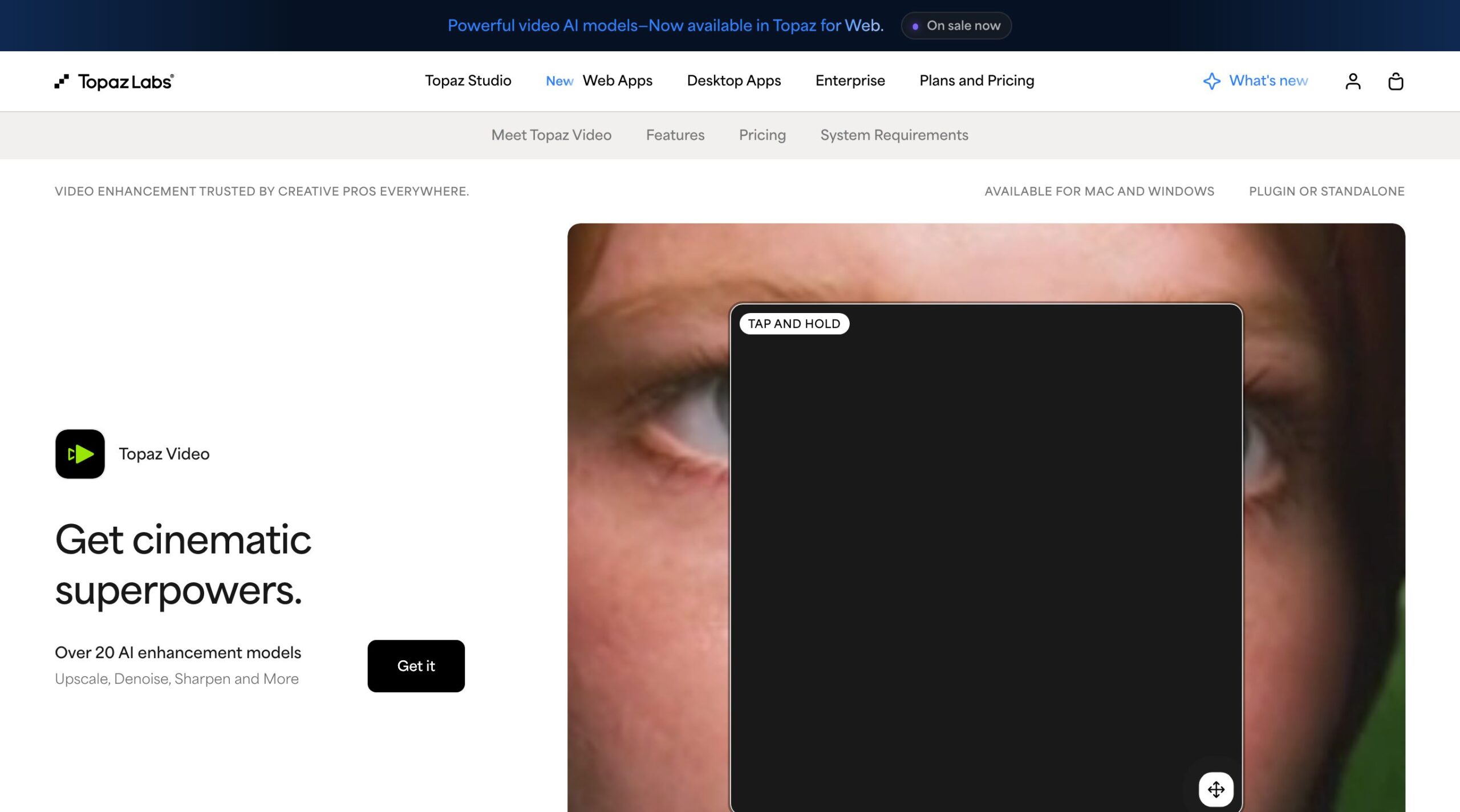
Topaz Video Enhance AI still exists, under a new name: Topaz Video. The software from Topaz Labs improves existing footage (upscaling up to 4K and 8K, denoising, stabilization, slow motion, SDR to HDR), either on your computer with a GPU or in the browser with no install.
The price grid we checked on October 1, 2026 on the official pages shows subscriptions only. Video Personal at $299 per year (or $59 per month with no commitment), Video Pro at $699 per year, the browser version Topaz for Web Video at $19 per month billed annually with 200 credits per month, and the full Topaz Studio bundle at $399 per year.
Three walls to know about before you pay. The free trial watermarks every export; cloud credits expire at the end of each month with no rollover; and commercial use on the Personal plan is capped at $1 million in annual revenue.
Where does Nation AI fit? Nation AI does not upscale your videos: it writes and optimizes the prompts that produce better footage on the first try, where every try costs money. Our prompt generator is the real lever on the generation side.
You searched for Topaz Video Enhance AI: the good news is the tool exists and it works. The less good news is that its name changed (it is now called Topaz Video), its pricing changed too, and the download listings that rank in Google often repeat prices that are no longer published anywhere. We pulled the official grid on October 1, 2026, screenshots included, to know exactly what you buy, what the free trial lets you do, and where the walls are.
What exactly is Topaz Video AI?
Topaz Video is an AI video enhancement application published by Topaz Labs, a Texas company that presents itself as specialized for more than 20 years in image and video enhancement, with “more than 3 million users” displayed on its online tool page. It is the former “Topaz Video Enhance AI”: the product name was shortened, but searches keep using the old one.
In practice, the software takes an existing video and rebuilds definition frame by frame. Typical uses are upscaling (taking a 480p or 720p video to 4K, up to 8K per the official page), denoising low-light footage, fixing compression artifacts, recovering family archives, stabilization, slow motion and frame interpolation up to 60 fps, or SDR to HDR conversion. The official page advertises “Over 20 AI enhancement models”: more than twenty specialized AI models.
The software comes in two forms, and that first choice drives the price. The desktop app (Windows and macOS) computes on your machine: the official page highlights that “Your files never leave your computer with local rendering”, a real argument for confidential footage. The browser version computes in the cloud: the official page of Astra, the publisher’s online video platform, states that it “runs entirely in your browser with no installation or GPU required”. The desktop app works standalone or as a plugin, with a dedicated panel for Premiere Pro and integrations with After Effects and DaVinci Resolve.
How much Topaz Video costs: the grid checked on October 1, 2026
Every price below was checked on October 1, 2026 on the publisher’s official pages (Topaz Video product page and plans page), screenshots below. They are published in US dollars, with no official conversion to other currencies.
| Plan | Checked price | Rendering | Cloud quota | Commercial use |
|---|---|---|---|---|
| Video Personal (desktop) | $59/month no commitment, $39/month annual, or $299/year | Local on your GPU, unlimited | 25 video credits per month | Limited (under $1M revenue) |
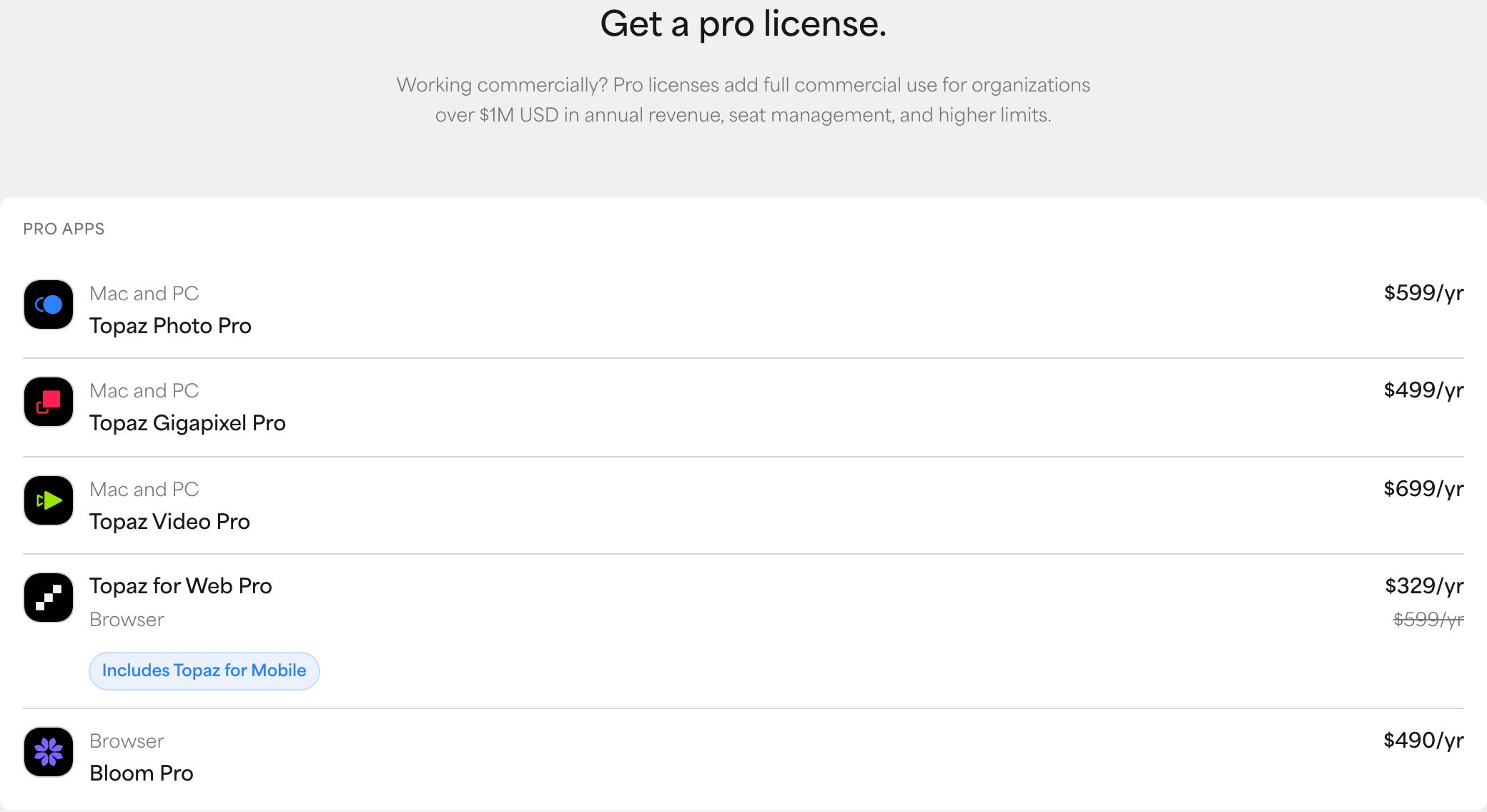
| Video Pro (desktop) | $74/month annual, or $699/year | Local on your GPU, unlimited | Extended credits, pro models | Full, no revenue threshold |
| Topaz for Web Video (browser) | $29/month no commitment, $19/month annual | Cloud, no GPU | 200 credits per month | Limited (under $1M revenue) |
| Astra Standard (4K cloud) | $39/month no commitment, $19/month annual | Cloud, no GPU | 400 credits per month | Limited (under $1M revenue) |
| Topaz Studio (bundle) | $399/year ($69/month no commitment) | Local + cloud | 300 video credits per month | Limited (under $1M revenue) |
The product’s official FAQ gives the desktop grid word for word: “Topaz Video Personal is available at $59 per month with no commitment, $39 per month on an annual commitment billed monthly, or $299 per year billed annually”. The Pro line follows: “Topaz Video Pro is available at $74 per month on an annual commitment billed monthly, or $699 per year billed annually”.
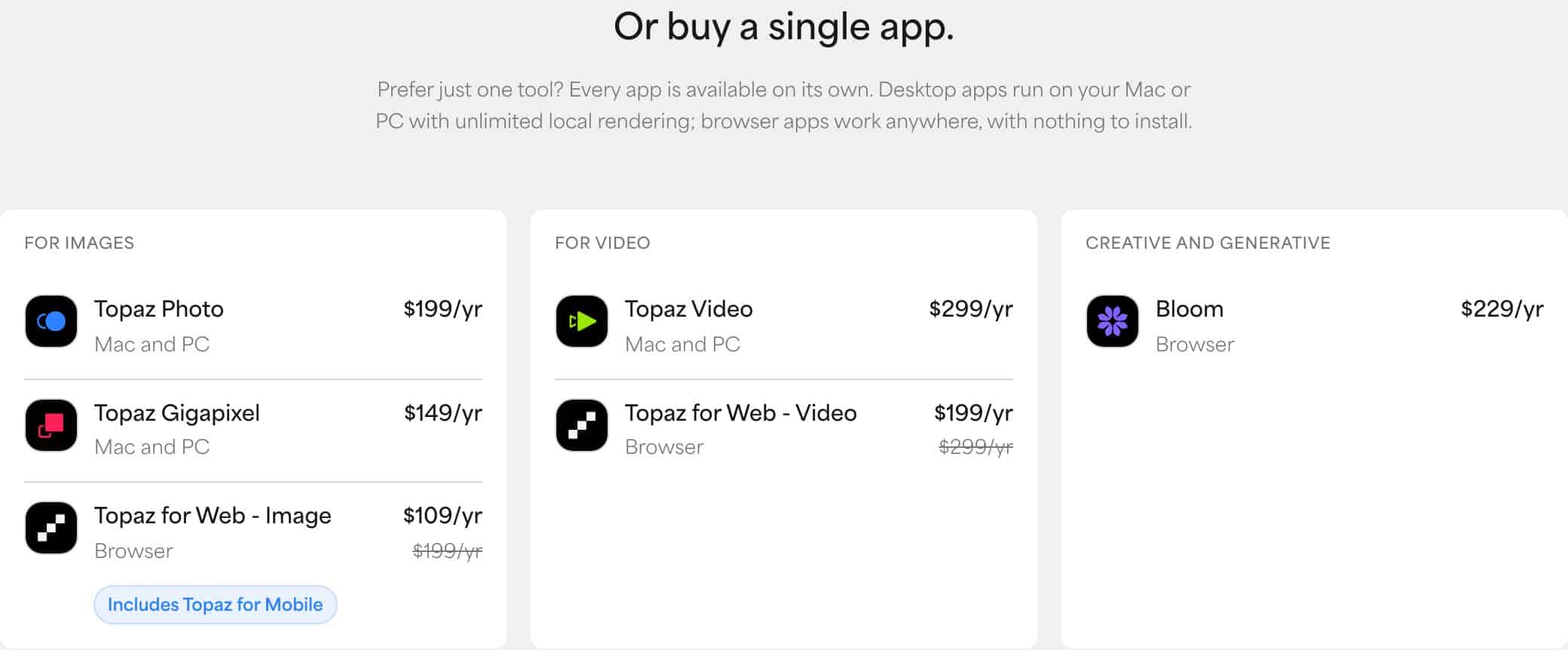
The most important point of this grid: subscriptions are all that is left. On the day of our check, no perpetual purchase option appears on the publisher’s plans pages, while the software sold for years as a lifetime license and many download listings still describe it in the present tense. $299 used to buy a license forever; today it buys one year of the entry plan. Before clicking a buy button from a third-party listing, re-check the official grid: that is the one that counts.
Personal or Pro: the real difference is not quality
Both desktop plans run the same engines. What changes is the right to exploit the output. The plans page says it plainly: “Pro licenses add full commercial use for organizations over $1M USD in annual revenue, seat management, and higher limits”. The Personal plan does not ban commercial use: it includes limited commercial use, for individuals and organizations under $1 million in revenue. A freelancer or a small agency can work on Personal; above the threshold, or for extended limits and exclusive pro models, the bill moves to $699 per year.
The Studio bundle: $399 for every app
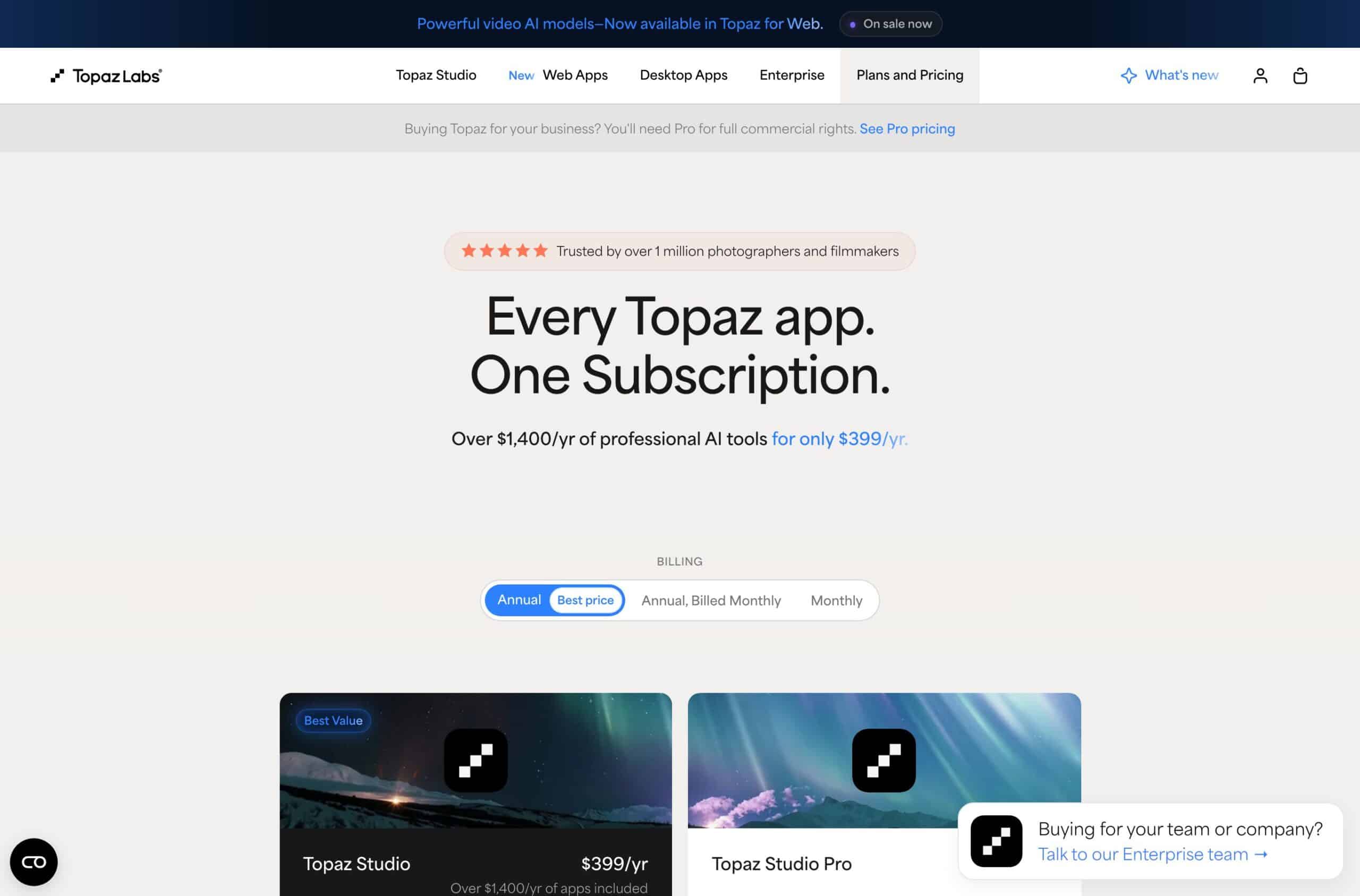
Last line of the grid: Topaz Studio, the all-apps subscription bundling every publisher application (Topaz Video, Topaz Photo, Topaz Gigapixel, the web versions, Astra, Bloom and the mobile app), at $399 per year, $69 per month with no commitment or $45 per month on an annual commitment. The official panel pitches it as the value play: “Over $1,400/yr of professional AI tools”. If you only need video, that is $100 more than Video alone for photo apps you may never open; if you also retouch photos, it is immediately the best ratio. The Studio Pro version goes to $799 per year with 600 monthly video cloud credits and full commercial use.
No graphics card: the browser version and its credits
Since the desktop app computes on your GPU, the publisher offers two entry points with no install: Topaz for Web Video, the video extension of its browser suite, and Astra, its dedicated video cloud platform. That is the only route if your machine is light, and it has its own grid.
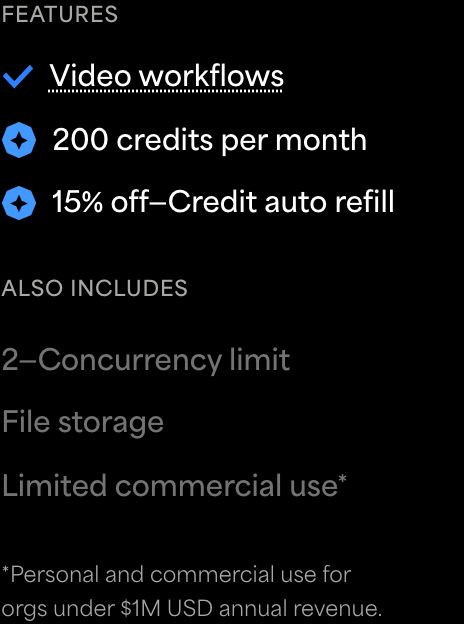
The official Topaz for Web Video card shows $29 per month with no commitment, struck through in favor of $19 per month on an annual commitment (that is $199 per year on the annual view), with “200 credits per month”, two concurrent processes, file storage and the mention “Limited commercial use”. The available treatments cover Precision Upscale, Creative Upscale, frame interpolation, slow motion and SDR to HDR conversion.
For Astra, the grid published on the same page states that the Standard offer includes 400 credits per month, enough to enhance about 10 minutes of HD video, with 4K output, all render modes, two videos processed at once and storage included. That figure is the most eloquent of the whole grid: it gives the real price of the cloud minute. 400 credits for 10 minutes is 40 credits per minute; and the publisher sells extra credits at $0.10 each (“Additional credits are $0.10 each”). At that published rate, one minute of HD video processed in the cloud costs about $4 in credits, which for a one-hour project comes close to the full annual subscription of the desktop app. The cloud is great for testing without a GPU; it is a trap for volume.

The line that stings. On its plans page, the publisher states that “Monthly credits expire at the end of each month and do not roll over”. A slow month does not carry over to the next one: size your subscription on your smallest month, not your biggest.
The free trial exists, but it watermarks every export
That is the number one question in related searches (“topaz video enhance ai free”), and the official answer is unambiguous. The product FAQ reads: “Topaz Video offers a free trial that allows you to process and preview video using all available AI models. Exported files from the trial include a watermark. A full subscription removes the watermark and unlocks all export options”.
In practice: you can test everything, every model, every resolution, before paying a cent. But no clean export comes out of the trial. To evaluate an upscale on your family archives, it is a real trial; to deliver client work, it is a wall. The trial answers “does it work on MY video?”, not “can I use it for free?”.
One useful nuance: the publisher’s online “Video Enhancer” tool, which also shows up in results, promises on its page a result “without watermarks”, MP4 in and out, with presets per video type including an “Old Video AI” one for dated footage. But that simple tool runs on Cloud Credits, the currency of the subscriptions described above: the “no watermark” belongs to paid accounts, not to any permanent free offer. As of October 1, 2026, we found no trace of one in the official grid.
The AI models: which one for which video
This is where the software earns its AI tool name: instead of a single filter, it ships a library of specialized models, and the result depends mostly on picking the right one. The official page lists fifteen local processing models (Starlight Precise, Proteus, Iris, Nyx, Rhea, Rhea XL, Artemis, Gaia, Theia, Apollo, Chronos, Aion, Themis, SDR to HDR, Stabilization), four cloud-accessible models (Starlight Mini, Sharp, HQ and Fast), plus models exclusive to Pro subscribers. On the browser version, the models named by the grid are Starlight Precise 2.6 and 2.5, Starlight Fast 2, Proteus, Astra 2, Hyperion and Apollo.
The official recommendations by source type, as published by the vendor:
| Model | Use recommended by the vendor |
|---|---|
| Starlight Precise | AI-generated video and footage demanding maximum detail fidelity |
| Proteus | General-purpose model with fine-tuning controls, for compression artifacts and noise |
| Iris | Interlaced footage and broadcast video |
| Rhea and Rhea XL | High-motion content |
| Artemis | Heavily degraded archives and low-resolution video |

The app supports multi-model preview: comparing several engines side by side on a sample before committing to the full render. On long videos, that is the feature that saves the most compute time, and therefore money when cloud credits are at stake.
The machine you need, and the workaround for a light PC
For local rendering, the official page lists: Windows 10 and Windows 11, macOS 12 Monterey through macOS 15 Sequoia, and GPU rendering “on NVIDIA, AMD, and Apple Silicon hardware”. One factual caveat: Google’s AI overview, displayed above results on this query, also announces “16GB+ RAM”, but that figure does not appear on the official product page on the day of our check. In other words: the GPU is the publisher’s published requirement; the RAM is search-engine lore, to be verified on your own machine during the watermarked trial.
If your computer has no dedicated GPU, do not force it: this is exactly the scenario for which the publisher sells its browser versions and its cloud platform, both advertised as working “with no installation or GPU required”. You then process on credits, with the per-minute arithmetic seen above.
Which Topaz plan for your project: the selector
Four questions, one recommendation among four real buying profiles, built on the official grid of October 1, 2026. The selector does not replace the watermarked trial: it tells you where to start so you do not pay twice.
The Topaz Video plan selector
Your recommendation
Waiting: answer the four questions then click Show my recommendation.
At least one answer is missing: complete the four questions to get a recommendation.
Before investing $299 in upscaling a video that does not exist yet: a good prompt produces a better video on the first try. Nation AI writes and optimizes that prompt.
The selector bases its answer on four buying profiles, whose card it copies on screen. Each describes a real situation, not a ranking:
No-GPU profile: Topaz for Web Video
Your machine cannot keep up, or you do not want to install anything. The browser version opens from any modern browser, and its official card (checked October 1, 2026) shows $19 per month on an annual commitment with 200 credits per month.
- Strength: no GPU required, two concurrent processes, storage included.
- Honest limit: 200 credits per month, no rollover; commercial use limited under $1M revenue.
- Start with: one video, one month, then measure your real consumption before sizing up.
Family archive profile: Video Personal on desktop
You have a GPU (Apple Silicon, NVIDIA, AMD) and boxes of tapes to rescue. At $299 per year, the desktop app renders with no quota on your machine, and the free trial lets you preview everything.
- Strength: unlimited local rendering, your files never leave your computer, output up to 8K.
- Honest limit: the trial exports watermarked; commercial use stays capped under $1M revenue.
- The right reflex: preview in multi-model on 10-second samples before launching the full hours.
Production profile: Video Pro
You deliver to clients, your organization tops $1 million in revenue, or you want the exclusive pro models. The Pro license at $699 per year is the step the publisher publishes for full commercial use.
- Strength: commercial use with no threshold, seat management, extended limits.
- Honest limit: $400 more than Personal for the same base engines; the difference is legal, not quality.
- Check before paying: does your real volume justify Studio Pro ($799 per year, 600 monthly video cloud credits) rather than Video Pro alone?
All-in-one profile: the Studio bundle
You do photo AND video. At $399 per year, the official bundle packs every publisher application, pitched as over $1,400 per year in tools bought separately.
- Strength: every desktop and web app, 300 monthly video cloud credits included.
- Honest limit: commercial use still limited under $1M; Studio Pro ($799 per year) is needed for the full right.
- The math to run: if you will only use video, Video Personal at $299 is enough and leaves the photo apps aside.
The limits to know before paying
Summary of the watch points checked on the official pages as of October 1, 2026:
- The trial watermark: every non-subscribed export is marked, with no published exception.
- The melting credits: cloud quotas expire at the end of each month, with no carryover.
- The commercial cap: Personal and the web offers include commercial use limited to organizations under $1M in annual revenue.
- The currency: the grid is published in dollars; pricing in another currency depends on the payment method, the publisher shows no euro grid.
- The GPU: desktop local rendering requires an NVIDIA, AMD or Apple Silicon GPU; without one, you go through the cloud and its credits.
Rights and disclosure. Enhancing a video gives you no rights over its content: someone else’s footage, a documentary or a film excerpt stays protected, however careful the upscale. And if the result alters the appearance of real people to the point of being passed off as authentic, the European AI regulation (Regulation (EU) 2024/1689, article 50, applicable since August 2, 2026) requires a visible disclosure of the manipulation when the content is distributed. Restoring your own family films is of course not covered.
What Nation AI does (and does not do) for your videos
Let us be precise, it is the house rule: Nation AI does not upscale video, and it does not replace a tool like Topaz Video. Where it saves you money is upstream. A failed AI-generated video costs tries, and every try has a price: we detailed that arithmetic in our article on the real price of AI video generators. The quality of the input instruction is the first lever, and that is exactly what our prompt generator does.
Nation AI also helps everywhere video is text work: the script of a clip or tutorial, subtitles, the shot list, the optimization of a YouTube description. For editing itself, our article on the 10 best AI video editing tools details the real free offers on the market, and if you start from a still image, begin with our quota checks on image animation and then the AI image generator for the starting frame.
Write a video prompt with Nation AI
FAQ: Topaz Video Enhance AI
Is Topaz Video Enhance AI free?
No, and the free trial has a visible cost: it lets you process and preview with every model, but every exported file carries a watermark, as the official product FAQ states. Only a subscription “removes the watermark”. As of October 1, 2026, the official grid shows no permanent free offer.
How much does Topaz Video cost in 2026?
Per the official grid checked on October 1, 2026: Video Personal at $59 per month with no commitment, $39 per month on an annual commitment or $299 per year; Video Pro at $74 per month annual or $699 per year; the Topaz for Web Video browser version at $19 per month annual with 200 credits; the Studio bundle at $399 per year.
Do you need a powerful computer to use it?
For the desktop app, yes: the official page requires an NVIDIA, AMD or Apple Silicon GPU, on Windows 10 and 11 or macOS 12 through 15. The “16GB of RAM” figure circulating in Google’s AI overview does not appear on the official product page at the date of our check. Without a dedicated GPU, the publisher’s browser versions and cloud platform work with no install.
What is the difference between Topaz Video Personal and Pro?
The right of use, not the quality. Personal includes commercial use limited to individuals and organizations under $1 million in annual revenue; Pro adds full commercial use with no threshold, seat management and extended limits, plus exclusive models. The base engines are the same.
Does a lifetime license still exist?
As of October 1, 2026, the publisher’s plans page shows only monthly or annual subscriptions; no perpetual purchase option appears on it. Download listings and older reviews mentioning a perpetual license describe a bygone pricing era: always re-check the official grid before buying.
Can you enhance a video online, without installing anything?
Yes: Topaz for Web Video and the Astra cloud platform open in the browser, with no install and no GPU, covering upscaling, interpolation, slow motion and SDR to HDR conversion. The publisher’s simplified online tool accepts MP4 and returns MP4. All these routes run on subscription credits.
Can you process other people’s videos?
Technically yes, legally it depends on you: enhancement creates no right over a third party’s work. And if the result alters real people and is passed off as authentic, Regulation (EU) 2024/1689 has required since August 2, 2026 a visible disclosure of the manipulation when distributing the content. Your own archives carry no such obligation.
In conclusion: the tool is solid, the contract changed
Topaz Video remains the reference it is known as for restoring and enlarging existing footage, with a library of specialized models few tools match. What changed is the contract: subscriptions only (checked October 1, 2026), a trial that watermarks, cloud credits with no rollover, and a $1 million commercial-use threshold that alone decides between $299 and $699 per year. The three numbers to remember before opening your wallet: $299 per year for the entry desktop plan, $19 per month and 200 credits for the browser version, and about $4 per HD minute in cloud credits at the published rate.
And if your video does not exist yet, the best upscale is the one you never need: a well-written instruction costs less than a render. Try the Nation AI prompt generator, or browse the full portal of our AI tools for the script, the subtitles and the starting images.
Sources: official Topaz Labs pages (Topaz Video product page, plans page, Topaz for Web Video page, Video Enhancer tool page), checked and screenshotted on October 1, 2026; Regulation (EU) 2024/1689 on EUR-Lex. Quotes are reproduced verbatim from the official pages.