

In brief

Creating an AI agent is not one magic step: it is a route choice. In 2026 there are four real paths: configure an existing assistant (Custom GPT, a Claude project, a Gem, Copilot), build your agent on a no-code platform (Copilot Studio, Botpress, n8n, Voiceflow), code it against a model API (Mistral, among others), or run it locally with software like Ollama.
Our survey of the official pricing pages on September 21, 2026 gives the real entry costs: custom GPT creation is listed in the ChatGPT Plus column, Claude projects require the Pro plan (15 euros per month on annual billing), Botpress starts at $0 with 25 conversations per month, the n8n cloud at 20 euros per month, and the Mistral Large API bills $0.5 per million input tokens and $1.5 per million output tokens.
Our advice: describe what your agent must do first (the system prompt is the real lever), prototype it for free inside an assistant, and only pay once real usage justifies it. The selector at the end of this article picks your path and your first step.
“I want to create an AI agent”: that sentence covers very different projects, and that is where everything is decided. An agent is software that does more than reply: it chains actions, calls tools, and goes back to fix its own mistakes. Whether you want a personal helper, a customer-support robot, or the processing of thousands of documents, the right path, the right cost, and the right skill level change completely. Here are the four routes that actually exist, with prices collected at the source on September 21, 2026.
The guides you will find on this topic list abstract steps (“define the goal, pick a model, test”) or sell one specific platform. This article takes the opposite approach: compare the four real paths, price each one on the vendors’ official pages, state the limits honestly (maintenance, hosting, data), then leave you a selector that decides for your case.
- Agent, chatbot, assistant: what we mean
- The 4 real paths to create an AI agent
- The comparison table: costs and limits
- Path 1: codeless assistants
- Path 2: no-code platforms
- Path 3: the developer API
- Path 4: local, free and private
- The selector: which path for you
- Your first step, path by path
- The mistakes that sink an agent
- FAQ
Agent, chatbot, assistant: what exactly are we talking about
A chatbot replies to messages. An AI agent goes further: it receives a goal, breaks the work down, calls tools (search the web, read a file, send an email, query a database), and iterates until the job is done. That move from answering to acting is what defines an agent, and it is what makes creating one different from setting up a simple chatbot. If the distinction interests you, our article on what a chatbot and a conversational agent are lays the groundwork, and the one on AI agents and their explosion describes the trend.
Concretely, creating an agent always comes down to the same three decisions: which “brain” (the language model and its instructions, the so-called system prompt), which tools it can trigger (web, files, business APIs), and where it lives (inside an existing assistant, on a platform, on a server, or on your own machine). Every path in this article is a different answer to those three questions, not an opposing technology.
The system prompt is the real leverWhatever route you take, your agent’s quality depends first on how precise its instructions are: role, scope, tone, what it must refuse, what format to answer in. A badly instructed agent on a $150/month platform will be less useful than a well-written Custom GPT at $0. That is why we ask you, at the end of this article, to write your agent’s identity sheet before paying for anything.
For readers who want to dig into the mechanics (loops, tools, state), our file on agentic AI: definition and how it works details the vocabulary, and the one on the agentic workflow shows how to orchestrate several steps. The rest of this article stays deliberately concrete: usage, prices, limits.
The 4 real paths to create an AI agent in 2026
Behind the marketing names, there are only four ways to put an agent into service. Paths 1 and 2 require no code; path 3 assumes you develop; path 4 is within reach of a motivated tinkerer.
- Codeless assistants. You configure an agent INSIDE an assistant you already use: Custom GPT on ChatGPT, a project on Claude, a Gem on Gemini, agents on Copilot. Zero hosting, up and running within an hour, but the agent stays inside the vendor’s ecosystem.
- No-code platforms. You assemble the agent in a dedicated product (Microsoft’s Copilot Studio, Botpress, n8n, Voiceflow): guided flows, ready-made connectors, publishing to your site or channels. More power, but quotas and a subscription.
- The developer API. You code directly against a model (Mistral’s API is our example, there are others): total freedom, pay-per-use cost, but everything else is on you.
- Local. You run an open model on your own machine with software like Ollama: free, private, works offline, but limited by your hardware and your patience.

The comparison table: entry costs, skills, hosting
Here is the overall comparison. Costs are those displayed on the vendors’ official pricing pages, collected on September 21, 2026; prices in dollars come from the US grids, prices in euros from the French and Spanish grids. The path-by-path detail, with proof, follows right after.
| Path | Entry cost (as of 09/21/2026) | Skill level | Where the agent runs | Main limit |
|---|---|---|---|---|
| Codeless assistants (Custom GPT, Claude, Gems, Copilot) | $0 to use; paid to create (Claude Pro 15 euros/month on annual billing; on ChatGPT, custom GPT creation is listed under Plus) | None | Inside the vendor’s assistant | Cannot be published on your site, closed ecosystem |
| No-code platforms (Copilot Studio, Botpress, n8n, Voiceflow) | $0 (Botpress Free, 25 conversations/month) then 20 euros/month (n8n Starter) to $150/month (Botpress Plus); Copilot Studio $30/user/month | Click and configure | The platform’s servers (or your server with self-hosted n8n) | Conversation or execution quotas, cost that climbs with volume |
| Developer API (Mistral example) | Pay per use: Mistral Large at $0.5 per million input tokens, $1.5 output | Developer | Your own infrastructure | Everything to maintain: hosting, security, uncapped cost |
| Local (Ollama) | $0 of software: your machine provides the computing power | Intermediate | Your computer or your server | Speed and memory limited by your hardware |
Relevés : pricing pages of ChatGPT, Claude, Google AI, Microsoft, Botpress, n8n, Mistral AI and Ollama consulted on September 21, 2026 (source links in the article body). Grids change often: double-check before you commit.
Path 1: codeless assistants (Custom GPT, Claude, Gems, Copilot)
This is the fastest path: the agent lives inside an assistant you (or your audience) already open every day. You write its instructions, optionally add reference files, and the assistant handles everything else: models, hosting, updates. The trade-off: your agent exists only in that ecosystem, and creation is paid on both leading platforms.
Custom GPT: creation is listed under ChatGPT Plus
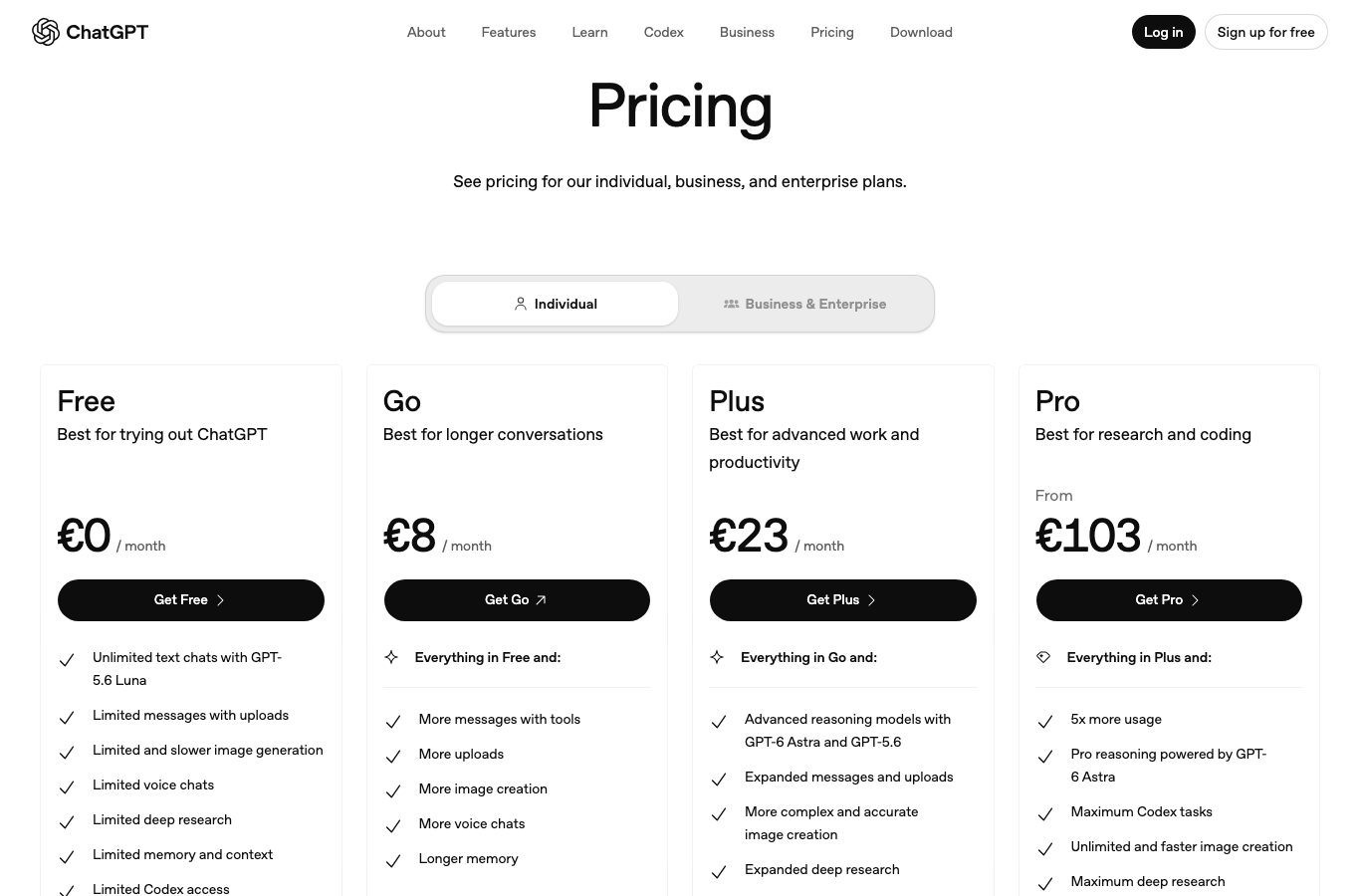
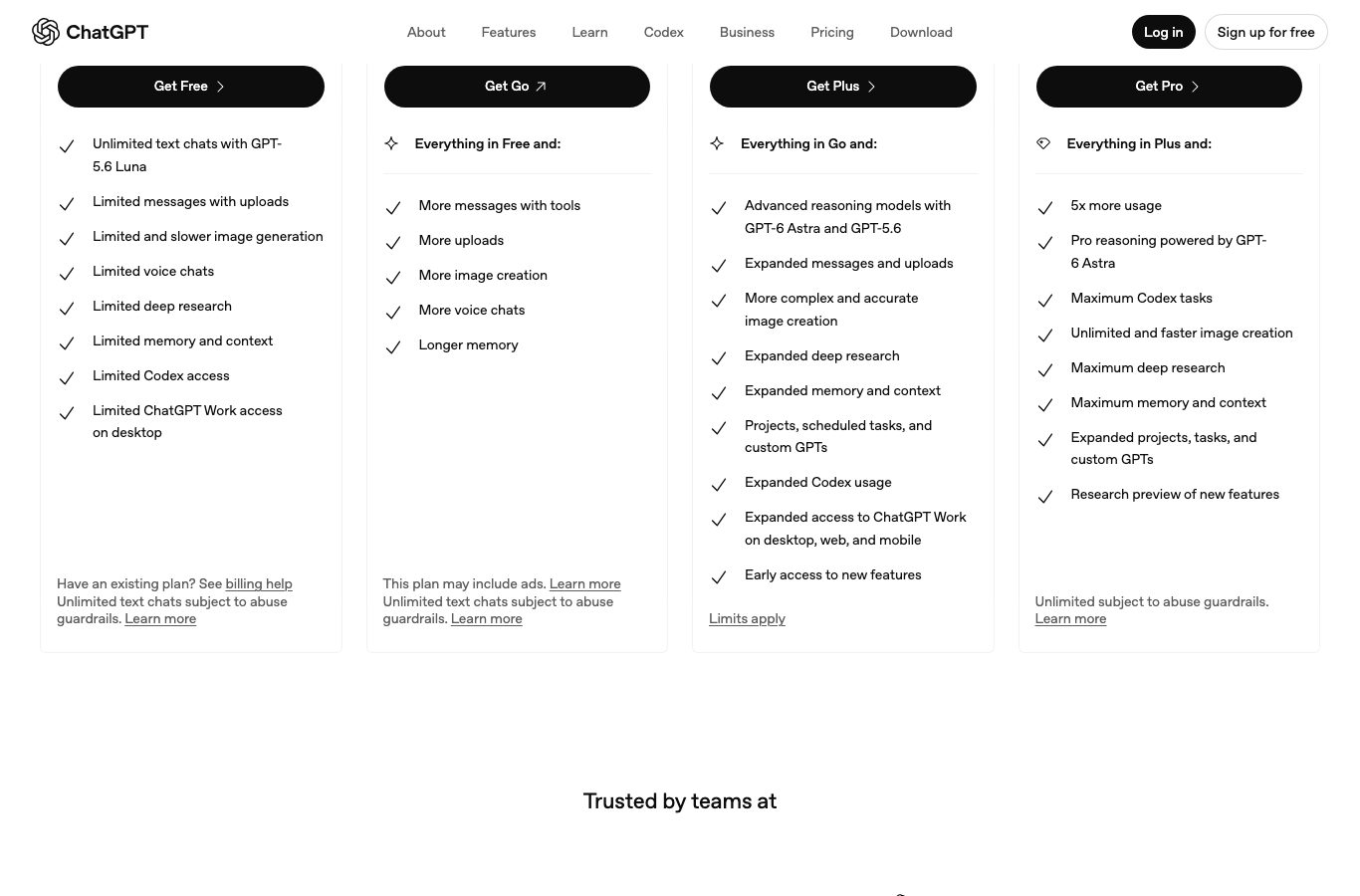
ChatGPT’s pricing page lists four plans: Free, Go, Plus, and Pro. Agent creation is explicitly filed under the paid side: the Plus column lists “Projects, scheduled tasks, and custom GPTs”, while the Free column mentions no GPT creation at all. One honest note from our September 21, 2026 survey: in our measurement, the English version of the page displayed no plan amounts (unlike the French grid, which shows Plus at 23 euros/month). Check the amount in your account before subscribing.
Claude: projects require the Pro plan, 15 euros per month on annual billing
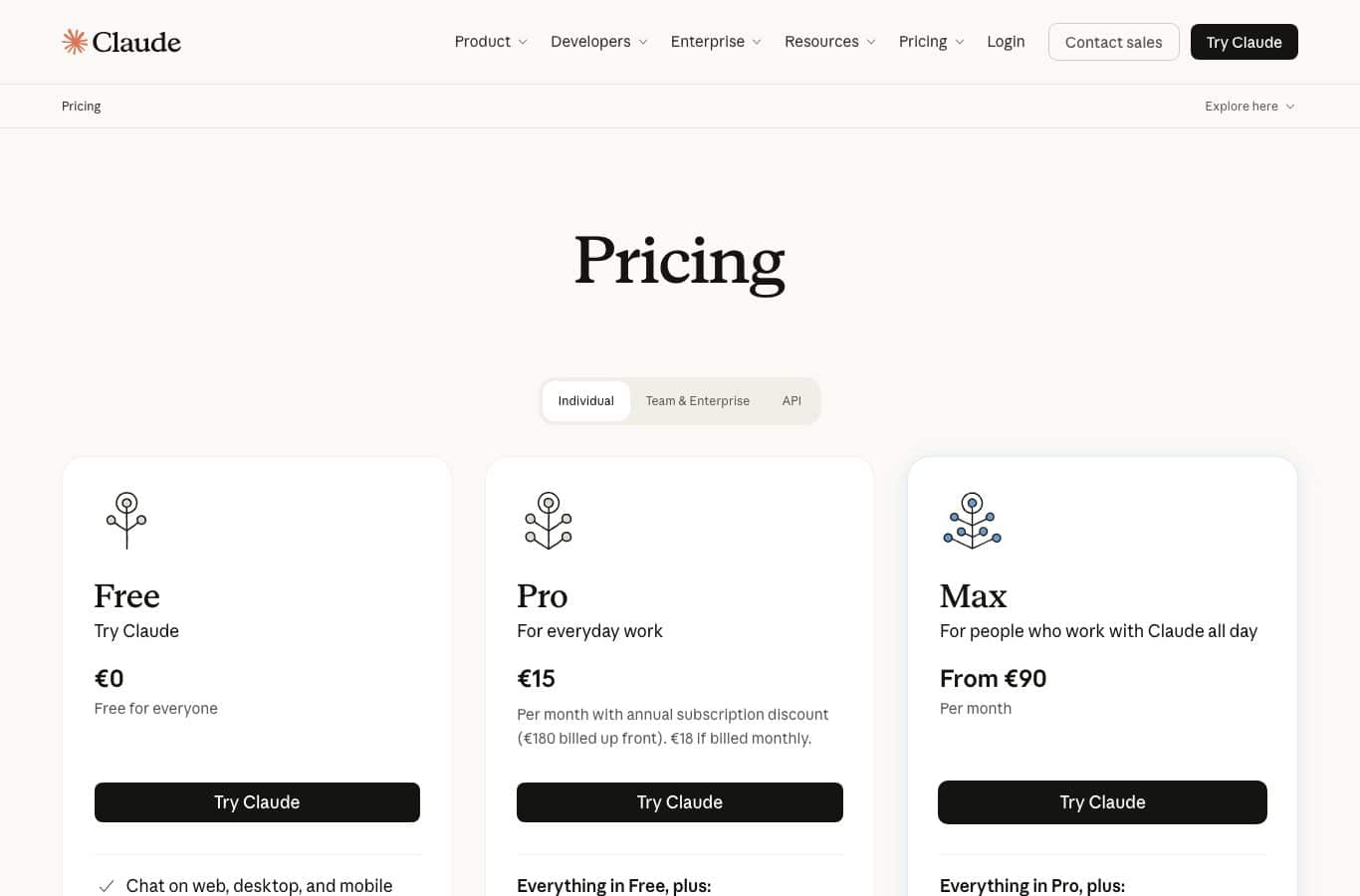
At Anthropic, the equivalent is called a project: a space where you give Claude its permanent instructions and your reference documents. The grid of September 21, 2026 shows Free at 0 euros, Pro at “15 Per month with annual subscription discount (180 euros billed up front). 18 euros if billed monthly” (the page displays euros in our measurement), and Max from 90 euros per month. In the feature table, “Projects” appears in the Pro column, not in Free. Plan availability varies by country, a point we cover in what country Claude AI is from; and to see Claude acting as an office agent, read Claude Code: automate your tasks without programming.
Gems and Copilot: free to chat, paid plans to go further
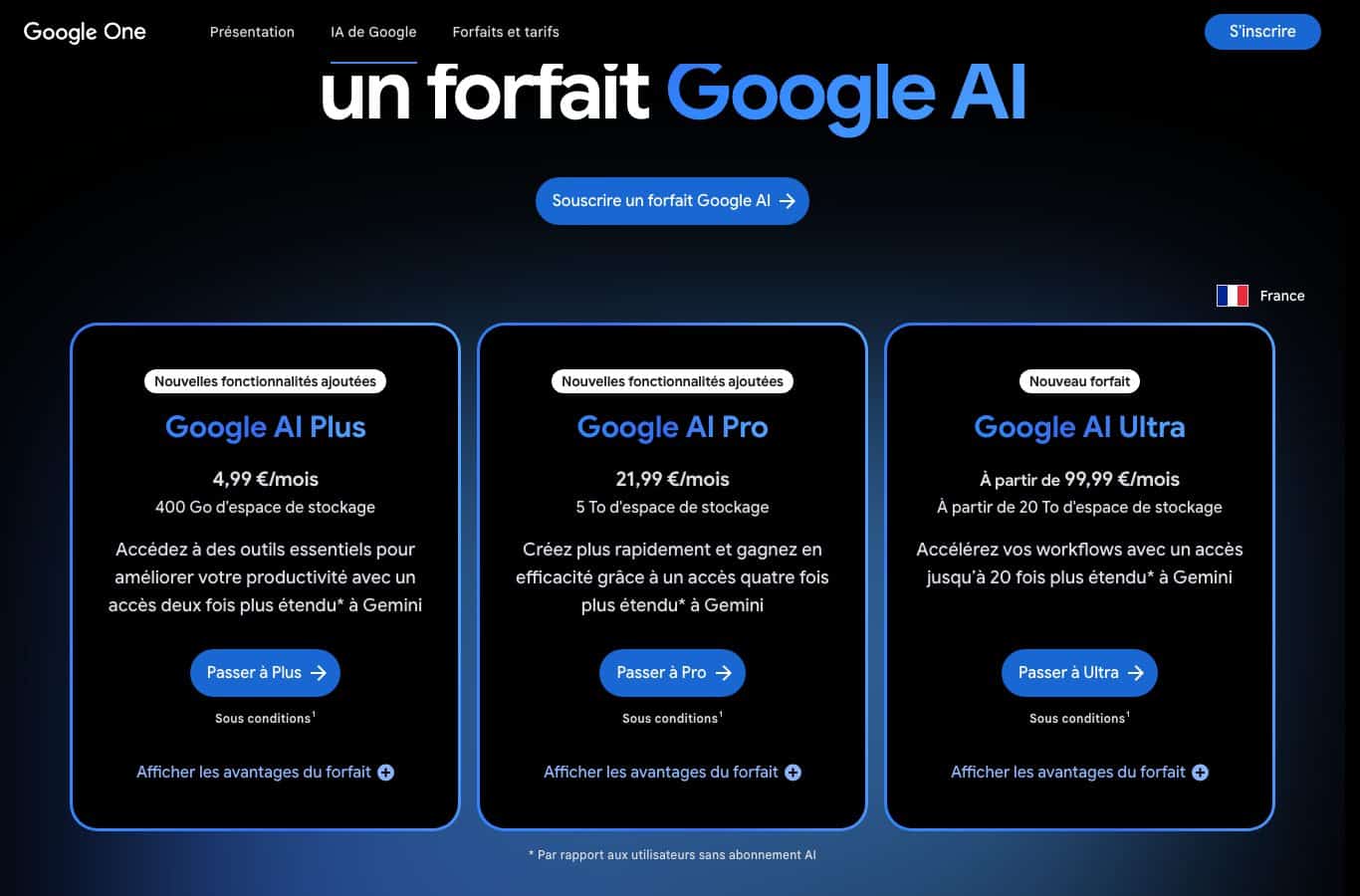
On Google’s side, the Gemini app lets you create Gems, its custom assistants. The Google AI plans displayed in Europe on September 21, 2026 are Google AI Plus at 4.99 euros/month, Google AI Pro at 21.99 euros/month, and Google AI Ultra from 99.99 euros/month; the Gemini app remains usable for free with limits. An honesty note: neither the plans page nor the help center we consulted that day states which exact plan unlocks Gem creation, which may also vary by country; check inside your app before subscribing.
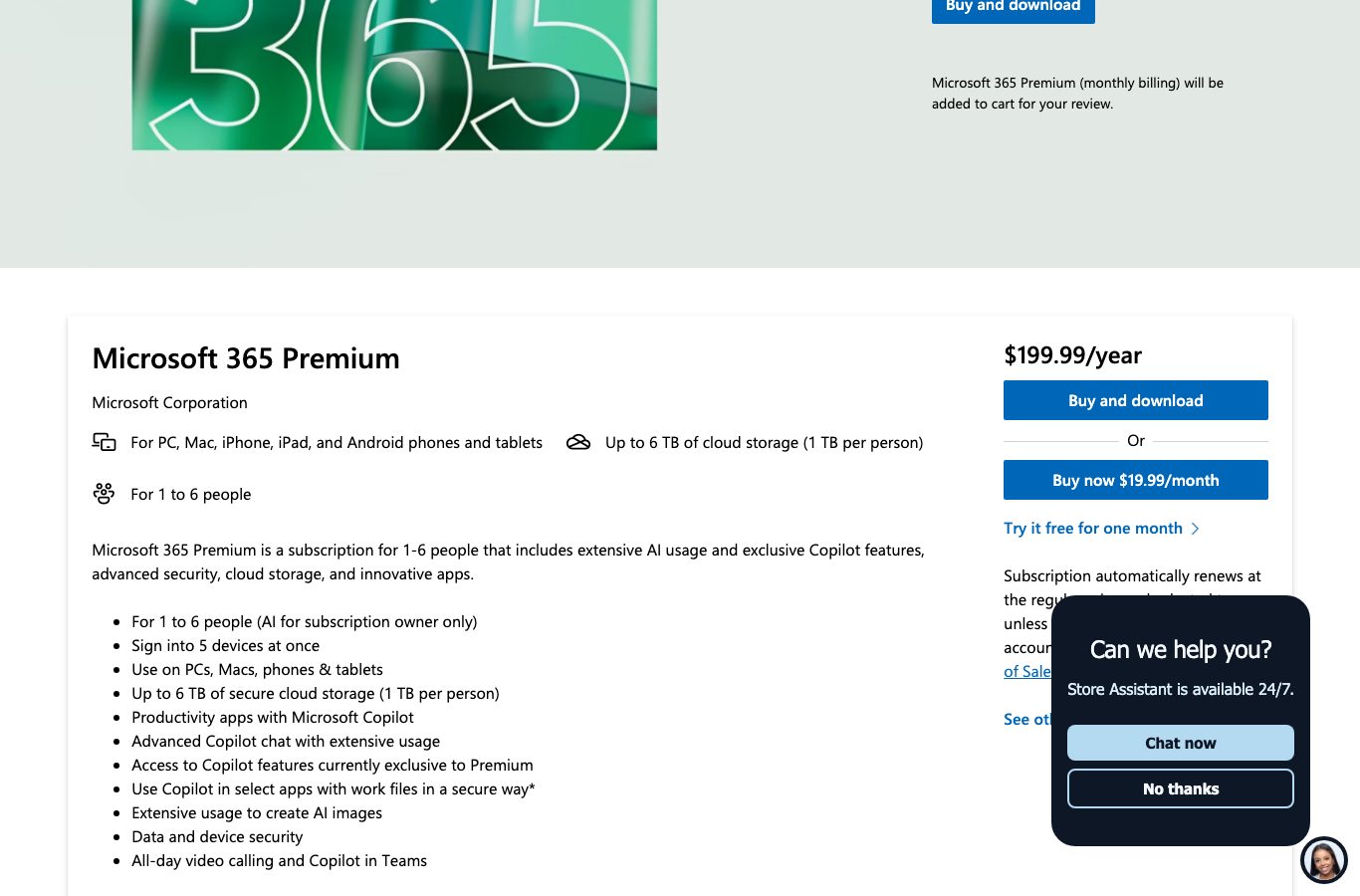
At Microsoft, Copilot is free to use, and consumers go through the Microsoft 365 Premium offer: $199.99 per year or $19.99 per month, with a one-month free trial, which includes “Productivity apps with Microsoft Copilot” and “Advanced Copilot chat with extensive usage”. Corporate agent creation goes through Copilot Studio, which we file under the no-code path right below.
What this path does not do
An agent created inside an assistant cannot be published on your website, cannot connect to your CRM, and cannot be billed per conversation. It serves to prototype, to automate your personal use or a small team’s, and to validate that the idea is worth industrializing. Path 1 is the best test bench before paying for a platform subscription.
Path 2: no-code platforms (Copilot Studio, Botpress, n8n, Voiceflow)
When the agent must live on your site, answer your customers, or trigger actions in your business tools, you need a dedicated platform. You click more than you code: flows in blocks, ready-made connectors, hosting included. But “free” is tightly framed by quotas, surveyed here at the source on September 21, 2026.
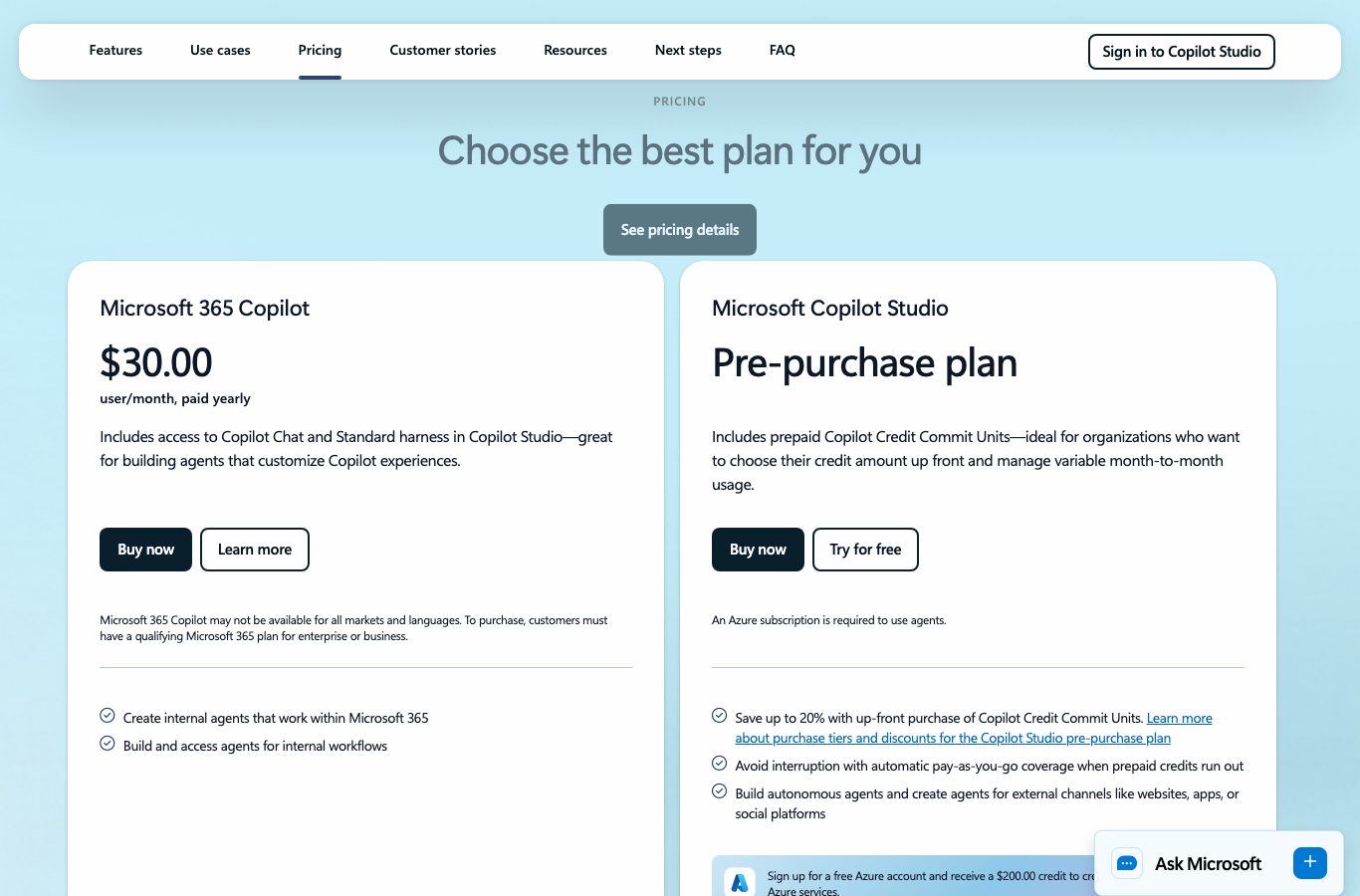
Copilot Studio: Microsoft’s offer at $30 per user per month
Copilot Studio’s official page shows, on September 21, 2026, a “Microsoft 365 Copilot” offer at “$30.00”, “user/month, paid yearly”, which “Includes access to Copilot Chat and Standard harness in Copilot Studio: great for building agents that customize Copilot experiences”. Microsoft also sells a pre-purchase plan of Copilot Credit Commit Units for organizations, and offers an open door at $0: a free Azure account with a $200.00 credit “to create agents or use in other Azure services”. It is the royal road if your organization already lives in Microsoft 365; it is a serious commitment if you start from scratch.
Botpress: a real free tier at $0, but 25 conversations per month
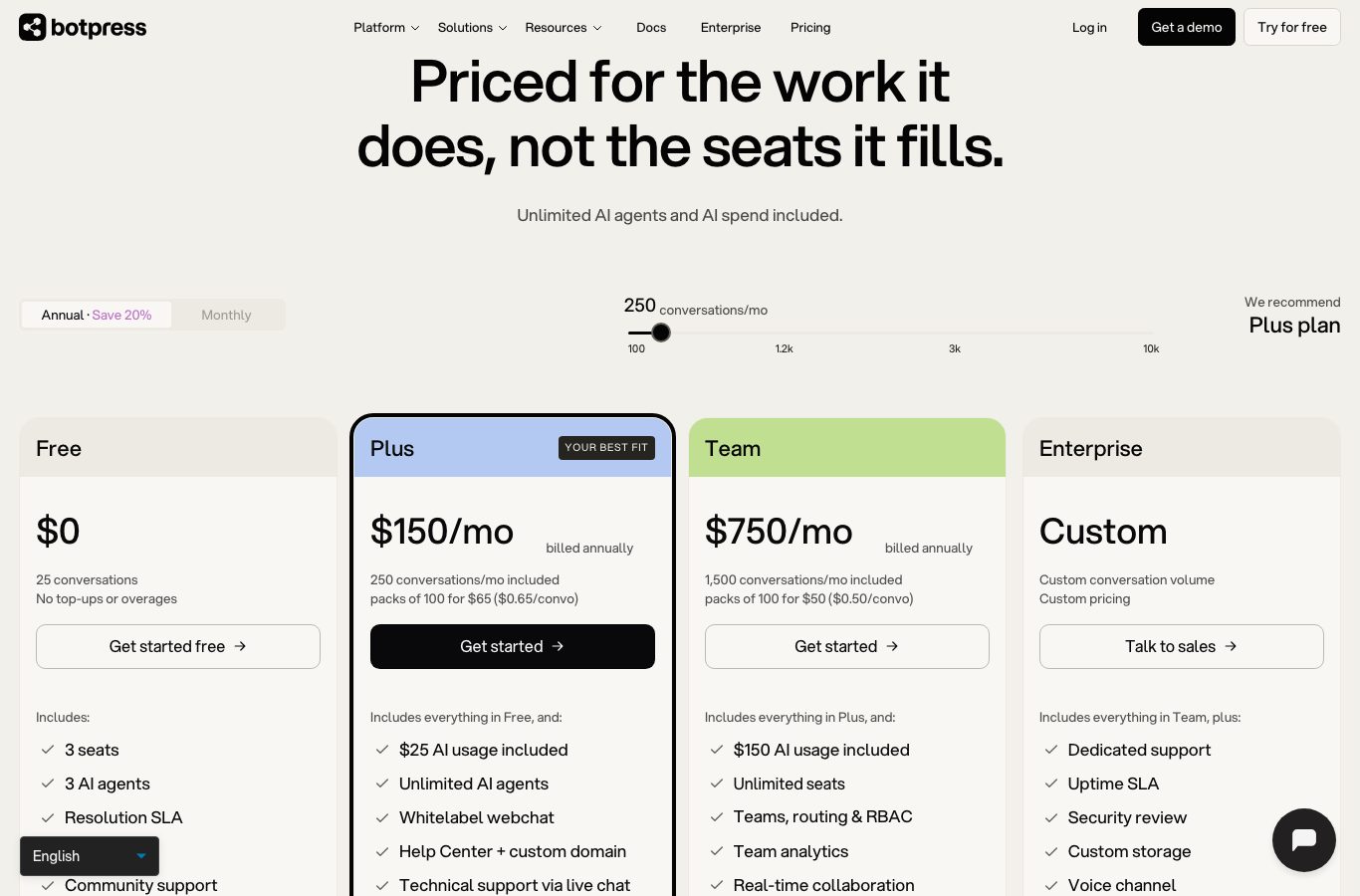
Botpress publishes its grid in full clarity. The Free plan, at $0, includes “3 seats”, “3 AI agents” and 25 conversations per month, with no refills: “No top-ups or overages”. The Plus plan, at “$150/mo” on annual billing (“billed annually”), includes 250 conversations per month, packs of 100 conversations “for $65 ($0.65/convo)” and “$25 AI usage included”; the Team plan climbs to $750/month on annual billing with 1,500 conversations. In other words: building and testing costs nothing, but as soon as the agent serves real users, the bill follows volume, about $0.65 per conversation beyond the quota at the Plus tier.
n8n: free self-hosted, cloud from 20 euros per month
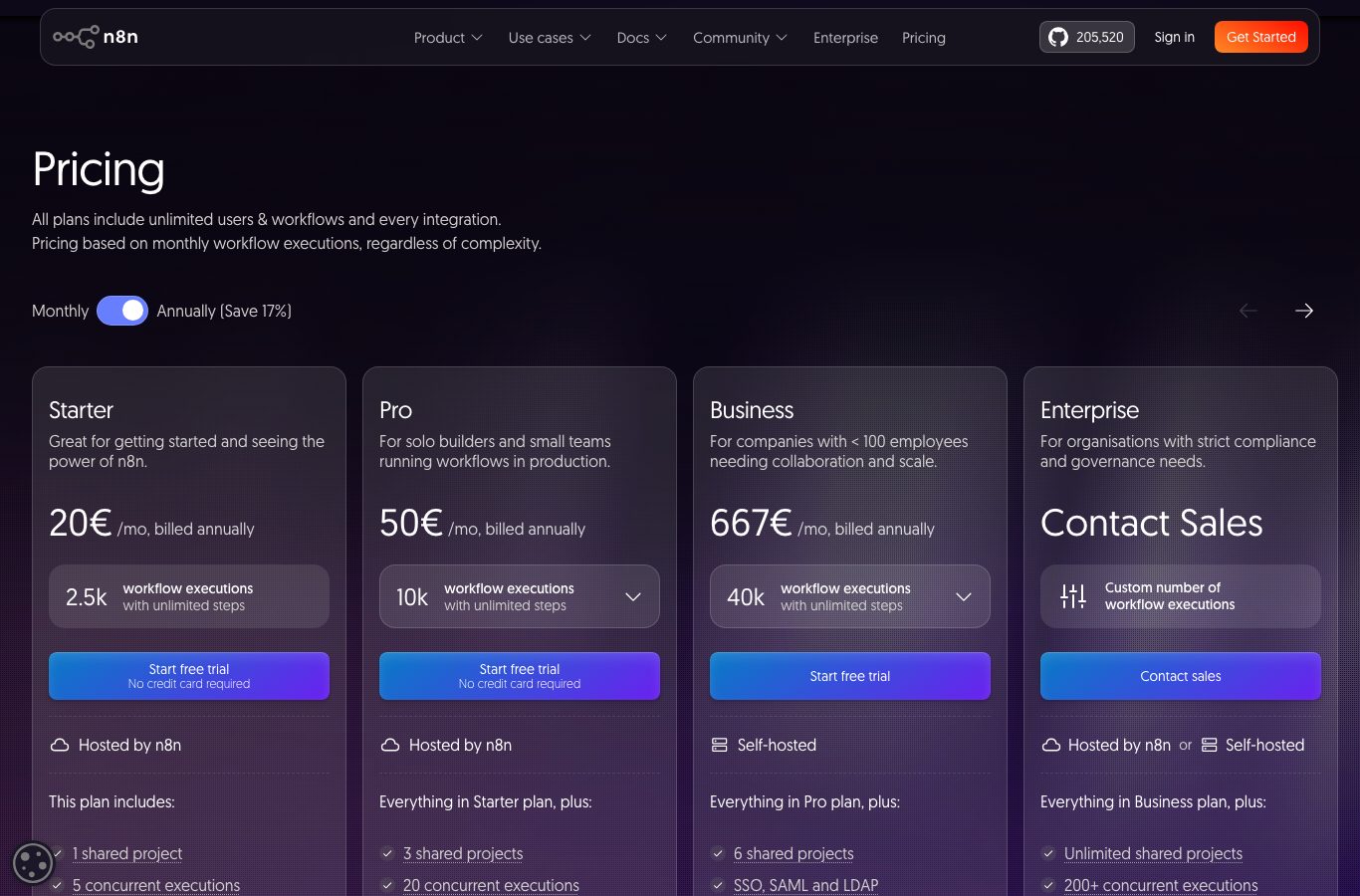
n8n is a node-based automation tool widely used to plug an AI into your tools (email, spreadsheets, databases, APIs). Its Community Edition installs for free on your own server, and it is the only durable “unlimited free” in this comparison, provided you accept hosting and maintenance. The cloud starts at the Starter plan at “20 euros /mo” on annual billing (“billed annually”) for 2,500 workflow executions per month, then Pro at 50 euros/month (10,000 executions) and Business at 667 euros/month (40,000), with a free trial and no credit card required. The page says it itself: “All plans include unlimited users & workflows and every integration.”
Voiceflow: the public grid has disappeared
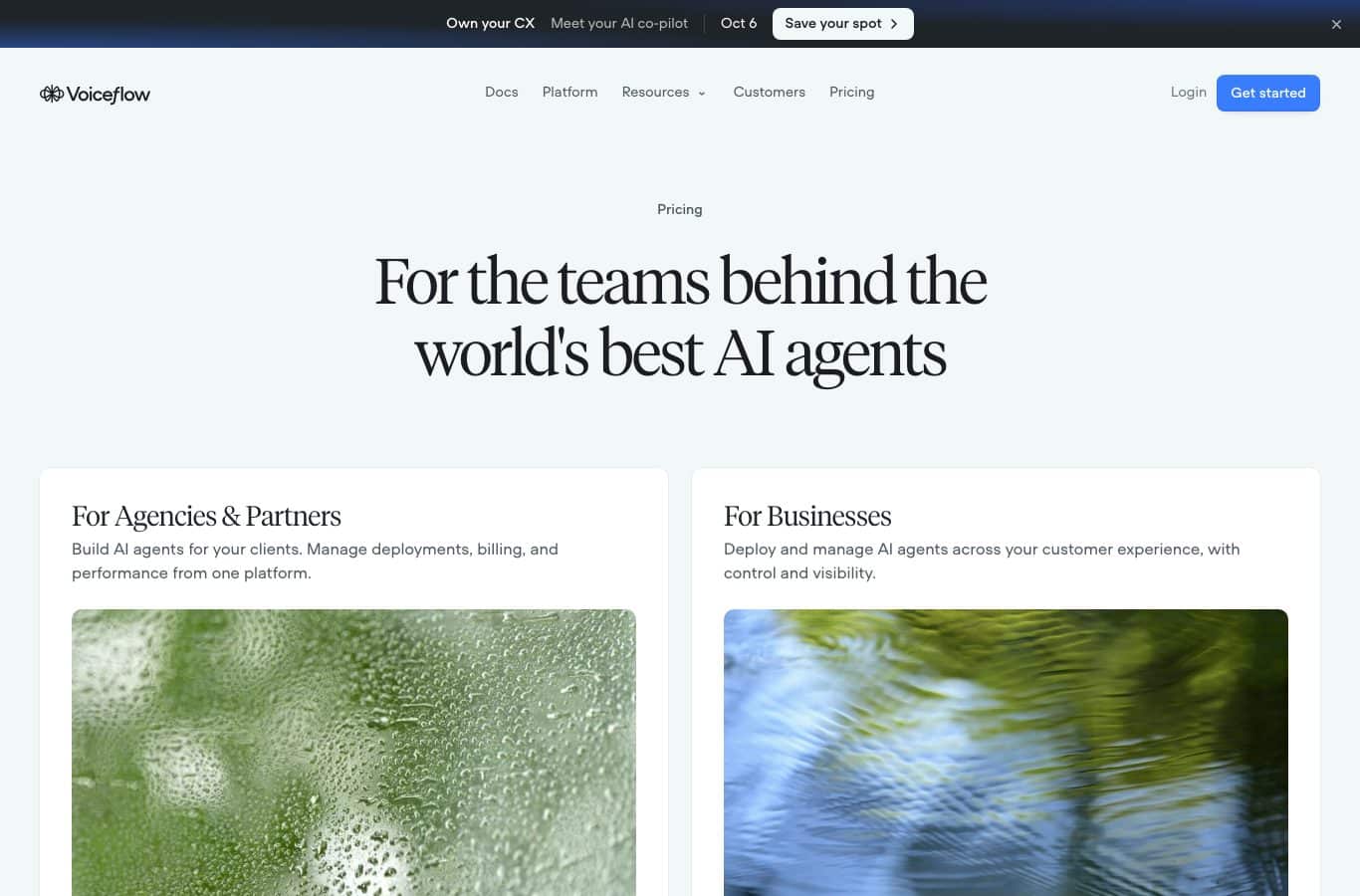
A textbook case: Voiceflow, a platform cited in many guides, no longer displays any public pricing grid on its Pricing page as of September 21, 2026. The page advertises a “Free trial, no credit card required”, then sends visitors to two sales entries, “For Agencies & Partners” and “For Businesses”. We are not pointing this out to criticize, but to recall a rule: grids change, sometimes by removing the information. Beware of comparisons that quote platform prices from memory, ours included: every figure in this article is dated and verifiable.
Path 3: the developer API (the Mistral example)
The third path: stop going through a product and call a model directly. This is the path for teams with a developer, a real specification, and a need for total control: exact behavior, deep integration, data at home. You code the agent loop (the call to the model, the execution of the tools it requests, the return of results, error handling), and you pay for the model by consumption.
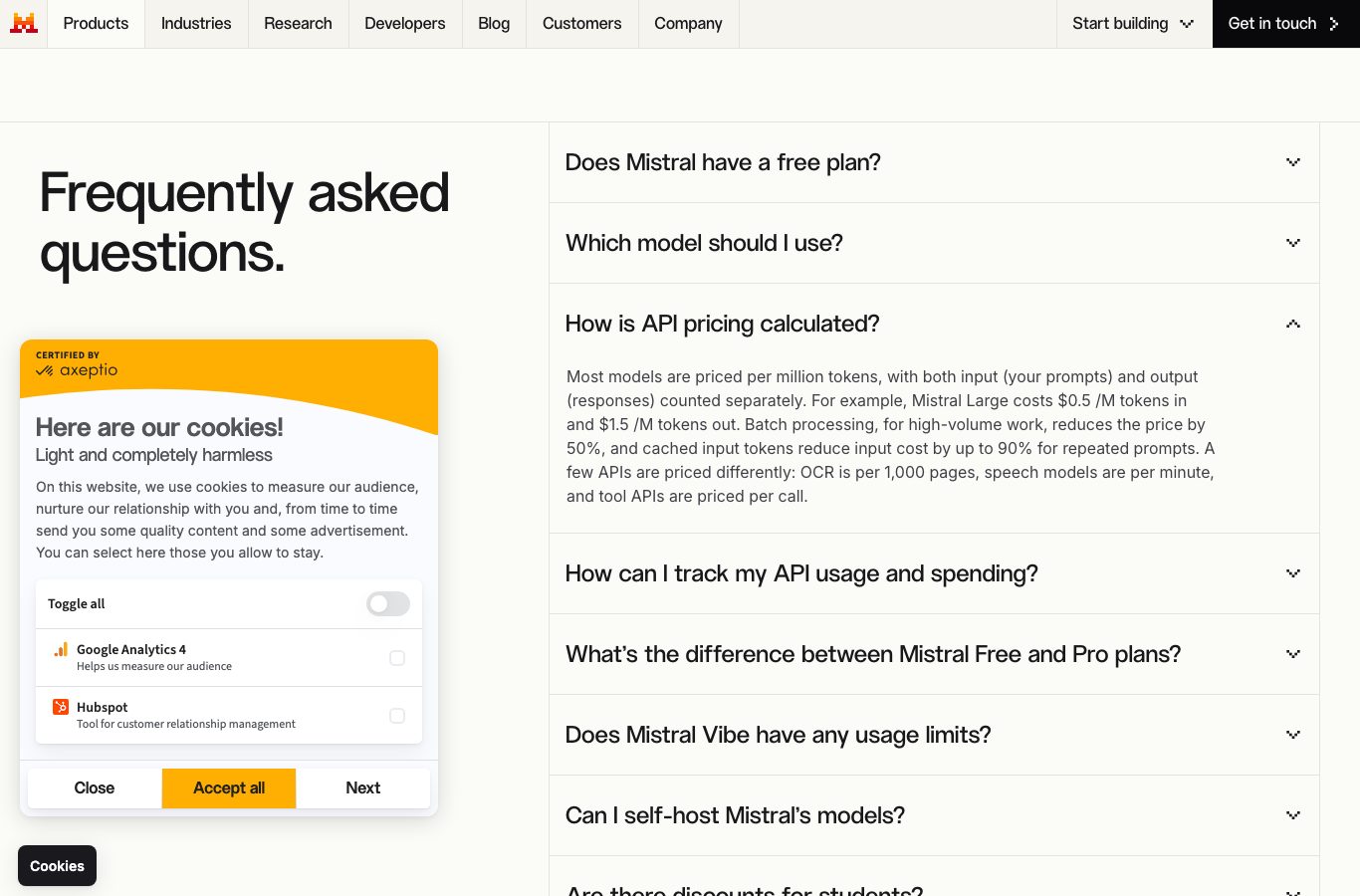
Take the Mistral AI example. Its pricing page explains, on September 21, 2026: “Most models are priced per million tokens”, meaning you pay for the text you send and the text you get back, and gives a numbered example: “Mistral Large costs $0.5 /M tokens in and $1.5 /M tokens out”. Two discounts are documented: batch processing cuts the price in half, and cached context reuse reduces the input cost “by up to 90% for repeated prompts”. A few services bill differently: OCR per page (per 1,000-page batch), speech per minute.
What does an agent actually cost at these rates? For a support agent exchanging 30 short turns per day, about 15,000 tokens per day, back-of-the-envelope math gives roughly $0.02 per day on Mistral Large, before optimizations: the machine cost is almost never the wall; development and maintenance are what count. That figure is an illustrative order of magnitude, not a quote: compute your own with your real volumes. And if you want to understand what you will be orchestrating, our article on the agentic workflow details the common patterns.
The API trap: nothing caps itselfOn a platform, the quota protects your invoice. On an API, a badly written loop can spin in circles and burn tokens all night. Developers systematically install three safeguards: a spend cap on the account, a maximum number of loop turns per request, and an alert before the threshold. It is basic, and it is what separates a demo from a service.
Path 4: local, free and private, but it is on you
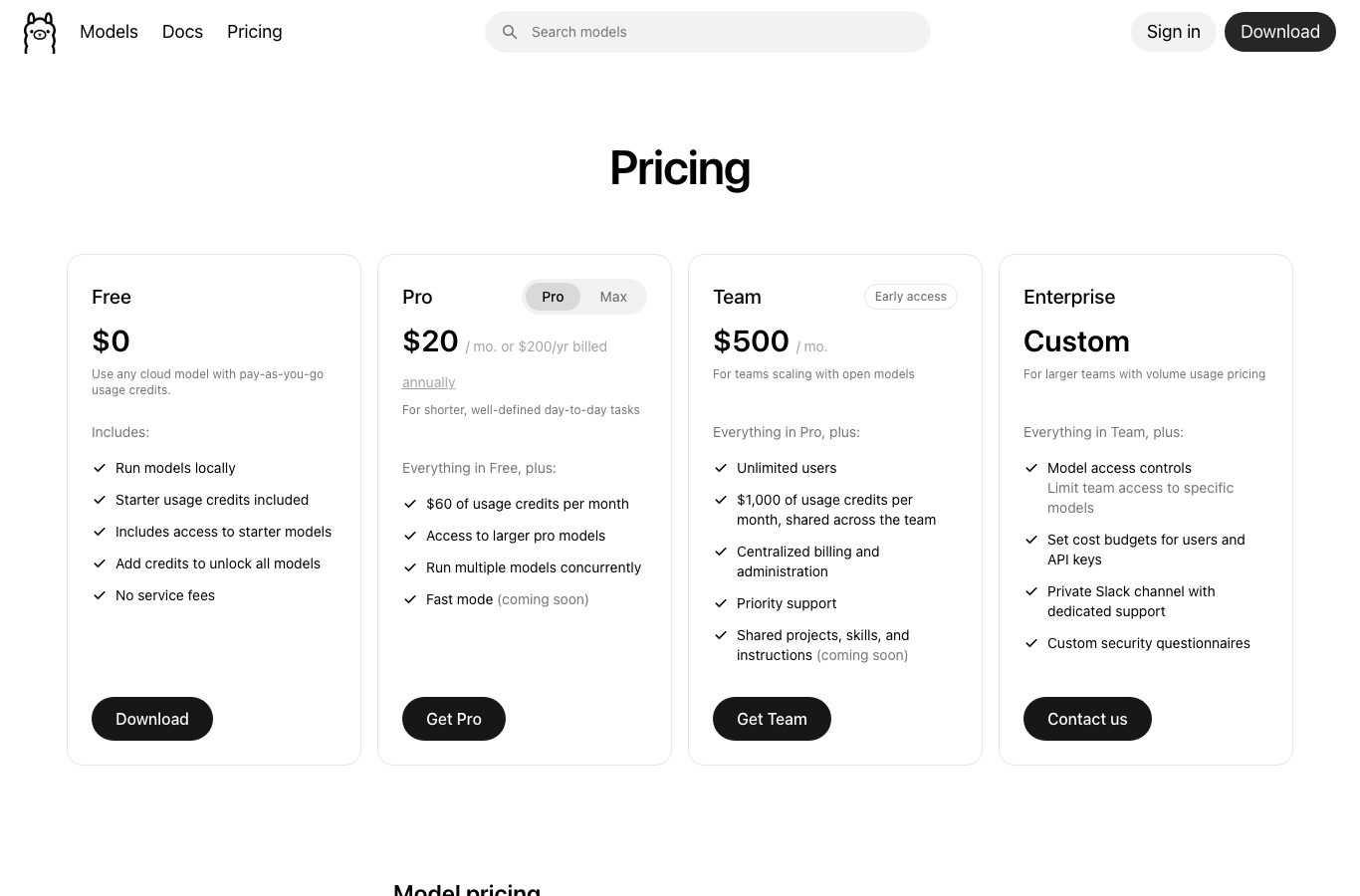
The last path consists of running the model at home, not at a vendor. The reference software is called Ollama: you download it, load an open model, and the agent works offline. Its pricing page sums it up: the Free plan, at $0, includes “Run models locally” and “No service fees”, and its FAQ states that “Running models on your own hardware is always unlimited”. For Ollama’s cloud (usage credits, not needed to run locally), the Pro plan is listed at “$20 / mo. or $200/yr billed annually” and a Team plan at $500/month.
The local path’s killer argument is confidentiality: your documents never leave your machine, and the agent works even without a connection. The trade-off is physical: speed and model size depend on your computer; a recent small open model is enough for short writing or summaries, heavy workloads do better on muscular machines. The tooling is also on you: Ollama provides the model, not the agent; you must add an interface or a small app that carries your instructions and your tools. This is the path of patient tinkerers, perfect for processing sensitive documents, less suited to customer service.
Which path for your agent? The selector
Four paths, four profiles. Rather than a ranking in the air, answer three questions: your agent’s main job, your skill level, and where it must live. The selector copies the sheet of the path that matches you, with its entry cost and your first step, both from the September 21, 2026 survey.
The selector: which path for your agent
Three questions, one recommendation. The costs quoted are those of the September 21, 2026 survey.
Your recommended path
Waiting: answer the three questions then click Show my recommendation.
At least one answer is missing: complete the three questions to get your path.
The selector’s reference table, worth reading even without the tool:
| Your path | Entry cost (09/21/2026) | Your first step |
|---|---|---|
| The codeless assistant | $0 to use, 15 to 23 euros/month to create (Claude Pro, ChatGPT Plus) | Write your agent’s identity sheet (role, scope, tone, answer format), then create a Custom GPT, a Claude project or a Gem with those instructions. |
| The no-code platform | $0 to build (Botpress Free, 25 conversations/month), then 20 euros/month (n8n Starter) to $150/month (Botpress Plus) | Draw the minimal flow in three blocks: what triggers the agent, what it answers, what it triggers next. Test it on ten real requests. |
| The developer API | Pay per use, for example $0.5 per million input tokens on Mistral Large | Code the minimal loop: call the model, run a single tool, return the result. Add the spend cap before the first demo. |
| Local | $0 of software, your machine provides the power (Ollama) | Install Ollama, load a small open model, and have it process five sensitive documents offline to judge speed and quality. |
Your first step, path by path: start without risk
Whatever the path, the order of the steps stays the same, and the first two cost nothing. That is intentional: you only pay for a platform or an API once the idea has been validated on real cases.
- Write the agent’s identity sheet. Its role in one sentence, its scope (what it handles, what it refuses), its tone, its answer format. This is the system prompt, the only deliverable that truly drives quality, whatever the tooling.
- Prototype for free inside an assistant. Paste your identity sheet into an AI assistant and have it play the agent on ten real requests. You will know within an hour whether the idea holds, with no credit card.
- Choose hosting based on usage, not on fashion. Personal use or a small team: stay on path 1. An agent published on a site or wired to tools: path 2. Total control or large volumes: path 3. Data that must not leave: path 4.
- Price the next tier before you climb. Compare the quota you will need with this article’s dated grids: conversations at Botpress, executions at n8n, tokens at Mistral, and keep an eye on the grids, they move.
- Only evolve if demand follows. An agent used ten times a month does not deserve a $150 platform; an overwhelmed agent deserves the next tier. The right cost is the one of real usage, not of the dream project.
Start by writing your agent, not by paying
Nation AI helps you draft your agent’s identity sheet: role, scope, tone, format, refusals. Then paste that system prompt into a Custom GPT, a Claude project or a Gem: it, not the subscription, is what makes the agent good.
The mistakes that sink an AI agent
- Starting with the tool instead of the need. “We’ll take such-and-such platform” is not a specification. Write first what the agent must accomplish, in one page, then choose the cheapest path that runs it.
- Neglecting the system prompt. An agent without precise instructions improvises, invents and disappoints, whatever the budget. It is the first work item, and the only free one.
- Ignoring quotas and the volume bill. 25 conversations per month at Botpress or 2,500 executions at n8n is plenty for testing and quickly too little for a real service. Price the paid tier BEFORE promising a timeline.
- Confusing demo and product. An agent that works three times out of four in prototype loses users’ trust as soon as it goes live. Plan the guardrails: narrow scope, sourced answers, handover to a human, API spend cap.
- Forgetting maintenance. Models, grids and even pricing pages change: Voiceflow removed its public grid, others will adjust their prices. An agent gets re-read, re-tested and re-priced regularly, especially on costs.
- Rushing the data question. Customer documents, personal data, business secrets: each path does not protect them the same way. Local sends nothing out at all, the API is configured server-side, platforms must be read in their terms. Decide it up front, not after the first incident.
FAQ: the questions we get about creating an AI agent
What is the best free tool to create an AI agent?
There is no single best tool; there is the cheapest path that covers your need. To prototype, an assistant with a good identity sheet is enough and costs nothing. To build without paying, Botpress Free ($0, 25 conversations per month, surveyed 09/21/2026) and n8n’s self-hosted Community Edition are the two most concrete free options in the survey. For total confidentiality, Ollama locally is free too, provided you add the agent’s interface yourself.
What is the difference between an AI agent and a chatbot?
The chatbot replies: it recognizes an intent and returns an answer, however well written. The agent acts: it breaks down a goal, calls tools (search, files, APIs), checks its results and iterates. A Custom GPT that merely answers in a given style remains an assistant; as soon as it reads your documents, triggers an action and comes back to confirm, it plays the role of an agent.
Is creating an AI agent really free?
The prototype, yes: writing a system prompt and testing it in a free assistant costs nothing, and several builds remain free (Botpress Free, self-hosted n8n, local Ollama). Going live, rarely: custom GPT creation is listed under ChatGPT Plus, Claude projects require Claude Pro (15 euros/month on annual billing), and platforms bill by volume as soon as the agent serves real users. The full survey is in the comparison table above.
Do you need to know how to code to create an AI agent?
No, for paths 1 and 2: Custom GPTs, Claude projects, Gems, Copilot Studio, Botpress or n8n in the cloud are built by clicking and writing instructions. Code becomes necessary on path 3, when you call an API directly to embed the agent in a product. Path 4 (local) requires installing software and using the command line, without programming per se.
How long does it take to create a first agent?
One to two hours for a serious prototype on path 1: the identity sheet, pasting it into an assistant, ten test requests. A few days for a published no-code agent: drawing the flow, tuning edge cases and connecting tools. Several weeks for an API agent in production, because the whole surroundings must be built: loop, errors, supervision, cost guardrails.
Can you create an AI agent in English?
Yes, no problem: the major assistants understand and write English natively, and your agent’s instructions can be written directly in English, which is what we recommend for an English-speaking agent (models follow a prompt in the service language better). To go further, our article on where Claude AI comes from and our AI agents comparison detail English-language usage.
Creating an AI agent in 2026 has never been so accessible, and never so much a matter of choice rather than technique: the four paths exist, they are documented, priced, and two of them can be tested at $0. Write first what your agent must do, try it for free, then pay only the tier your real usage requires: that order is what separates useful agents from abandoned projects.
Sources and surveys (September 21, 2026) : official pricing pages of ChatGPT, Claude, Google AI, Microsoft 365 Premium, Copilot Studio, Botpress, n8n, Mistral AI, Ollama and Voiceflow. Grids change: every figure in this article is dated from the day it was collected.