

In short

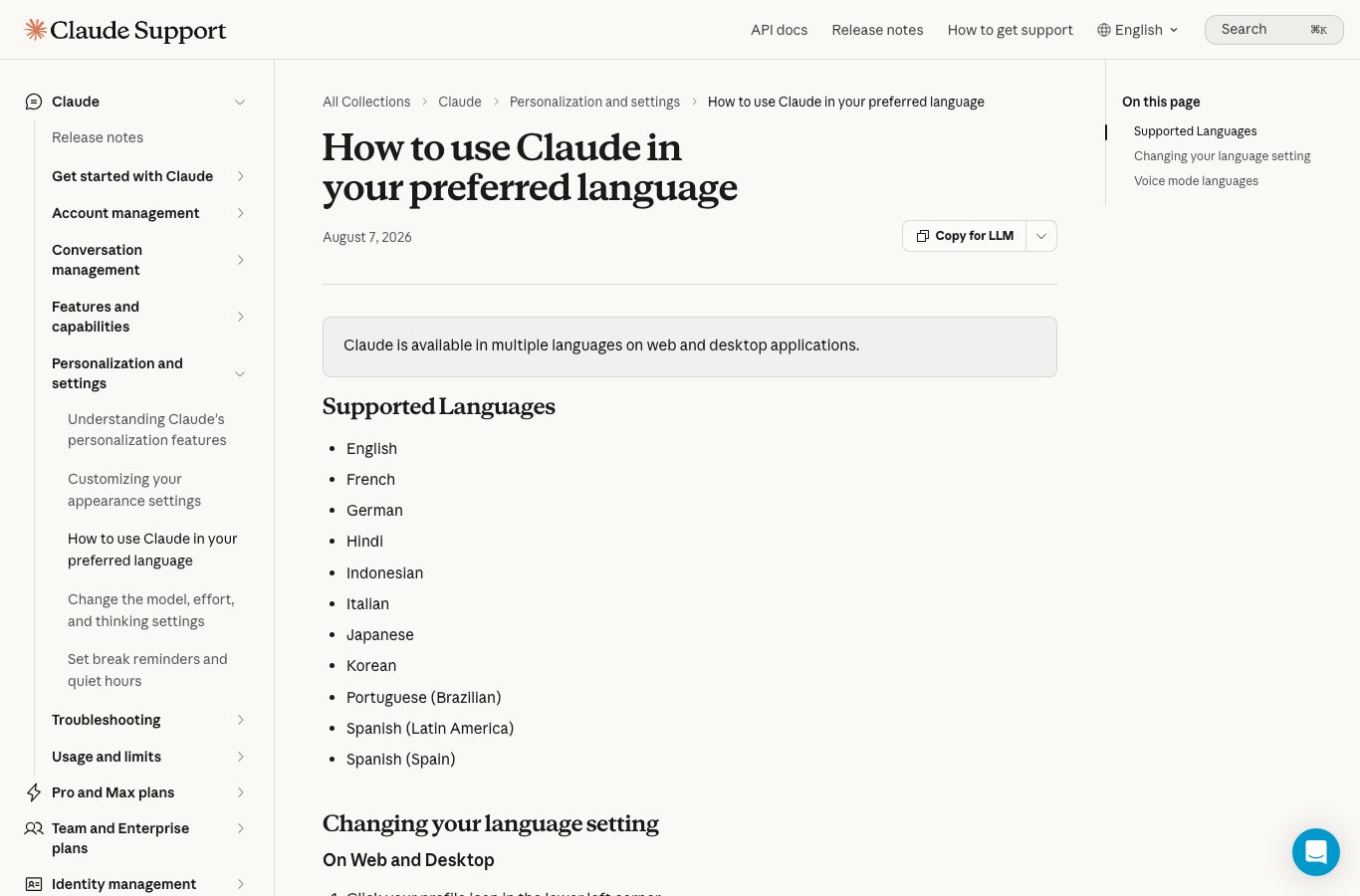
Yes, Claude works in your language: the official help center lists 11 supported languages, including English, French and two variants of Spanish, on web and desktop applications (article updated August 7, 2026).
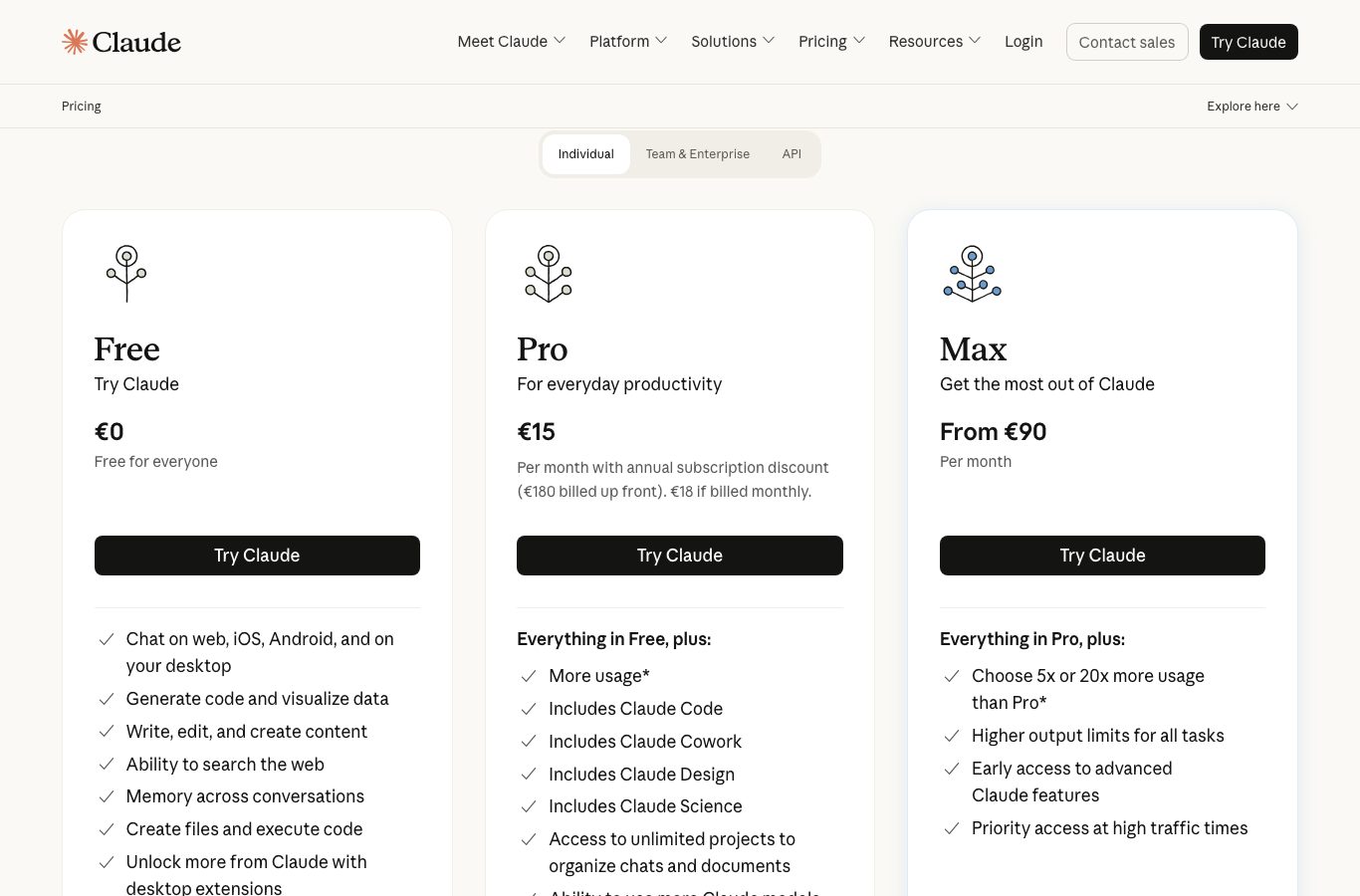
The official pricing grid, measured September 9, 2026 from a US connection, shows a free plan at $0, Pro at $17 per month on annual billing ($20 monthly) and Max from $100 per month, with limits that reset on rolling five-hour windows.
Watch out: pages like hix.ai promise “Claude AI free” without sign-up, but their own interface tells you the free credits run out and asks you to register. The legitimate pages are claude.ai and claude.com, published by Anthropic.
Claude is developed by Anthropic PBC, a US company; customers in the European Union are served by Anthropic Ireland Limited.
To chat with an AI in English without creating an account, Nation AI can be tried for free, no sign-up.
“Claude AI in French” and “Claude language setting” are searches that hide three very different questions: does the assistant understand your language, is the interface translated, and is the site you landed on the real one? All three answers exist, but they are scattered across the official help center, the pricing page and third-party sites that sit at the top of Google. We checked everything against official sources on September 9, 2026, screenshots included, so you know exactly what is true, what costs money and what does not deserve your click.
Before we start, a note on method: every figure in this article (prices, languages, models, app ratings) was taken on September 9, 2026 from Anthropic’s official pages and from the app store listings. Quotes are given verbatim, and each section names its source. Nothing was copied from intermediary sites.
Does Claude really speak your language?
Yes, and this is not an approximation: the official Claude help center devotes an entire article to the question, updated August 7, 2026. Its opening line is unambiguous: “Claude is available in multiple languages on web and desktop applications.” The official list of supported languages has eleven entries: English, French, German, Hindi, Indonesian, Italian, Japanese, Korean, Portuguese (Brazilian), Spanish (Latin America) and Spanish (Spain).
What “speaking your language” means here
Two distinct things: the language of the AI’s responses, which simply follows the language of your messages, and the language of the interface (buttons, menus, settings), which you pick in your account settings. Both are available in the supported languages on web and desktop applications, according to the official help center.
The most important point for everyday use sits in the note of that same article: “Even if you’ve changed your language settings, you can still chat with Claude in any language. Claude will converse with you in the language you use.” In practice: write your question in French, and you get an answer in French, whatever the interface setting. It also works in reverse, which is why community threads keep asking why Claude “stays” in one language after a single message: it mirrors what you write, so the fix is simply to write in the language you want back.
That is also what the English app listing promises when it presents Claude as “The AI assistant that thinks with you”, there to “write, code, and solve complex tasks”. Nothing special to install, no language pack to buy: language is part of the product, not a paid option.
The interface language: the exact setting
Responses in your language are automatic, but the interface itself (the menus, the buttons, the settings screens) is set once, in the account. The official help center gives the steps, on web and desktop applications:
- Click your profile icon, bottom left. It is the small thumbnail of your account, in the lower left corner of the interface.
- Go to the “Language” section. It lives in the profile menu, next to the other account settings.
- Choose your language. The list covers the eleven supported languages, from English to Spanish (Spain).
- Nothing else to do: “The interface will update automatically”, the help center says. No reload, no app reinstall.

Voice mode is set separately. The help center says it explicitly: “Voice mode has its own language setting, separate from your display language.” To have Claude speak and listen in your language, go to Settings, then General, then Voice, then Language, and pick yours. If you dictate and Claude answers in another language, it is almost always that setting that is missing, not the other one.
What about phones?
As of September 9, 2026, the official article documenting the interface language change only cites “web and desktop applications”. The mobile app listings are fully localized in several languages on Google Play and the App Store, and the app works fine for chatting in any supported language. We could not verify the interface language toggle inside the mobile app from the outside: that is the one limit of this review, and we flag it rather than assume it.
How much Claude costs
This is the question with the most wrong answers floating around, even though the official grid is public. Measured September 9, 2026 from a US connection, the official pricing page shows these figures:
| Plan | Price measured September 9, 2026 (US) | Models included | What to remember |
|---|---|---|---|
| Free | $0, “Free for everyone” | Sonnet and Haiku, 200,000-token context window | Chat, web search, memory and extended thinking included; limits on rolling five-hour windows. |
| Pro | $17 per month with the annual discount ($200 billed up front), $20 if billed monthly | Opus, Sonnet and Haiku; Fable via usage credits | Unlocks Claude Code, Cowork, Design and Science, unlimited projects and the Microsoft 365 integration. |
| Max | From $100 per month | Fable up to “50% of weekly limits”, plus Opus, Sonnet and Haiku | “Choose 5x or 20x more usage than Pro”, with priority access at busy times. |
| Team | From $20 per seat per month, on the Team & Enterprise tab | Fable, Opus, Sonnet and Haiku | Two seat types (standard and premium at 5x usage), centralized billing and admin. |
How the limits work deserves an explanation, because it surprises most first-time users. The official page puts it this way: “Every plan has usage limits that reset on a rolling five-hour session window, and paid plans add weekly limits on top. Your activity across Claude on web, desktop, mobile, and Claude Code all draws from the same pool.” In other words, there is no visible message counter: the length and complexity of your conversations determine how fast you reach the limit. The same source notes that “Pro gives you at least 5x more usage per 5-hour session than Free.”
Three details that prevent surprises
First: “Prices shown don’t include applicable tax”, the official page warns. Second: the currency depends on the region you browse from; we measured dollars with a US connection and euros (15 instead of 17 for Pro annual) with a French one, same day, same page, and the amounts are not a simple conversion. Third: “Price and plans are subject to change at Anthropic’s discretion”, so check the official page right before subscribing.
The Claude models in 2026: Fable, Mythos, Opus, Sonnet, Haiku
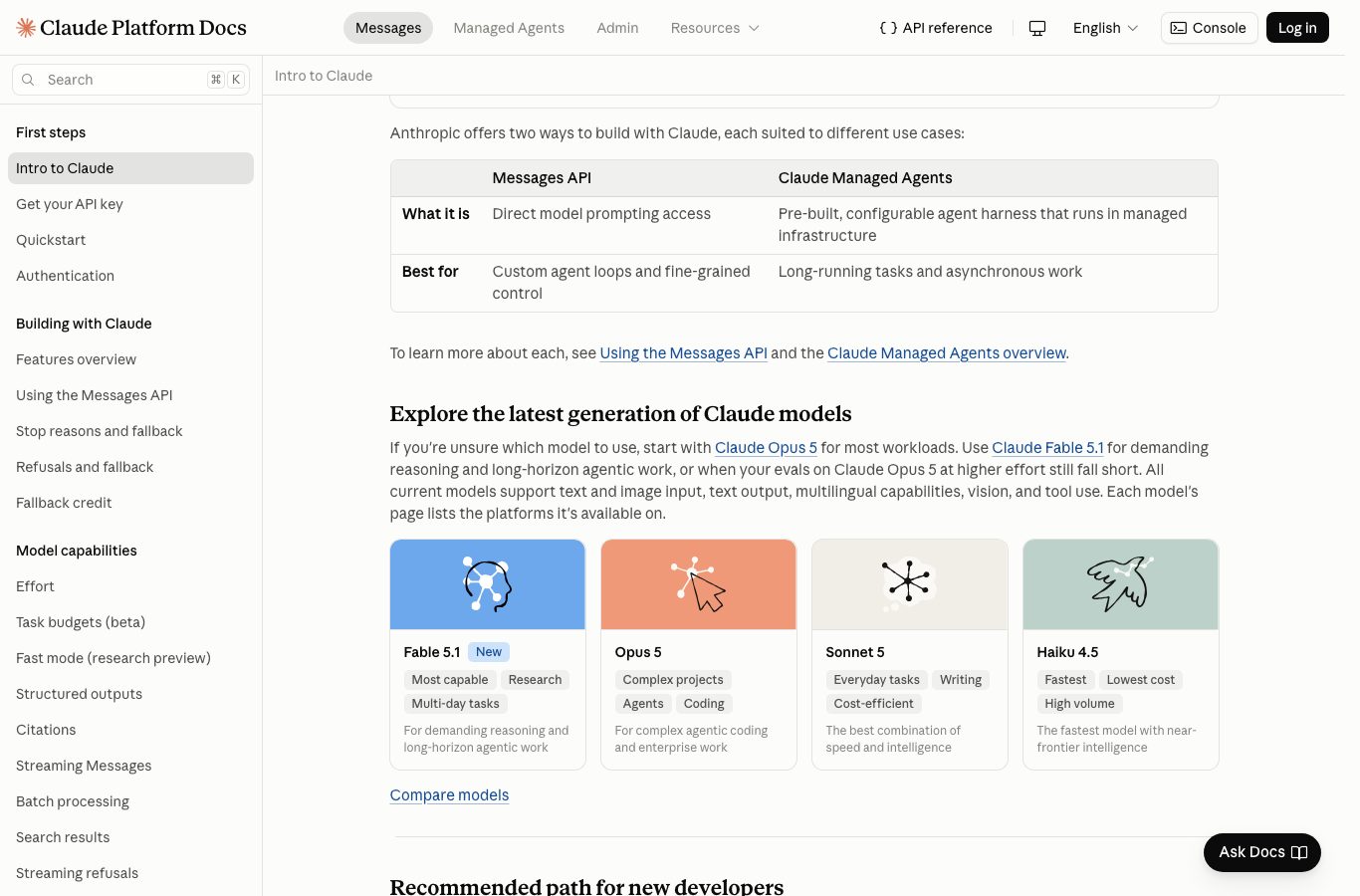
Model names change fast, and plenty of dated articles mix generations. Here is the official lineup in September 2026, as the developer documentation presents it, with the role Anthropic assigns word for word:
| Model | Role described by the official documentation | Available from |
|---|---|---|
| Claude Fable 5.1 | “For demanding reasoning and long-horizon agentic work.” | Usage credits on Pro, “50% of weekly limits” on Max; not included in the free plan. |
| Claude Mythos 5.1 | Listed by the French and Spanish documentation as offering “the capabilities of Claude Fable 5.1” by invitation; the English intro page omits it as of September 9, 2026. | Invitation-only program (Project Glasswing), no public terms as of September 9, 2026. |
| Claude Opus 5 | “For complex agentic coding and enterprise work.” | Pro plan and above. |
| Claude Sonnet 5 | “The best combination of speed and intelligence.” | All plans, including the free one. |
| Claude Haiku 4.5 | Badged “Fastest” and “Lowest cost”, built for high volume. | All plans, including the free one. |
For everyday multilingual use (writing, summarizing, translating, explaining), Sonnet and Haiku, included in the free plan, are more than enough. Fable 5.1, the frontier model, is reserved for long reasoning and agent work; it is also what the Max plans lead with. If you develop, know that Claude Code, the command-line agent, ships with paid plans: our hands-on guide Claude Code to automate without programming covers what you can get out of it as a non-developer.
The official mobile app exists, and its listing is localized
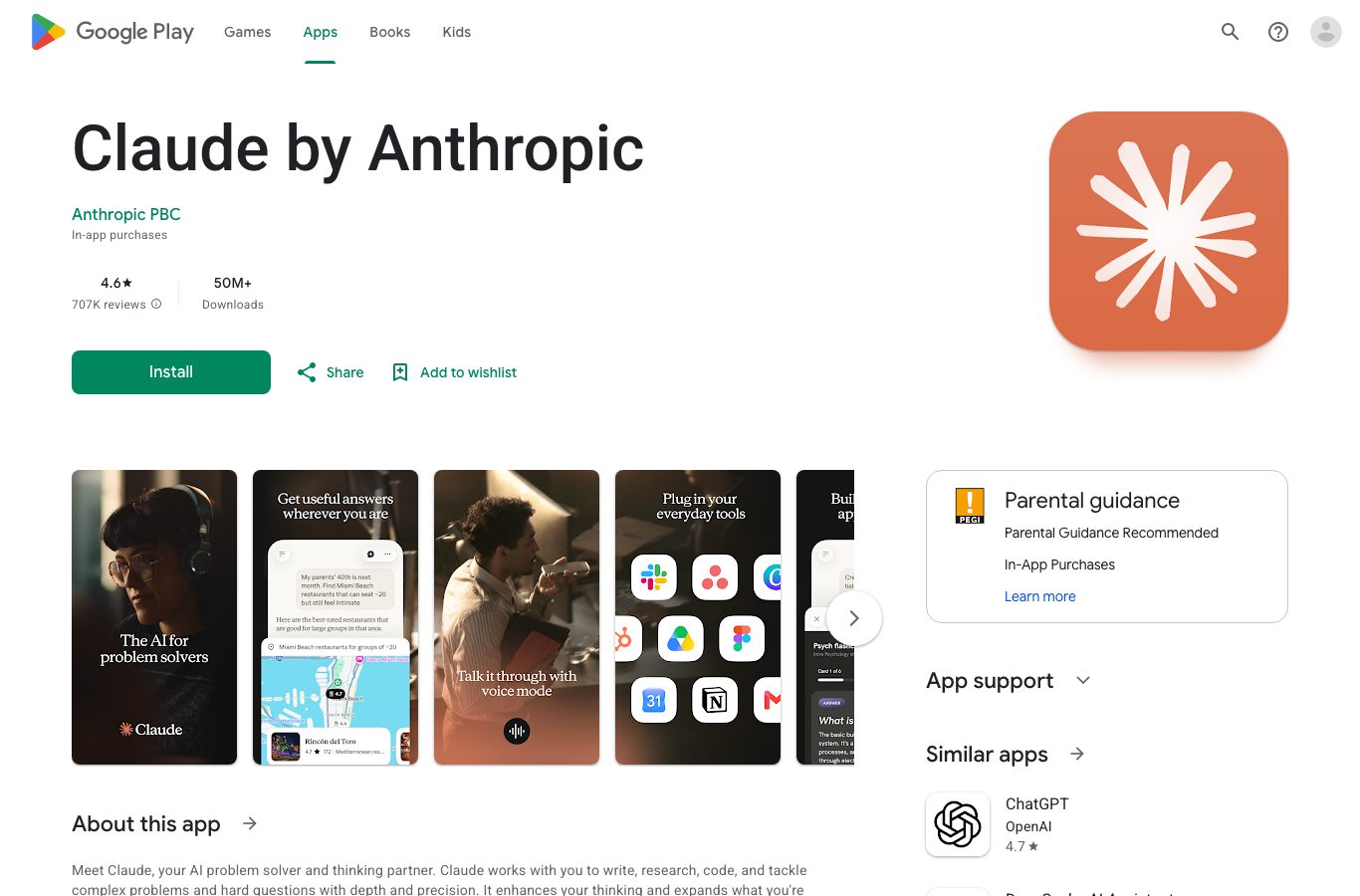
The official app is called “Claude by Anthropic”, its developer is “Anthropic PBC”, and its Google Play listing is fully localized. As of September 9, 2026 it shows a 4.6 out of 5 rating with over 707,000 reviews, more than 50 million downloads, an update dated September 8, 2026, and the number 3 spot in top-grossing Productivity. The app also exists on Apple’s App Store, with localized listings as well.
The Play listing pitches Claude as “The AI assistant that thinks with you”, there to “write, code, and solve complex tasks”. Downloading is free: it is your account plan (free, Pro, Max) that sets the usage limits, exactly like on the web, and the quota is shared across your devices.
HIX AI, the page promising free Claude without sign-up: what is behind it
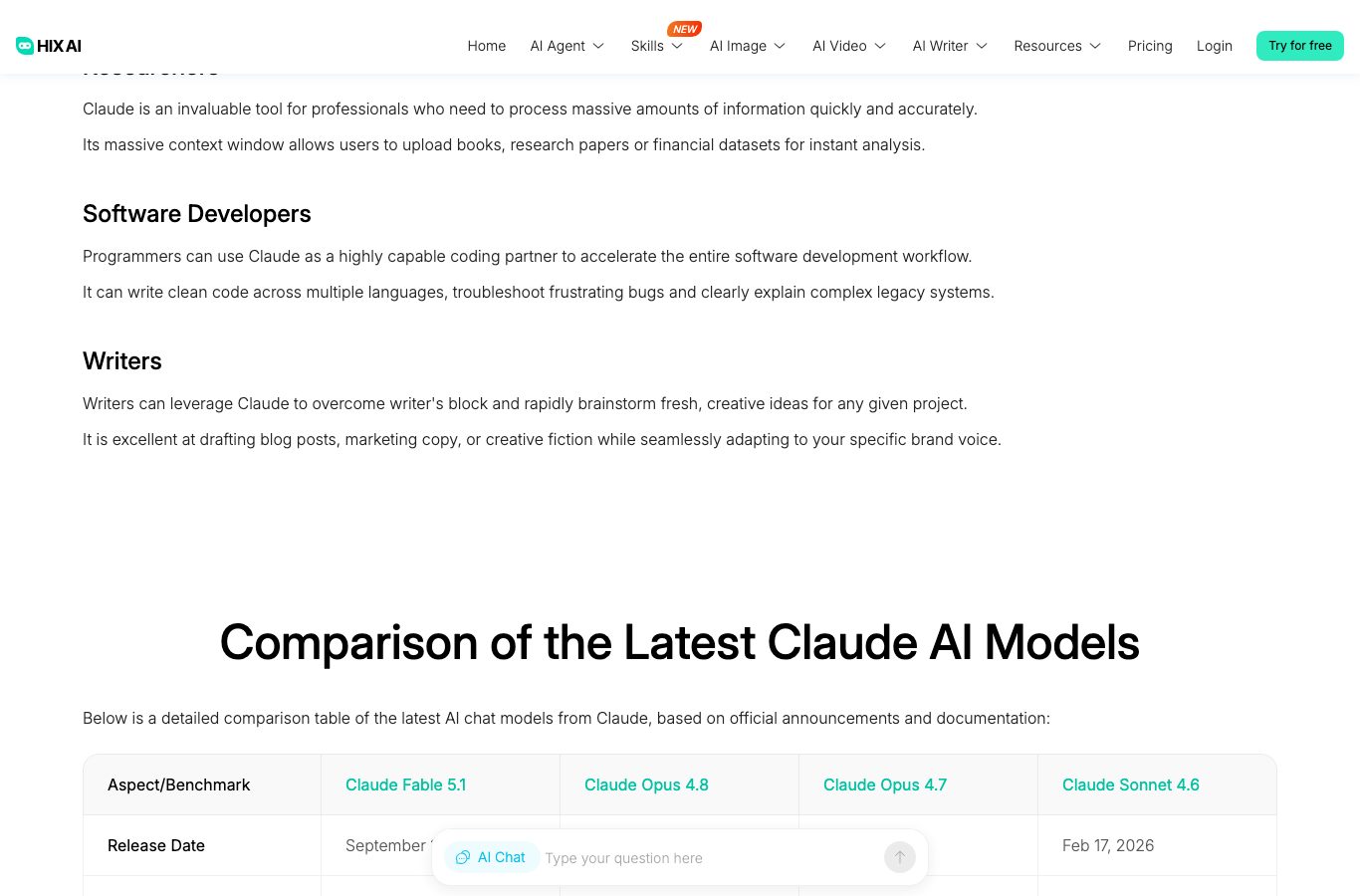
Search for Claude and, among the top results, you will meet hix.ai/claude, with a very direct title: “Claude AI Free: Chat Online Without Sign Up”. It helps to know what it is: a third-party page, with no corporate tie to Anthropic. Its footer points to HIX.AI, a company with a declared address in Singapore, and the page credits Anthropic as Claude’s developer without explaining the technical route of the access.
The promise is emphatic: “Chat with Claude models 100% free, without registration”, with three highlighted features: “Claude Only”, “Chat with History” and “Tools Only”. The main button invites you to “Get your free credits and start chatting now”.
The catch appears when you use it: the interface itself warns “You have used up your free credits” and asks you to “Sign up now to get more free credits”. The “without sign-up” promise turns, in practice, into a credits wall with a registration. The page also shows no price at all: only a “Pricing” link and an “Upgrade now” button. And there is a telling detail: its copy cites “Claude Sonnet 4.5” as the recent model, while the official September 2026 documentation already lists Claude Sonnet 5. Compare the two offers, each measured September 9, 2026 on its own page:
| Criterion | claude.ai / claude.com (official) | hix.ai/claude (third party) |
|---|---|---|
| Publisher | Anthropic PBC, creator of Claude | HIX.AI, company with a declared address in Singapore |
| Entry promise | Free plan at $0 with a free account | “Claude AI Free: Chat Online Without Sign Up” |
| Visible prices | Yes: public grid by plan ($0, $17, from $100) | No: only a “Pricing” link and an “Upgrade now” button |
| What it asks in return | Create a free account, no card | Limited free credits and registration once they run out |
| Model cited | Official lineup through Sonnet 5 and Fable 5.1 (docs, 09/09/2026) | “Claude Sonnet 4.5”, one generation behind the official one |
The lesson is not that every third-party site must be avoided on principle: reselling access or aggregating models is perfectly legal. The lesson is that a “free without sign-up” promise you can verify in ten seconds (credits run out, registration requested) is worth checking before you hand over your email, and that the official free tier, account or not, is the only one publishing its full grid.
The reflex that protects you
We are not calling this page a scam: it names its company and its buttons. But a site that promises “without sign-up”, whose own usage demands sign-up once credits run out, that publishes no prices and cites an outdated model, deserves a comparison before you register. Before giving your email, read the footer and check the domain: the official pages are claude.ai and claude.com.
Is Claude American or European?
The question keeps coming back in one form or another, and the answer is clear: Claude is developed by Anthropic, a US company incorporated as a “public benefit corporation”, signing “Anthropic PBC” on its pages and on its app’s Google Play listing. Customers in the European Union are served, per the official footer, by Anthropic Ireland Limited, an Irish entity.
Language support in French, Spanish or German is therefore a feature of an American product, not a sign of origin. If you deliberately want a European-developed AI, the best-known case is the French company Mistral: our article Mistral AI, success or failure? reviews what the French publisher is actually worth today. And if you simply want to chat with an AI without registering, Nation AI offers a free trial with no account.
Getting started in five minutes
If you want to try Claude officially, here is the shortest path, verified September 9, 2026:
- Open the official page. The legitimate addresses are claude.ai and claude.com, published by Anthropic; any other domain reusing the brand deserves a footer check.
- Create a free account. The Free plan is $0 and asks for no card; it includes the Sonnet and Haiku models, web search and memory.
- Set your interface language. Profile icon bottom left, Language section, your pick: the interface updates automatically.
- Write your first message in your language. No extra setting: Claude answers in the language you use.
- Keep the five-hour window in mind. The free plan recharges by sessions; if you hit a limit, it resets after five rolling hours.
Two honest limits to know before you start: account creation is required on the official offer (that is the difference with a no-sign-up trial); and the privacy settings deserve a detour, since the pricing page indicates that model training on your content can be switched off, which implies going to do it yourself in the settings.
The no-sign-up alternative
If what holds you back in the path above is creating an account, a more direct option exists: Nation AI, the assistant of nation.ai. It can be tried for free, with no account creation, and leans on the leading market models with a layer designed in France. For writing, summarizing, translating or reviewing a text, it is the shortest path: no subscription to try, and no five-hour window to manage for a first opinion.
The two are not mutually exclusive: many readers use Claude for long reasoning and a no-sign-up assistant like Nation AI for daily tasks. Our analysis of ChatGPT alternatives places these options in the full 2026 assistant landscape.
The selector: find your way into Claude
Four situations, four access paths. Answer the four questions: the selector copies the card that matches your case, with the figures measured in this article.
The Claude access selector
Four questions, one recommendation. The facts quoted are from the official measurements of September 9, 2026.
Your recommendation
Waiting: answer the four questions, then click Show my recommendation.
At least one answer is missing: complete the four questions to get a recommendation.
The selector leans on four cards, and copies the one that fits you. They are real usage situations, not a ranking:
The Claude mobile app
The official “Claude by Anthropic” app, published by Anthropic PBC, with a fully localized listing.
- Free to download, account required; 4.6 out of 5 and more than 50 million downloads on Google Play as of September 9, 2026.
- Conversations run in your language from the first message; the quota is shared with your other devices.
- Honest limit: the help center only documents the interface language setting on web and desktop as of September 9, 2026.
Claude on web and desktop
The most complete official path: localized interface, free plan and paid plans on the same page.
- Interface language via the profile icon, Language section; “The interface will update automatically”.
- Free at $0 (Sonnet and Haiku), Pro at $17 per month annual or $20 monthly, limits on rolling five-hour windows.
- Check the domain: claude.ai or claude.com, and not a third-party site reusing the brand.
The platform and its localized docs
For developers: the official API documentation exists in several languages, full model lineup included.
- Fable 5.1, Opus 5, Sonnet 5 and Haiku 4.5 are described role by role (plus Mythos 5.1 in the French and Spanish docs).
- Usage-based billing by model and volume, separate from consumer subscriptions.
- Starting point: the Getting started section of the documentation, read September 9, 2026.
Nation AI, with no sign-up
If account creation holds you back: an assistant you can try immediately, with no account.
- Free trial without registration, designed-in-France layer on top of leading models.
- No five-hour window to manage for a first opinion.
- For writing, summarizing, translating or reviewing: open Nation AI.
Frequently asked questions
Is Claude AI free?
Yes, there is a Free plan at $0 on the official pricing page, measured September 9, 2026. It includes the Sonnet and Haiku models, web search, memory and extended thinking, with limits that reset on rolling five-hour windows. Advanced features (Claude Code, Cowork, Design, Science, unlimited projects, access to Opus and Fable) come with the Pro plan at $17 per month on annual or $20 monthly.
How do I change Claude’s language?
Two separate settings. For the interface: click your profile icon bottom left, go to the “Language” section, choose your language; the help center says “The interface will update automatically”. For the responses, nothing to do: “Claude will converse with you in the language you use”. Voice mode has its own setting, under Settings, General, Voice, Language.
Is Claude an American or a European AI?
American. Claude is developed by Anthropic PBC, a US company that serves European Union customers through Anthropic Ireland Limited, according to the official footer. Pages that aggregate or resell access to Claude, like hix.ai, are third-party services, not the publisher. If you want a European-developed AI, the best-known case is the French company Mistral.
What is the difference between Claude and ChatGPT?
Both are generalist conversational assistants, with a free plan and subscriptions, and both answer in multiple languages without configuration. The differences sit in the models used (Claude runs Anthropic’s Fable, Opus, Sonnet and Haiku range), in how usage is metered (Claude works on rolling five-hour windows with weekly limits on paid plans), and in the features bundled with the subscription (Claude includes Claude Code, Cowork, Design and Science from the Pro plan). Our ChatGPT alternatives analysis details the full landscape.
How much does Claude cost in 2026?
Per the official page read September 9, 2026: Free at $0, Pro at $17 per month on annual billing ($200 up front) or $20 monthly, Max from $100 per month, and the Team plan from $20 per seat per month. Visitors with a French locale are served the same page in euros (15, 18 and from 90). Prices shown don’t include applicable tax, the page warns, and they can change.
Is HIX AI the official Claude site?
No. hix.ai is a third-party service run by HIX.AI, a company with a declared address in Singapore. Its page promises to “chat with Claude models 100% free, without registration”, but its own interface warns that free credits run out and asks you to sign up, it publishes no prices, and it cites as recent a model (Claude Sonnet 4.5) one generation behind the official lineup. The official site is claude.ai, published by Anthropic.
The verdict in three sentences
Claude speaks eleven languages including French and Spanish, its interface language is an official account setting, and its free plan is enough to form an opinion: the real questions are price and access path. The official pages are clear and publish their full grid; the sites promising “free without sign-up” deserve a ten-second check before you hand over your email. Compare, read the footers, and remember a no-sign-up AI exists if you just want to try.
Chat with an AI now, without creating an account
Nation AI answers from your very first question, with no registration and no waiting windows: writing, translation, summaries, review. Free trial, layer designed in France.
Measurements and sources: official Claude help center, article “How to use Claude in your preferred language” dated August 7, 2026 (support.claude.com); official pricing page claude.com/pricing read September 9, 2026 from a US connection (dollars) and from a French-locale connection (euros); developer documentation platform.claude.com/docs/en/intro (plus its French and Spanish versions for the Mythos 5.1 line), read September 9, 2026; Google Play listing of the “Claude by Anthropic” app, read September 9, 2026; hix.ai/claude read September 9, 2026.