

Key takeaway: The Velo IDE AI Assistant revolutionizes development on Wix Studio. By automating script creation and immediate error correction, this tool boosts productivity. The engineer’s role thus shifts towards strategic supervision, where global architecture takes precedence over manual syntax for exceptional results.

Are you tired of sacrificing your valuable talent on redundant and exhausting coding tasks that hinder your daily productivity and technical creativity? Wix is now deploying artificial intelligence to automate the production of most technical code, finally allowing you to fully focus on global architecture and pure innovation. Learn to master these new Velo IDE tools to instantly validate sophisticated logic and assert your new role as a strategic, agile, expert, and high-performing supervisory engineer within your company.
The Wix Code AI Assistant Transforms the Velo IDE
After years of manual coding, Wix is finally integrating artificial intelligence directly where developers work. Here’s how to activate it.
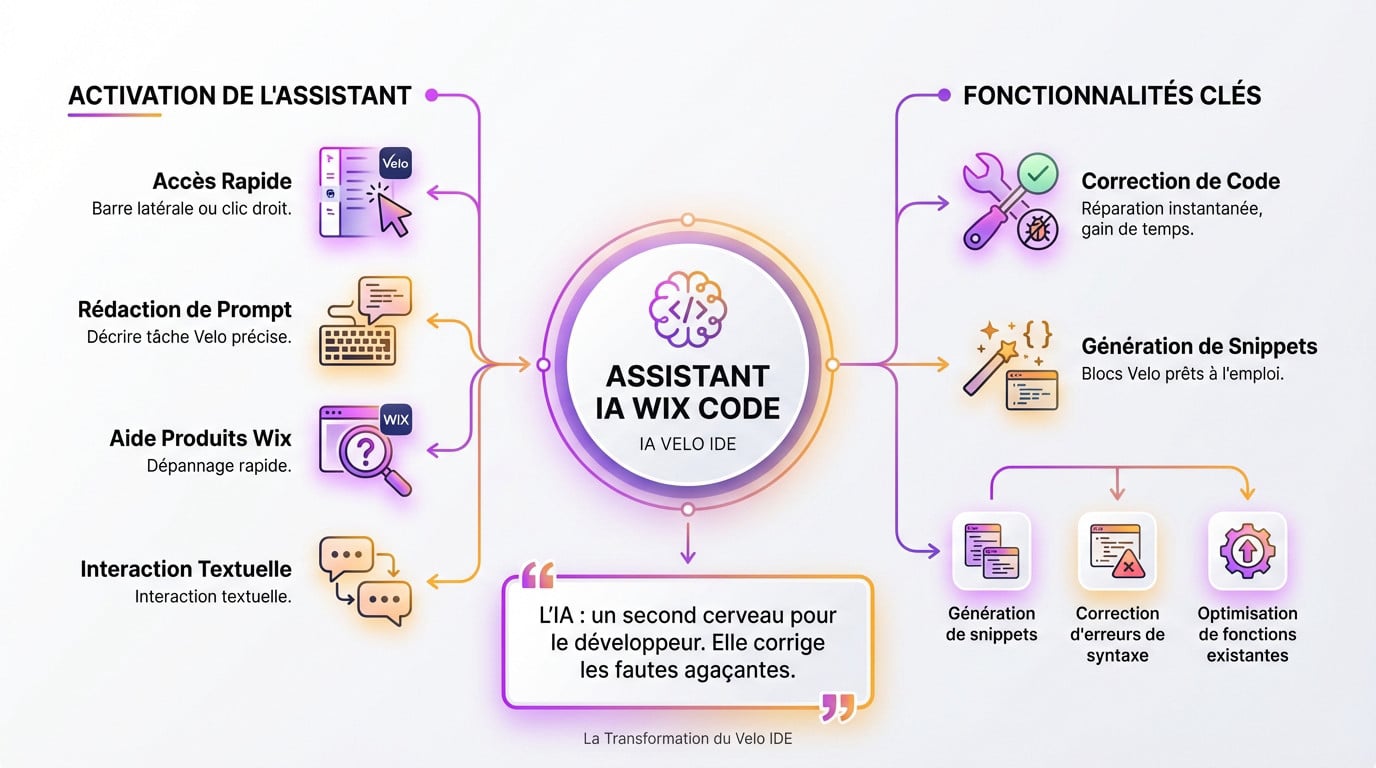
Activating the Assistant in the Studio Environment
Opening the tool is a breeze. You access it via the Wix Studio sidebar or a simple right-click. It’s the vital entry point for any modern developer.
Crafting an effective prompt will change your habits. Describe your Velo task precisely. The AI analyzes your real need to provide a context-aware response. It’s clear, fast, and it works.
Need a hand with a Wix product? Ask the AI to troubleshoot your functions in a flash.
This textual interaction boosts your productivity without any extra effort.
Immediate Correction and Snippet Generation
Are bugs tiring you out? Highlight the error, click, and the AI fixes everything instantly. It’s a huge time-saver for your complex projects.
Inserting snippets simplifies life. The assistant generates ready-to-use Velo blocks. Copy them or inject them directly into your open file. Wix plans to use artificial intelligence to generate most of the code, which will lead engineers to redefine their role within the company.
- Snippet Generation
- Syntax Error Correction
- Optimizing Existing Functions
AI doesn’t replace the developer; it simply offers a second brain to correct their most annoying typos.
3 Major Changes for the Engineering Profession
It’s not just about tools; it’s the entire way of designing a site that is shifting towards a new paradigm.
Prioritizing Architecture Over Basic Syntax
Wix plans to use artificial intelligence to generate most of the code, which will lead engineers to redefine their role within the company. In short, the machine handles repetitive tasks.
Engineers now handle high-level tasks. Architecture becomes the central focus. Basic Velo syntax is no longer an obstacle for technical creatives. It’s a real technical relief.
Try using smart assistants daily to move forward. It’s a radical change for the entire web sector.
Wix Studio uses a VS Code-based environment. This aids the integration of these highly productive new work methods.
Supervision of Logic and CMS Collections
Your role becomes that of an attentive supervisor. You must validate the custom scripts offered. AI often misunderstands specific business needs. So, be vigilant about every detail.
CMS collections are configured quickly. AI helps structure them rapidly. However, managing complex data remains a human prerogative to avoid errors. Security depends on you.
| AI Task | Code Generation, CMS Creation |
| Human Task | Logical Architecture, Security Validation, Complex UX |
Human expertise remains the last line of defense. We check everything before the final launch.
How to Master Custom Scripts?
To get the most out of this technology, you need to understand its workings and especially its blind spots.
Managing the Limitations of the Wix Generative Model
Wix’s generative system knows the Velo API inside out. However, it doesn’t perform systematic miracles. Its understanding remains limited to its current database.
Stuck on a bug? Be careful with follow-up questions. The assistant only allows two follow-ups before resetting. So, be precise from your first message to avoid unnecessary struggle.
Tools like Code with AI by Certified Code sometimes offer different angles. But the native assistant remains your main ally for fast coding.
Knowing when to stop and restart a conversation is a key skill to avoid wasting time.
Systematic Validation in Preview Mode
Testing is not an option. Always use Wix’s preview mode. A script that looks perfect on paper can collapse once launched in real-world conditions on your interface.
For effective prompts, name your elements clearly (#myButton). The more technical details you provide, the less time you’ll spend manually correcting errors. It’s a given.
This rigor is part of an effective assisted programming logic. This is how you truly gain productivity.
Wix plans to use AI to generate most of the code, pushing engineers to redefine their role. Clean code also helps your SEO.
AI is revolutionizing your daily life as a developer on Wix Studio. Finally free yourself from repetitive tasks to focus on architecture and pure innovation. Adopt the Velo Assistant today. Propel your projects towards unprecedented technical excellence. Together, let’s redefine the limits of high-performing web creation.