

The essential takeaway: terminating a Caktus AI subscription works best via the website’s “Billing & Subscription” tab to guarantee immediate processing. This approach effectively stops future payments while maintaining premium access until the current billing cycle concludes. Notably, Caktus retains all user data and essays for exactly 90 days after cancellation, offering a crucial safety net for potential reactivation.

Watching your bank account bleed monthly fees likely has you wondering how to cancel Caktus AI subscription before it renews again? This guide cuts through the confusion to help you terminate your plan on any device or platform in just a few clicks. Beyond the exit button, we reveal a hidden option to freeze payments that keeps your saved essays safe for when you inevitably need them again.
The Quickest Ways to End Your Caktus AI Subscription
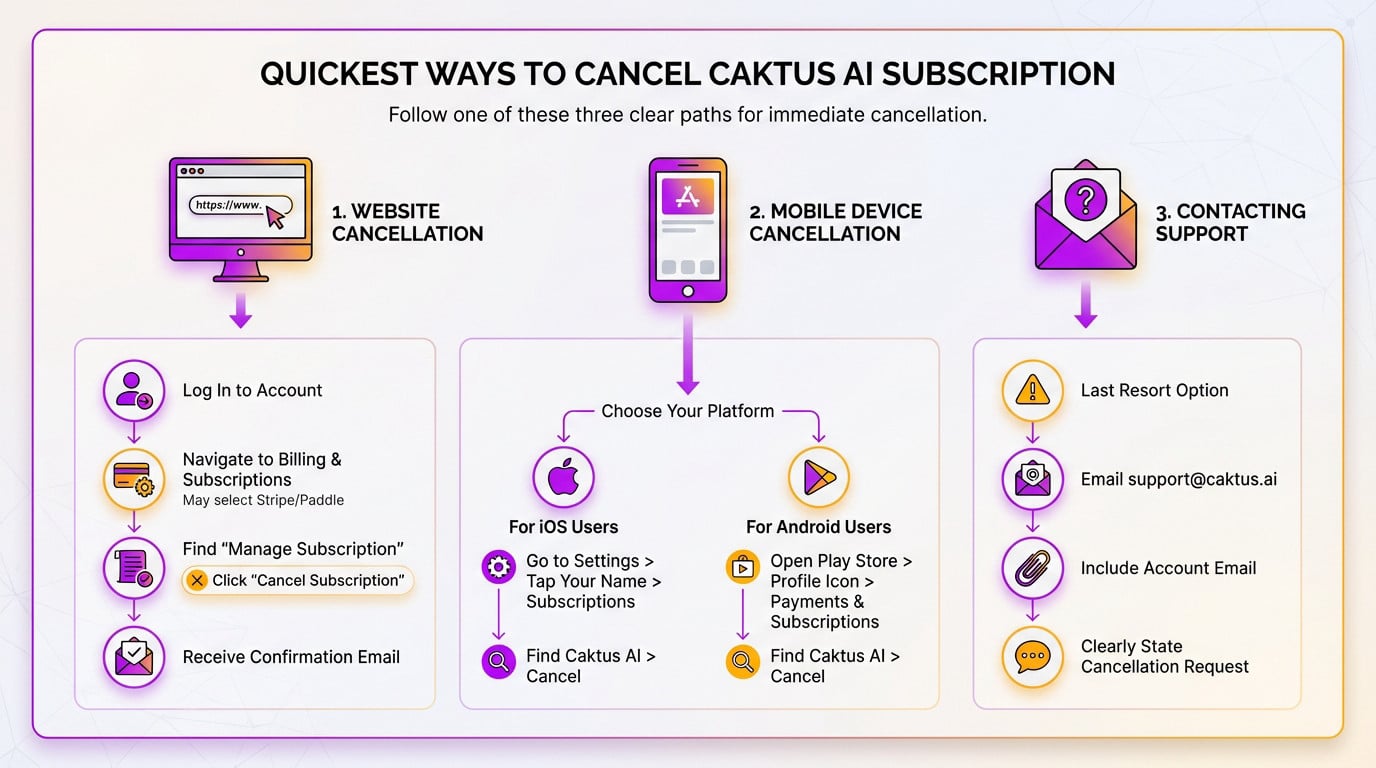
Cancelling Directly From the Caktus AI Website
You want to cancel caktus ai subscription without the headache? The website is honestly your safest bet to stop the charges. Just log into your account to get the ball rolling immediately.
Head straight to your profile icon and hit “Billing & Subscription“. You might have to pick between Stripe or Paddle here—don’t panic, just choose your provider.
Now, hunt down “Manage Subscription” and click the “Cancel Subscription” button. Once done, keep an eye out for the confirmation email; that digital paper trail is your only real proof the process actually worked.
- Log in to your Caktus AI account.
- Navigate to the “Billing & Subscription” section.
- Find and click “Manage Subscription”, then “Cancel Subscription”.
- Wait for the confirmation email.
Using Your Mobile Device for Cancellation
Did you subscribe via an app store? You must cancel there. Deleting the app does absolutely nothing to stop billing.
For iPhone users, the process is simple but hidden. Open Settings, tap your name, then hit “Subscriptions”. Locate Caktus AI in that list and tap to cancel it for good.
Android folks, open the Google Play Store immediately. Tap your profile icon, go to “Payments & Subscriptions”, find Caktus AI in the menu, and shut it down right there.
When All Else Fails: Contacting Support
If the buttons aren’t working, don’t stress. This is your fallback option, though be warned—it’s significantly slower than doing it yourself.
Shoot an email directly to support@caktus.ai. Be blunt: state clearly that you want out and include your account email. This manual approach is common when canceling AI subscriptions across different platforms.
Hold On – Are There Smarter Moves Than Cancelling?
So, you know how to cancel caktus ai subscription. But before you pull the trigger, let’s quickly check if you’re leaving a better deal.
Pausing Your Subscription: The Temporary Fix
Sometimes you don’t hate the tool; you just don’t need it right now. Think about summer vacation or that gap between semesters. Pausing lets you take a breather without nuking your account history.
Here is the cool part: Caktus AI lets you hit pause for 1 to 3 months. It stops the billing clock immediately and picks up automatically later. It’s the hassle-free way to save cash without the finality of cancellation.
- Keep your account data and history.
- Avoid the hassle of signing up again.
- Save money during periods of non-use.
Downgrading Your Plan or Getting a Discount
Maybe the tool is great, but the price tag hurts. If that’s the case, look at switching to a lower-tier plan. A cheaper option might still handle your workload perfectly.
Don’t forget the obvious win: the student discount. If you have a .edu email, you can snag up to 20% off. That price drop often makes the service affordable again.
Still not convinced? The AI market is huge. You might find powerful free AI alternatives that fit your budget better. It never hurts to look around before committing to a paid plan.
Cancellation vs. Alternatives: A Quick Comparison
To make this decision brain-dead simple, here is a breakdown of what each option really means for your wallet and your data.
| Action | Cost | Access | Data Retention |
|---|---|---|---|
| Full Cancellation | $0 after current cycle | Ends after billing period | Lost after 90 days |
| Pause Subscription | $0 during pause | Suspended during pause | Fully retained |
| Downgrade Plan | Reduced monthly/annual fee | Reduced features | Fully retained |
This table should clarify which path is the best for your specific situation.
The Aftermath: What Happens Once You Hit Cancel
Your Access Until the Billing Cycle Ends
Let’s be clear: deciding to cancel Caktus AI subscription plans doesn’t mean you suffer an immediate loss of access. Since the service has already been paid for the current period, it remains yours to use. You won’t be cut off instantly.
You can continue to utilize all the premium features until the very last day of your current billing cycle. Honestly, you should make the most of it while it lasts. Don’t let that paid value vanish into thin air.
The Deal With Refunds and Past Charges
Here is the reality check on getting your money back. Caktus AI generally does not offer refunds for subscription fees that you have already paid. Once the transaction clears, that money is typically gone.
This makes the specific timing of your exit vital. If you are currently on a free trial, you must cancel at least 24 hours before it ends to avoid being charged automatically. Don’t get caught by that strict deadline.
What About Your Data and Essays?
You might worry that your essays disappear the moment you leave. Thankfully, your data isn’t gone forever, at least not right away.
Caktus AI actually holds onto all your user data, essays, and history for 90 days after cancellation. Consider it a temporary safety buffer in case you regret leaving.
Your essays, documents, and account history are kept for 90 days after you cancel, giving you a window to change your mind without losing everything.
However, I strongly suggest you take action before cancelling. Go to the “Account > Export Data” option right now as a safety measure to protect your work permanently. It is better to be safe than sorry.
Troubleshooting: When Cancellation Isn’t Working
In a perfect world, cancelling is a one-click affair. But we don’t live in a perfect world. Here’s your game plan if you hit a wall.
You Cancelled, But Still Got Charged
It’s maddening to see a charge pop up after you’ve tried to cancel caktus ai subscription. Sadly, this is the most common complaint with many online subscriptions today.
First step: double-check your inbox for the cancellation confirmation email immediately. If they don’t have it, the cancellation might not have been processed correctly on their end.
If they have the email but were still charged, they should immediately contact Caktus support with the proof attached. If support is unresponsive to your request, it’s time to escalate the issue to get your money back.
Your Escalation Plan: Disputing the Charge
Explain that if the company won’t help resolve this, your bank certainly will. This consumer protection mechanism is called a chargeback.
If a service continues to bill you after you’ve followed their cancellation process, you have every right to dispute the charge with your bank.
Contact the bank or credit card company right away to explain the situation clearly. State that you want to initiate a chargeback for services not rendered or an unauthorized transaction. This usually gets results fast.
- Gather your evidence: the cancellation confirmation email.
- Call your bank’s customer service line.
- Clearly state you want to dispute a charge from Caktus AI.
- Follow their instructions to formally file the dispute.
Add a final tip: they can also ask their bank to block future payments from the merchant to prevent it from happening again. You need accessible customer support when money is involved.
Ending your Caktus AI subscription doesn’t have to be a headache. Whether you choose to cancel completely, pause for a break, or switch to a cheaper plan, you remain in control of your wallet. Just remember to export your essays before you go—nobody wants to lose that 2 a.m. masterpiece!