

The essential takeaway: Pictory AI revolutionizes creation by turning text, scripts, and URLs into professional videos automatically. This intelligent partner eliminates steep learning curves, removing technical barriers to unlock massive productivity gains. With game-changing features like instant URL-to-video conversion, creators scale high-quality output effortlessly without needing expensive hardware or manual editing skills.

Are you tired of intimidating editing tools and wondering exactly what is Pictory AI? This intelligent ally automatically turns your raw scripts and blog posts into professional, engaging videos in mere minutes without requiring any technical skills. Prepare to discover how this accessible platform eliminates manual tasks to boost your production speed and visual identity immediately.
Pictory AI and the End of Manual Video Editing
You probably think video editing requires expensive gear and endless hours of misery. Well, you’re wrong.
Defining the Cloud-Based Video Partner
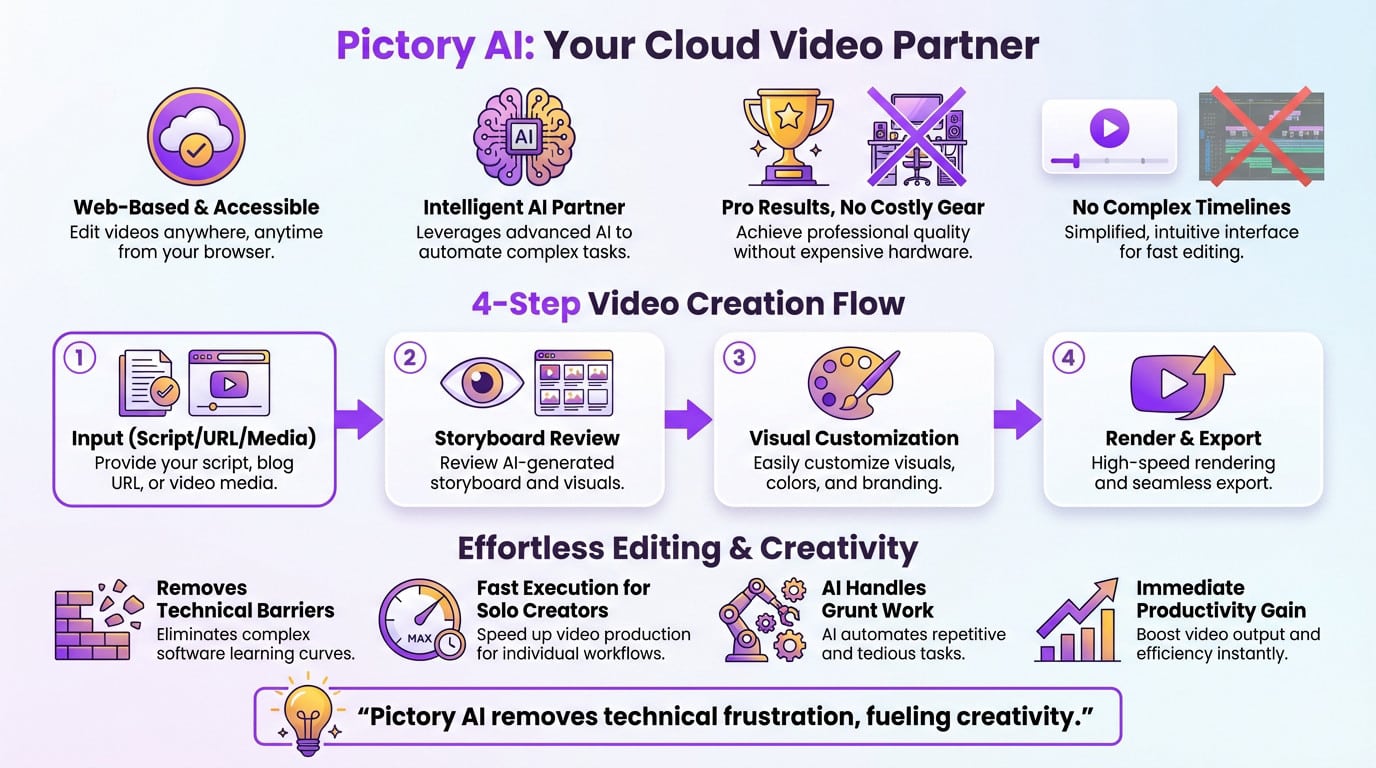
So, what is Pictory AI really? It is not heavy software, but an intelligent web partner accessible to everyone. You get professional results without ever buying a pricey workstation. It works for you, not against you.
Say goodbye to complex timelines forever. This interface replaces the traditional tools that usually intimidate beginners.
The 4-Step Path from Idea to Export
Start by simply importing your raw content. The tool guides you through the process without any friction. It feels surprisingly natural right from the first click.
Here is the simple breakdown:
- Step 1: Choice of input (script, URL, media).
- Step 2: Review of the generated storyboard.
- Step 3: Visual customization.
- Step 4: Rendering and final export.
Eliminating the Steep Learning Curve of Editing
We are tearing down technical barriers here. Speed is the ultimate advantage for a solo creator today. The AI handles the grunt work instantly.
Manual editing eats days; this takes minutes. The productivity gain is immediate.
Pictory AI doesn’t just edit your videos, it eliminates the technical frustration that often kills creativity.
5 Ways to Turn Raw Assets Into Professional Video
So, the platform is set. Now, let’s see how it actually flips your dormant files into dynamic content.
Converting Blog Posts and URLs Instantly
The URL-to-video feature shows exactly what is Pictory AI capable of. The AI scans your article and pulls out the absolute essence. It’s perfect for recycling content. Bloggers save a massive amount of time.
The algorithm picks out the key points for you. Your video structure logically follows the original source material.
Transforming Scripts and Audio Files
Check out the script-to-video workflow. Narration drives the entire process here. The AI syncs visuals with your text or audio without missing a beat.
Think about your podcast archives today. You transform a simple audio file into an engaging social video. It is a formidable weapon for modern storytelling.
Giving New Life to PPTs and Images
Those static PowerPoint presentations are often dead weight. You can make them fluid and animated instantly. Slides become living video sequences without any extra effort.
Use your image collections. The AI creates movement where none existed.
Your old PowerPoint files are no longer dead documents, but video scripts waiting to be activated.
How Does the AI Handle Branding and Engagement?

Production speed means nothing if your audience scrolls past. That is the real challenge.
Automated Captions and Visual Selection
85% of videos are watched on mute. Pictory solves this by auto-generating precise captions instantly. No manual transcription is needed. That simple addition keeps eyes on your content.
The AI also scans your text to pull relevant stock footage from a massive library, matching visuals to every sentence.
Maintaining Brand Consistency with Custom Assets
Don’t let AI dilute your brand. Here is how what is Pictory AI protects your identity.
| Brand Element | Customization Capability |
|---|---|
| Logo | Fixed placement on all scenes |
| Fonts | Import custom TTF/OTF files |
| Colors | HEX codes to match guidelines |
Upload your own clips to blend with AI assets seamlessly. This ensures the final video actually looks like you.
Generating Content with AI Studio and Script Tools
AI Studio is your command center. The script generator organizes raw ideas into a structured narrative before visuals are even selected. Writer’s block is dead.
Upcoming AI Avatars will add a human face to these presentations. It’s the next logical step.
The interface prioritizes speed. You don’t need a degree to use it.
Scaling Production with Smart Integrations
To shift into high gear, Pictory doesn’t sit alone in a corner—it integrates right into your ecosystem.
Marketing and Educational Use Cases
If you are wondering what is Pictory AI best used for, here is the breakdown:
- Marketing: Create rapid social ads that grab attention.
- Education: Transform text courses into video modules.
- HR: Automate internal training videos easily.
- Coaching: Generate summaries from live sessions.
This drastically impacts your content pipeline. You produce more, faster, without adding headcount to your creative team.
Boosting Efficiency with Zapier and Chrome
Grab the Chrome extension to capture web content in a single click. It is the perfect tool for creators who need to move fast while browsing.
Then, leverage the Zapier integration. You can automate video creation the moment a new article is published. It is the absolute peak of efficiency for marketing squads.
Choosing Between Starter and Enterprise Plans
Compare the offers quickly. The Starter plan fits solo creators, while Enterprise supports large structures with custom limits.
Keep in mind this is a web platform. There is no mobile app, but you get full accessibility from any modern browser.
The choice is flexible. Every profile finds an option adapted to their specific goals.
Stop struggling with intimidating timelines. Pictory AI transforms your raw ideas into professional videos instantly. You save time, boost engagement, and maintain your unique brand identity. It is the ultimate partner for modern creators. Ready to revolutionize your content strategy? Start your journey today.
FAQ
How does Pictory AI turn text into video?
Pictory AI acts as your intelligent production assistant. You simply provide a script, a blog post URL, or a rough idea, and the algorithms analyze your text to identify key concepts. The system then automatically pulls relevant footage from a massive stock library and synchronizes it with your narrative, delivering a polished video in minutes rather than hours.
Do I need video editing experience to use the platform?
Absolutely not. Pictory AI is designed specifically to eliminate the steep learning curve of traditional editing software. The interface is intuitive and drag-and-drop simple, allowing you to produce professional-grade content immediately. You focus on the message, and the AI handles the complex technical tasks like transitions and timing.
Can I customize the videos to match my brand identity?
Yes, maintaining your brand consistency is effortless. You can upload your specific logos, fonts, and color palettes into a dedicated Brand Kit that applies your style to every project automatically. Whether you use AI-generated visuals or upload your own clips, the final output will always look uniquely yours.
How does the auto-caption feature boost engagement?
Most social media videos are watched without sound, making captions essential. Pictory AI automatically generates accurate subtitles for your content, instantly grabbing viewer attention. This simple addition ensures your message is understood by everyone, significantly increasing watch time and engagement rates across all platforms.
Does Pictory AI integrate with other marketing tools?
Pictory integrates seamlessly into your existing ecosystem to scale your production. With connections to Zapier and a dedicated Chrome extension, you can automate video creation triggers from your other apps. This allows you to turn web content or new data entries into video assets instantly without disrupting your workflow.