
The essential takeaway: Anthropic introduces Claude Cowork, an autonomous agent designed to actively manage local files within a secure sandbox, moving far beyond simple chat. By adapting developer-grade tech for general productivity, it turns tedious administrative chores into automated workflows. Remarkably built in just over a week, this research preview is currently exclusive to Claude Max subscribers on macOS.

Do you ever feel like your computer is slowly becoming a chaotic graveyard for unorganized downloads and endless administrative drudgery that simply drains your creative energy? With the release of anthropic claude cowork, you finally gain access to a proactive digital colleague capable of rolling up its virtual sleeves to execute these tedious chores directly on your local machine. We will examine how this agentic technology evolved from a niche developer secret into a secure productivity powerhouse that autonomously organizes your digital life while you reclaim your time for high-value work.
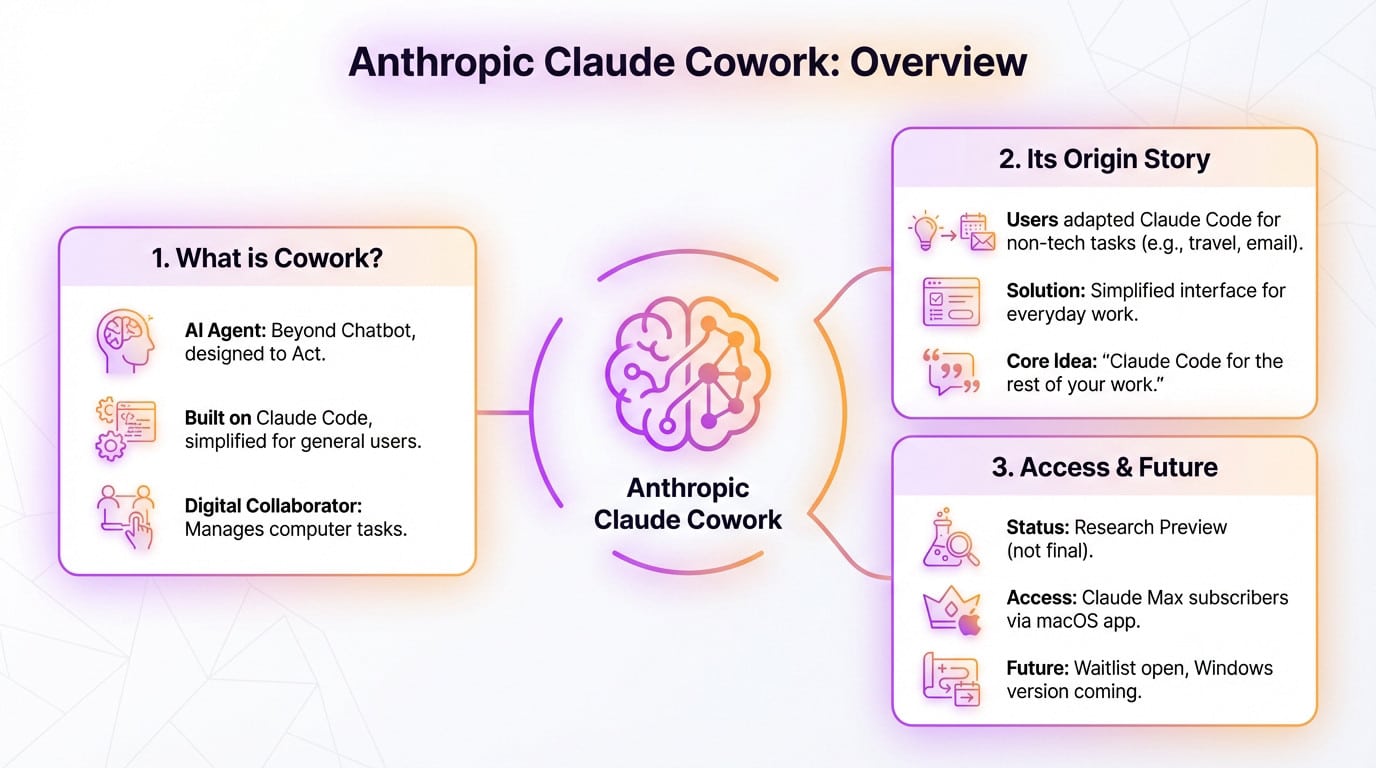
So what exactly is Anthropic Claude Cowork?
Not just another chatbot
Forget the endless chat windows. Anthropic Claude Cowork isn’t here to just chat; it’s a hands-on AI agent built to actually do things. It acts, rather than just speaking.
Under the hood, it runs on the robust engine of Claude Code, yet they’ve stripped the scary terminal for a friendly interface.
Think of it as a digital collaborator sitting right inside your machine. It accesses specific local folders to organize files or crunch data, moving beyond simple text generation to concrete action.
Born from a surprising user habit
Here’s the funny part about innovation. Anthropic noticed developers using the hardcore Claude Code tool for mundane life admin, like planning holidays or sorting messy emails. They were hacking a dev tool for personal chores.
Cowork is the direct answer to that unexpected behavior: a sleek version designed specifically for those everyday needs.
As Simon Willison put it:
“Cowork is essentially Claude Code for the rest of your work, stripping away the developer-centric interface for something anyone can use to get things done.”
Who can get it, and when?
Don’t get too excited just yet. This is officially a “research preview,” meaning it’s experimental territory rather than a polished, final product on the shelf.
Access is currently locked behind the high-tier Claude Max subscription. You’ll also need the macOS desktop application to even see the option appear on your dashboard.
For everyone else, there’s a waitlist. Windows support is on the roadmap, but for now, it’s an Apple-exclusive party.
How It Works: Your New AI Colleague in a Box
Giving the AI Keys to a Room, Not the Whole House
Think of Anthropic Claude Cowork not as a chatbot, but as a digital temp worker. You don’t just talk; you grant access to a specific folder on your machine. That folder becomes its dedicated desk. It lives there.
Inside that space, it can read, modify, and create files to finish whatever job you assigned. It’s hands-on work.
Everything stays locked in this controlled sandbox environment. It can’t snoop around your entire hard drive, keeping your private data safe.
The Agentic Loop: Plan, Act, Check, Repeat
This isn’t a blind command execution script. Cowork actually pauses to think like a real assistant would. It iterates through a loop until the job is done right.
Here is exactly how it tackles a complex problem without you holding its hand:
- Formulates a plan: It breaks down your request into a series of logical steps.
- Executes the steps: It performs actions like opening a file, writing text, or renaming a document.
- Verifies its work: It checks if the outcome matches the goal.
- Asks for clarification: If it’s unsure or hits a roadblock, it will ask you for guidance.
Connecting to the Outside World
Local files are great, but sometimes the job needs external data. Cowork isn’t stuck offline; it hooks into existing connectors to fetch what it needs.
It links up with tools like Asana, Notion, or PayPal effortlessly. Even better, pair it with the Claude in Chrome extension. It can handle web tasks, like filling out forms or navigating sites. It’s surprisingly capable.
Real-world Tasks for the Average Office Worker
Theory is fine, but utility is better. Here are concrete office tasks you can delegate to Cowork right now to stop drowning in digital clutter.
From Messy Downloads to Organized Folders
You know that chaotic “Downloads” folder? You can point Anthropic Claude Cowork at it and command it to trier et renommer tous les fichiers based on actual content, not just filenames.
Try this: “Move all utility bills into a sub-folder named ‘Invoices’ and rename them by date.“
It turns a digital nightmare into a clean workspace in seconds—a chore we all delay.
Turning Receipts and Notes Into Actual Reports
Organizing is basic; the real power shows up when the AI synthesizes scattered data into something you can actually use.
| Task: Create Q3 Expense Report | Manual Workflow | Claude Cowork Workflow |
|---|---|---|
| Manually open images, type data, and convert currencies. | Give Cowork a folder of receipt screenshots. Prompt: “Create an expense sheet, categorize spending, and total in EUR.” | |
| Gather scattered notes from TXTs/PDFs and copy-paste key points. | Give Cowork a folder of notes. Prompt: “Draft a summary report based on these docs, focusing on milestones.” | |
| Manually create charts and format the final report. | Cowork generates a structured document (CSV or Markdown) ready for final review. |
Beyond Simple Organization
Don’t limit yourself to administrative cleanup. Since it runs locally, think of it as a junior analyst sitting inside your hard drive, ready to execute.
- Drafting presentations: Give it a folder of research and ask it to generate a slide-by-slide outline.
- Data analysis: Feed it a messy CSV file and ask it to clean data, identify trends, and output a summary.
- Content creation: Provide raw ideas and ask it to structure them into a first draft for a blog post.
The big question: is it safe to use?
The power of the sandbox
Let’s be clear: Cowork doesn’t have free rein over your entire hard drive. It only touches the specific folder you explicitly assign to it. Your private data remains off-limits.
Anthropic runs this operation inside a virtualized “sandbox”. Think of it as a sealed, airtight container within your machine. Whatever chaos happens inside that box cannot leak out to infect your main system.
This architecture comes straight from Claude Code, a tool already battle-tested by thousands of developers.
Real risks and how to mitigate them
We need to be honest about the dangers here. If your instructions are vague, the AI might misinterpret them with frustrating results.
The biggest nightmare isn’t data theft; it is a destructive action. Imagine asking the AI to “clean up” a folder, and it deletes the wrong files because it misunderstood your intent.
Anthropic explicitly warns users to provide very clear instructions, as the risk of the model taking destructive actions based on a misunderstanding is real and present.
Your role in staying safe
Security isn’t just software; it is a shared responsibility. You hold the keys to preventing disasters.
To keep your data safe while using Anthropic Claude Cowork, follow these three non-negotiable rules:
- Start with copies: Always work on copies of your important files, never the originals.
- Be hyper-specific: Instead of “clean this folder,” say “delete all .tmp files and move all .jpg files to the ‘Images’ subfolder.”
- Review the plan: Before Cowork acts, it often presents a plan. Read it carefully.
The Bigger Picture and Available Alternatives
A Different Path for AI Productivity
While Microsoft tries to bury AI deep inside your operating system, the Anthropic Claude Cowork strategy takes a sharp left turn. They aren’t trying to take over your whole machine. Instead, they chose a more isolated and controlled approach.
It is a calculated bet on a model where you delegate specific tasks within a secure perimeter. This prioritizes safety and clarity over that opaque “magic” integration others sell. You stay in the driver’s seat, not the passenger seat.
The Speed of Development Is the Real Story
Here is the detail that actually blew my mind. The team reportedly built this entire Cowork functionality in about a week and a half. That speed of execution is frankly ridiculous.
This serves as a powerful demo of the AI’s meta-capability. The developers almost certainly used Claude Code to build its own successor, Cowork. We are watching the tool accelerate its own evolution. It is recursive improvement in real-time.
Can’t Get Cowork Yet? Consider This
Let’s be honest, getting access right now is a massive pain. It is currently locked behind the pricey Claude Max subscription on macOS. Most people simply cannot use it today.
Yet, the hunger for powerful, simple AI tools isn’t going away. You need solutions that work right now.
For those seeking high performance with an accessible interface, tools like Nation AI position themselves as an interesting alternative to the sector’s giants. They offer a compelling option while you wait for the big gates to open.
Claude Cowork represents a massive leap from passive chatbots to active digital colleagues. By letting AI safely handle files within a sandbox, Anthropic is redefining productivity. While it’s currently a VIP-only party, this agentic approach—and accessible alternatives like Nation AI—proves that the future of work involves a lot less busywork.