
The short version

An AI video generator is not billed by the month, it is billed by the second. At Runway, the $15 entry plan buys exactly 52 seconds of Gen-4.5 per month, which works out to $0.29 a second. At Kling, $10 buys 33 clips in 720p. At Vidu, the same budget buys 200.
Two things changed this summer. Sora, which half the roundups still rank in the top three, shut down on April 26, 2026, and its API goes dark on September 24. And since August 2, 2026, the European AI regulation requires every machine-generated video to be marked.
What you get here: the real price of one generated shot at each vendor, taken from their own pricing pages on August 3, 2026, a budget calculator, and the transparency rule that now applies to what you publish.
Search for an AI video generator and you get thirty product pages and three roundups, all built on the same promise: describe it, and the AI shoots it. What almost none of those pages tell you is what the thing actually costs once you move past the demo. This article starts from the other end: the price grids the vendors publish themselves, converted into a single comparable unit, the price of one shot.
AI video generator: what we are actually talking about
Under one label, the search results mix three products that share neither the use case, nor the price, nor the limits. Knowing which family you are in avoids 90 % of the bad surprises.
Text to video
You write a description and the model builds a shot a few seconds long, often with sound. It is the most spectacular family, and the most expensive.
Runway, Google Flow (Veo 3.1), Kling, Vidu, Seedance
Image to video
You supply a still image and the model animates it. Far more controllable than text alone, because you lock the framing, the colors and the subject before you pay for the generation.
The same engines, in first-frame mode
Avatar video
A synthetic presenter reads your script to camera. Nothing cinematic, but it is the only family that produces long videos at a predictable cost.
Synthesia, HeyGen
Assisted editing
The AI does not create the images, it cuts, captions and paces your own footage. A different craft, and by far the cheapest one.
CapCut, Clipchamp, Canva, Descript

What a shot means here
In this article, a shot is one generation: a continuous clip a few seconds long, produced in a single pass by the model. It is the unit every vendor bills, and it is also the unit of editing. A 30-second video is typically 4 to 6 shots cut together.
Durations look alike from one engine to the next, because compute cost dictates them. Google documents 4, 6 and 8-second videos for Veo 3.1, and up to 10 seconds with Gemini Omni Flash. Vidu advertises “Supports 3-16s video generation” on its English page. Kling counts in clips. Runway alone thinks directly in seconds. Nobody produces three unbroken minutes.
The roundup everyone keeps copying no longer exists
On August 3, 2026, the first page of results for this query lines up three editorial articles. Two of them put Sora in their top three: one “Top 10” ranks it second behind Veo 3, a “tested 2026 comparison” ranks it fifth. A fourth result, a platform reselling access, advertises “40+ models including Sora 2”.
Sora, however, is gone. OpenAI’s own help center, updated in late July 2026, says so in one sentence.
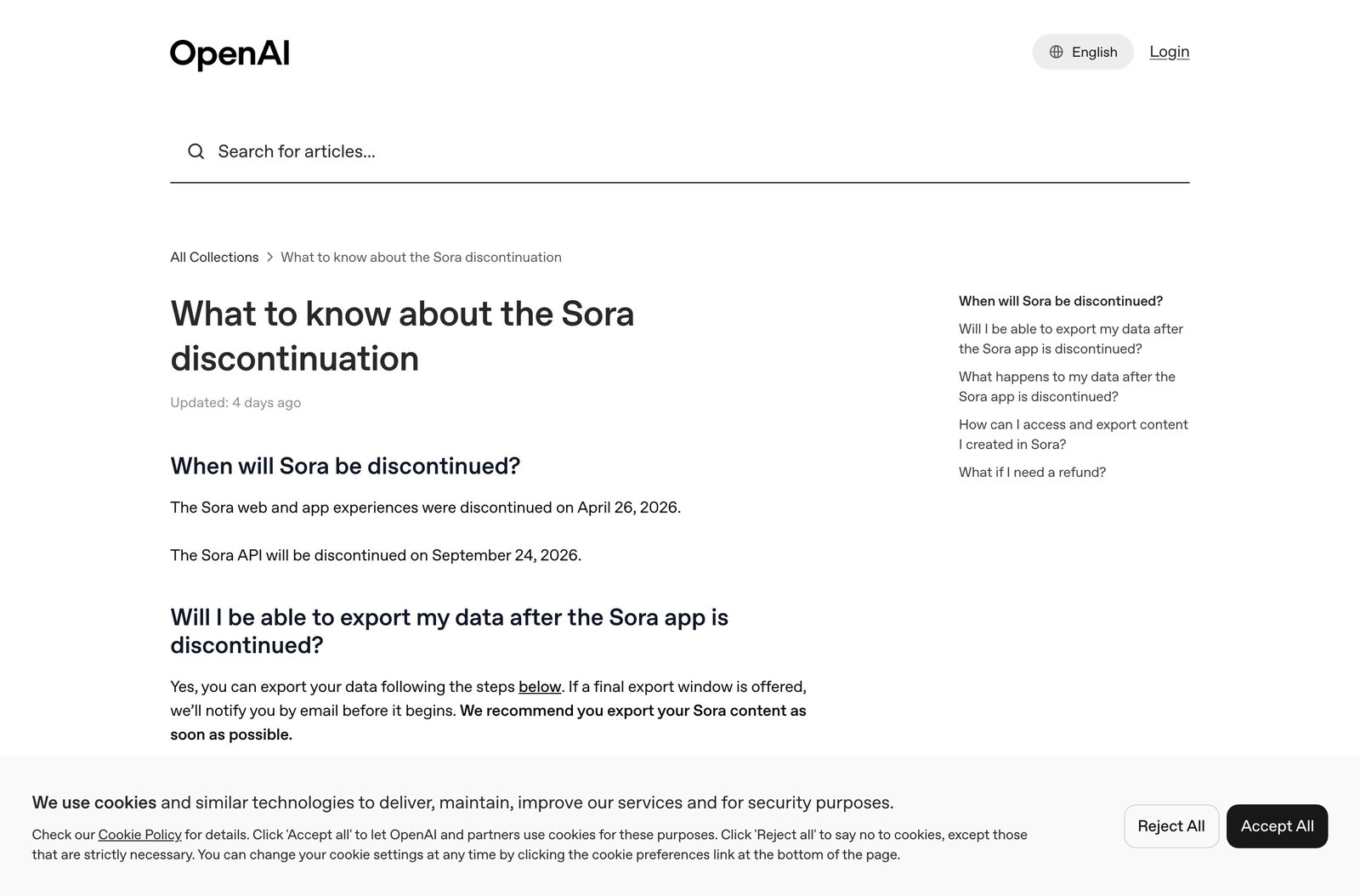
The app and the website closed on April 26, 2026. The API survives until September 24, 2026, which explains why resellers still list “Sora 2” in their model catalogs: they call the API, and that tap closes in seven weeks. The address openai.com/sora/ now redirects to that notice, which takes one second to verify.
What that means in practice
A service selling you a “Sora 2” subscription today is selling access that expires on September 24, 2026. Before paying a middleman platform, check which engine actually runs behind it, and for how long.
The lesson goes beyond Sora. In a market where a leading model can vanish in four months, a roundup copied from one year to the next is worthless. The only information that holds up is the price grid the vendor publishes, with the date you read it. That is the rule for everything below.
The real price of one AI video shot
Every vendor invented its own currency. Runway counts in credits and translates them into seconds itself. Kling counts in credits and translates them into “720p videos”. Vidu counts in credits and advertises a maximum number of videos. Google counts in credits and translates nothing at all. Reducing all of that to a common unit takes patience, but the result is brutal.

Runway is the only vendor that does the conversion for you, in a tooltip on its pricing page: “625 credits monthly = 52s of Gen-4.5, 104s of Gen-4 Turbo, or 78 Gen-4 Images (1080p)”. In other words, the $15 entry subscription buys less than one minute of video in the house’s best model. A 30-second ad eats more than half the monthly allowance on its own, and that is before any failed attempt.
The calculator
Here is the tool missing from every page in the top 10. Describe your project in three questions, and the last column of the table updates with your monthly budget at each vendor, computed from its own entry pricing.
What will your AI video cost?
Three questions, and the last column of the table shows your monthly budget at each vendor, at the entry plan pricing recorded on August 3, 2026.
Your project needs 48 generated shots per month.
| Generator | Paid entry plan | What the vendor advertises for that price | Price of one shot | Your monthly budget |
|---|---|---|---|---|
| Runway Gen-4.5 |
Standard, $15/month billed monthly |
“625 credits monthly = 52s of Gen-4.5”. Six 8-second shots, no watermark. | 2.31 $ per 8 s shot |
110.88 $ |
| Kling AI Video 2.6 |
Standard, $10/month list price |
“660 Credits per month”, broken down as “660 images / 33 720p videos”. Commercial use allowed. | 0.30 $ per 720p video |
14.40 $ |
| Vidu Q3 |
Standard, $10/month billed monthly |
“800 credits monthly”, “Generate up to 200 videos”, “Supports 3-16s video generation”. | 0.05 $ per video |
2.40 $ |
| Google Flow Veo 3.1 |
Google AI Pro $19.99/month |
“1,000 Google Flow credits each month”. What one generation costs in credits is published nowhere. | Not published | Impossible to compute |
| Luma Ray |
Plus, $30/month billed monthly |
“10,000 credits”. No free plan, and no per-generation cost published. | Not published | Impossible to compute |
List monthly prices in the currency each vendor displays, excluding first-subscription discounts and annual commitments. The budget shown applies the unit rate of the entry plan: past the included volume you either move up a tier or buy credit packs, which in practice lowers the unit price rather than raising it.
Two things jump out. First, the gap between engines is measured in multiples of ten: for around ten dollars a month, Kling advertises 33 720p videos and Vidu up to 200, while Runway charges $15 for six 8-second shots. That is not abnormal, you are not comparing a 1080p clip with sound to the fastest mode in a catalog. But no comparison page says so, and most present these tools as interchangeable.
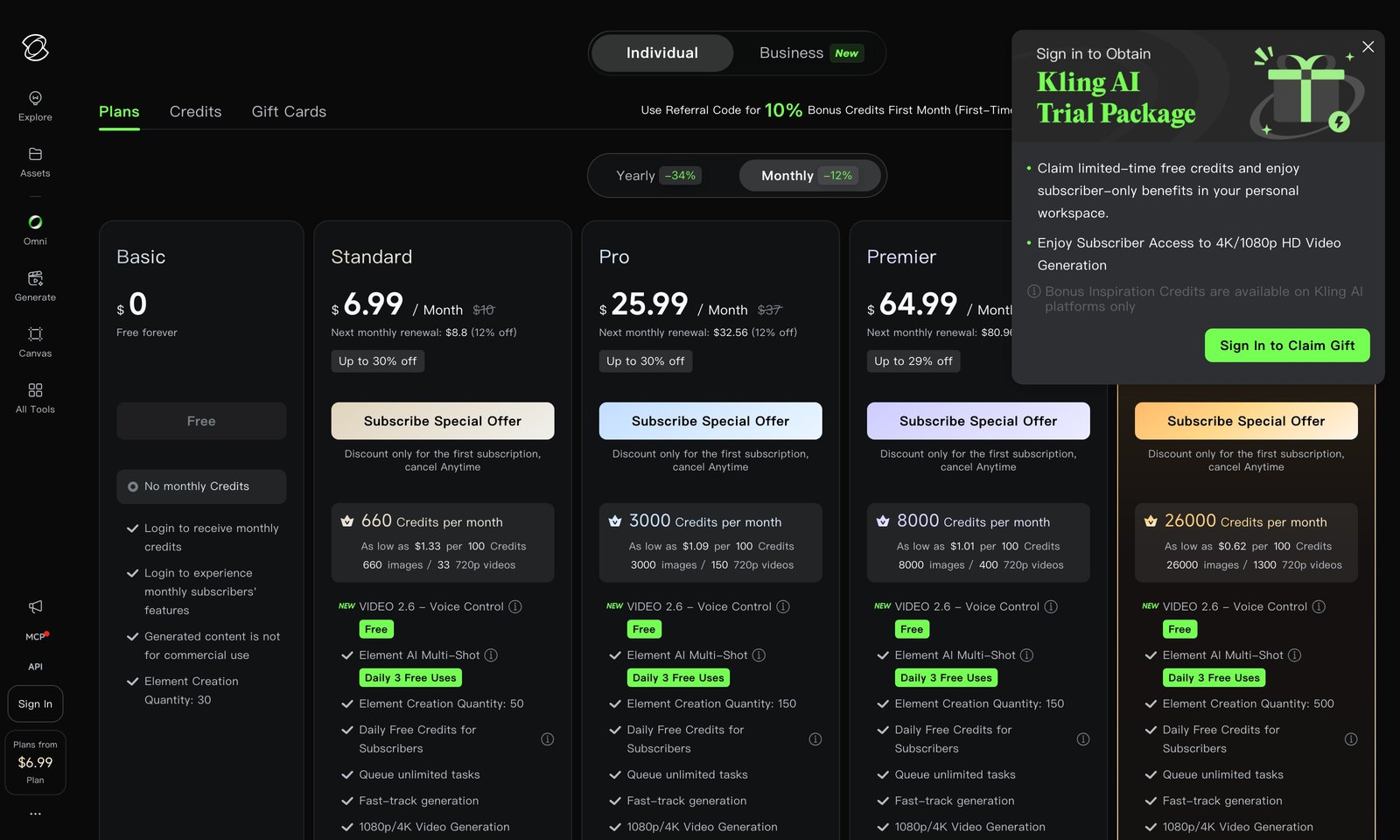
Second, the unit price drops sharply as you move up. Still at Runway, the $95 Max plan advertises 9,500 credits, that is 791 seconds of Gen-4.5: the second falls to $0.12, against $0.29 on Standard. The entry plan is, mathematically, the most expensive per unit. The same holds at Kling, whose page reads “As low as $1.33 per 100 Credits” on Standard and “$0.62 per 100 Credits” on its top tier.
The variable nobody budgets for
The number of attempts. A shot that lands on the first try is the exception: the motion drifts, hands deform, the framing ignores the instruction. That is why the calculator asks, and that is where half the bill is decided.
The generators, one by one, with the grids
Runway, the only one counting in seconds
Runway deserves credit for clarity. Its pricing page shows four tiers and, on each, a tooltip converting credits into seconds of video for every model. The free plan gives 125 credits one time, not per month, which amounts to roughly ten seconds of Gen-4.5 for life. Standard at $15 removes watermarks and opens access to every model, including Kling 3.0 and Veo 3.1 served from inside Runway.
Google Flow and Veo 3.1, generous but opaque
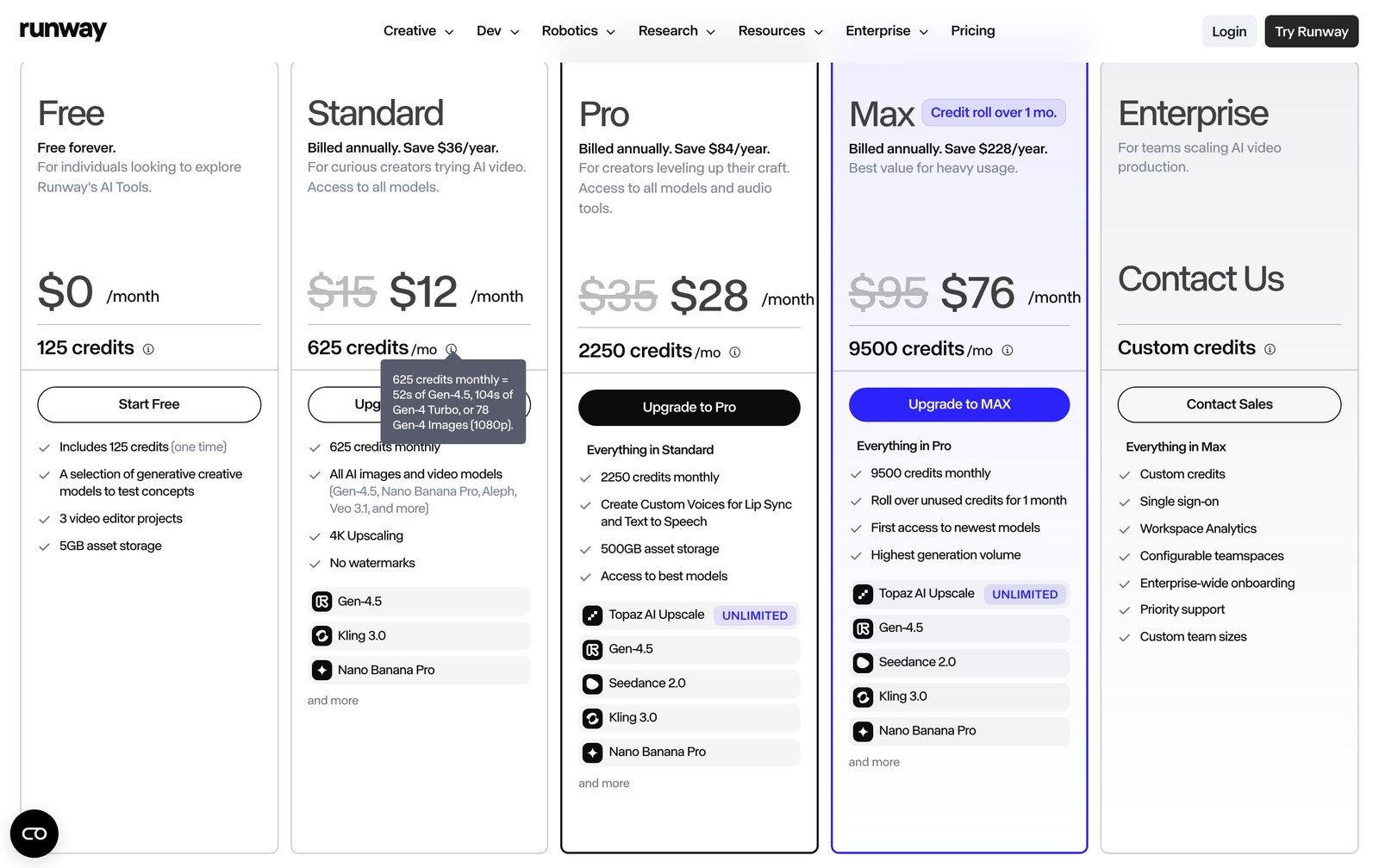
Google is the most generous at the door: its help center states that with no subscription at all you receive 50 Google Flow credits per day. No other player resets the meter every morning. Subscriptions add 200 credits a month on Google AI Plus at $4.99, 1,000 on Google AI Pro at $19.99, then 10,000 and 25,000 on the two Ultra tiers at $99.99 and $199.99.
The problem is elsewhere: Google publishes nowhere what a generation costs. The help page about models sends you back into the app (“check the active model and the latest credit costs in the prompt box settings”) and the page about credits offers only “the number of AI credits used for each feature and model varies”. So there is no way to know, before paying, how many clips $19.99 will buy.
Kling AI, the volume-per-dollar leader
Kling is one of the few that translates credits into a number of videos. The Standard plan, listed at $10 a month, gives 660 credits, that is “660 images / 33 720p videos”. Moving up takes you to 150 videos for $37, 400 for $92 and 1,300 on the top tier.
The free plan deserves a careful read: it is labeled “No monthly Credits” and “Generated content is not for commercial use”. In other words, no automatic monthly allowance, and no commercial use. It is one of the details most often skipped in roundups.
Vidu, the cheapest per clip
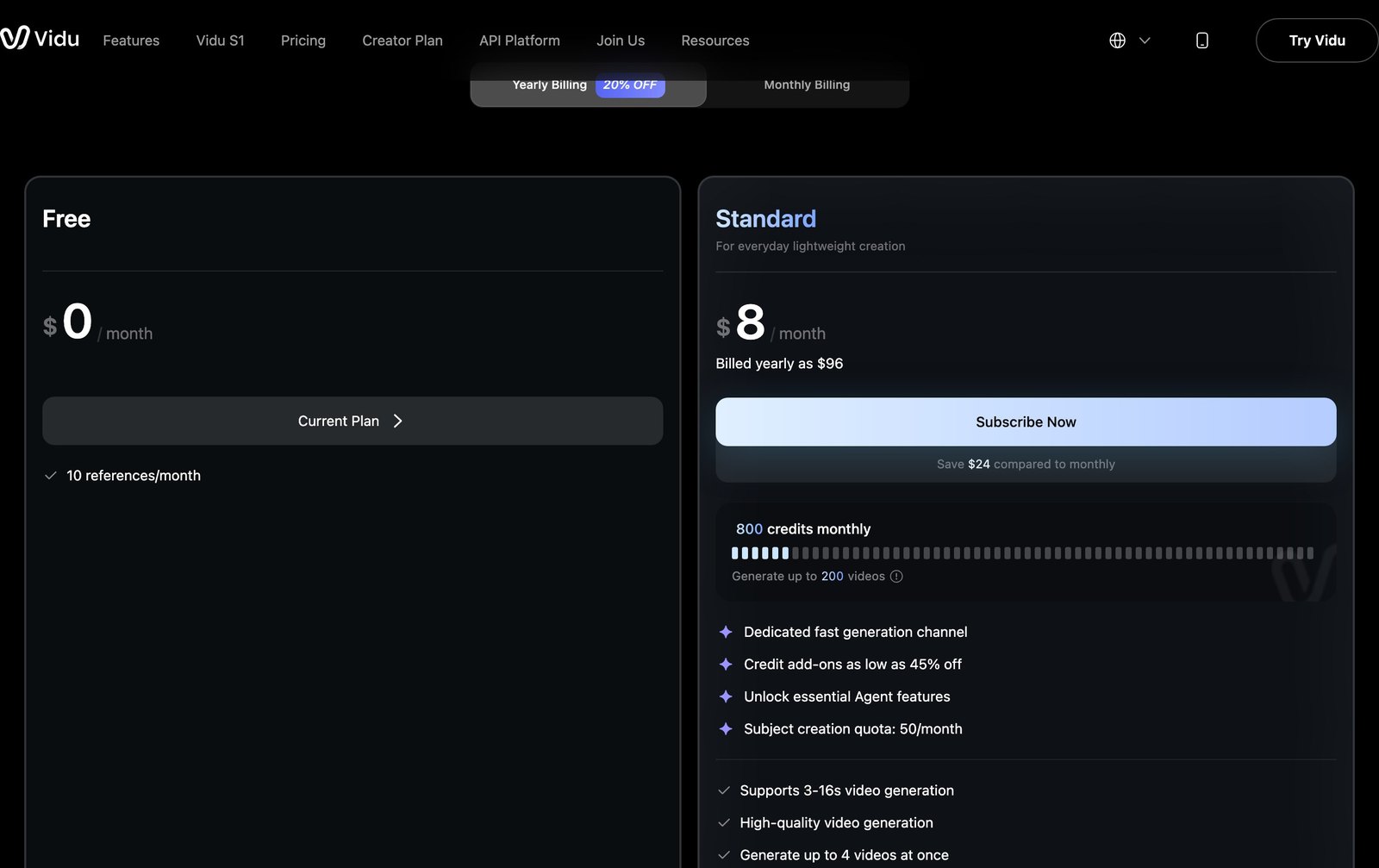
Vidu publishes a plain pricing page and sticks to it. Its free plan amounts to “10 references/month”, with no monthly video credit advertised. Standard, at $8 a month billed yearly ($96 a year, so $10 on monthly billing), gives 800 credits and advertises “Generate up to 200 videos”, supporting 3 to 16 seconds, with commercial use allowed.
The words “up to” matter: those 200 videos assume the cheapest mode in the catalog. A high-resolution generation eats more. It is the floor price, not the average price.
Synthesia and HeyGen, the avatar family
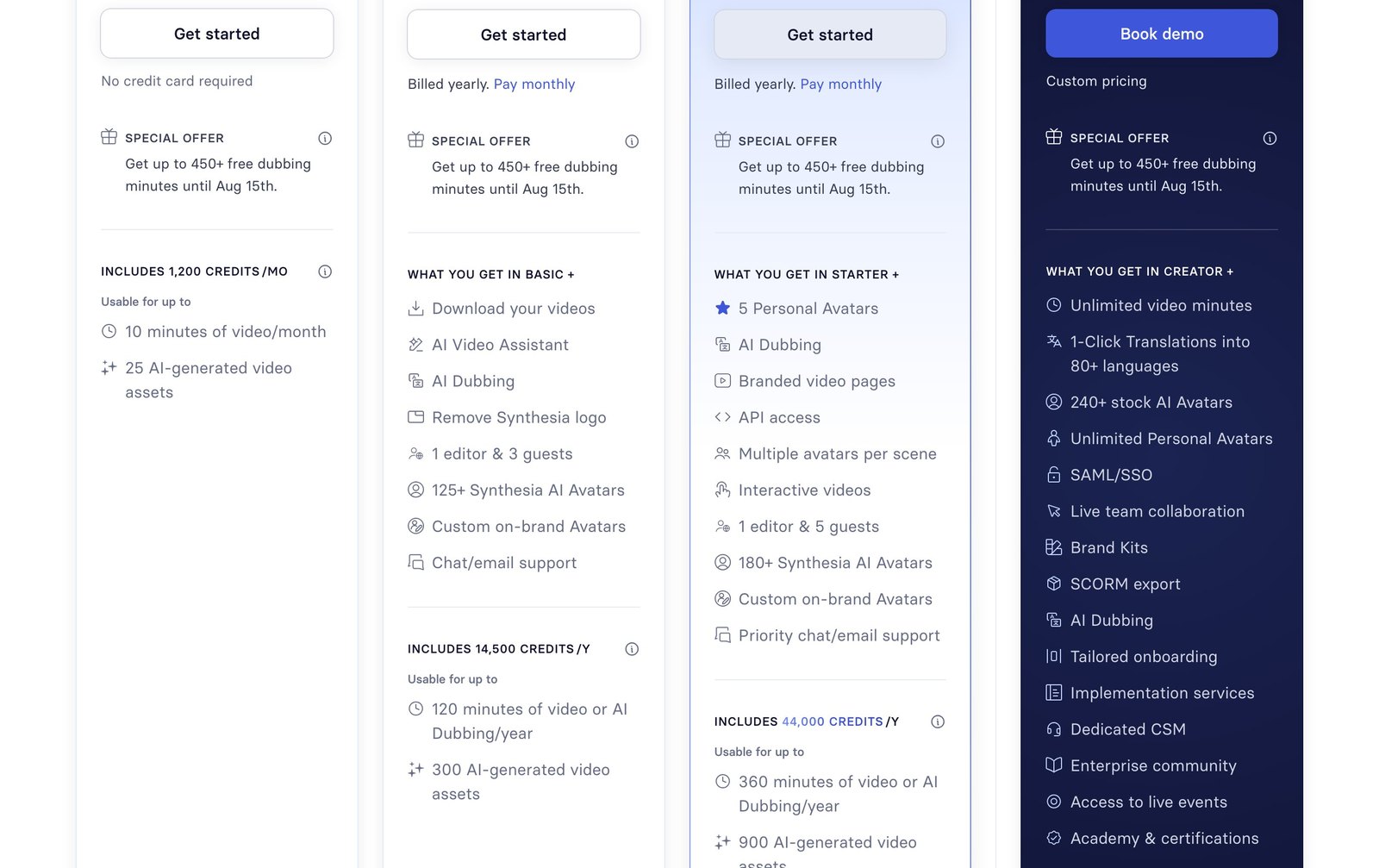
Completely different logic: here you do not buy shots, you buy minutes of speech. Synthesia gives 10 minutes of video per month on its free Basic plan, funded by 1,200 monthly credits. And here is the find of this survey: the paid Starter plan, listed at €19 a month (€12 on an annual commitment), includes “120 minutes of video or AI Dubbing/year”, which is exactly 10 minutes a month. The same volume as the free tier.
So what the subscription buys sits elsewhere, and the page says it plainly: Download your videos and Remove Synthesia logo. You are not paying for more video, you are paying for the right to take it away and publish it unbranded.
HeyGen splits things similarly but more legibly: the free plan allows 3 videos per month, up to one minute, and the Creator plan at $29 a month brings 600 credits, videos up to 30 minutes, 1080p export and watermark removal.
Canva and CapCut, the mainstream front door
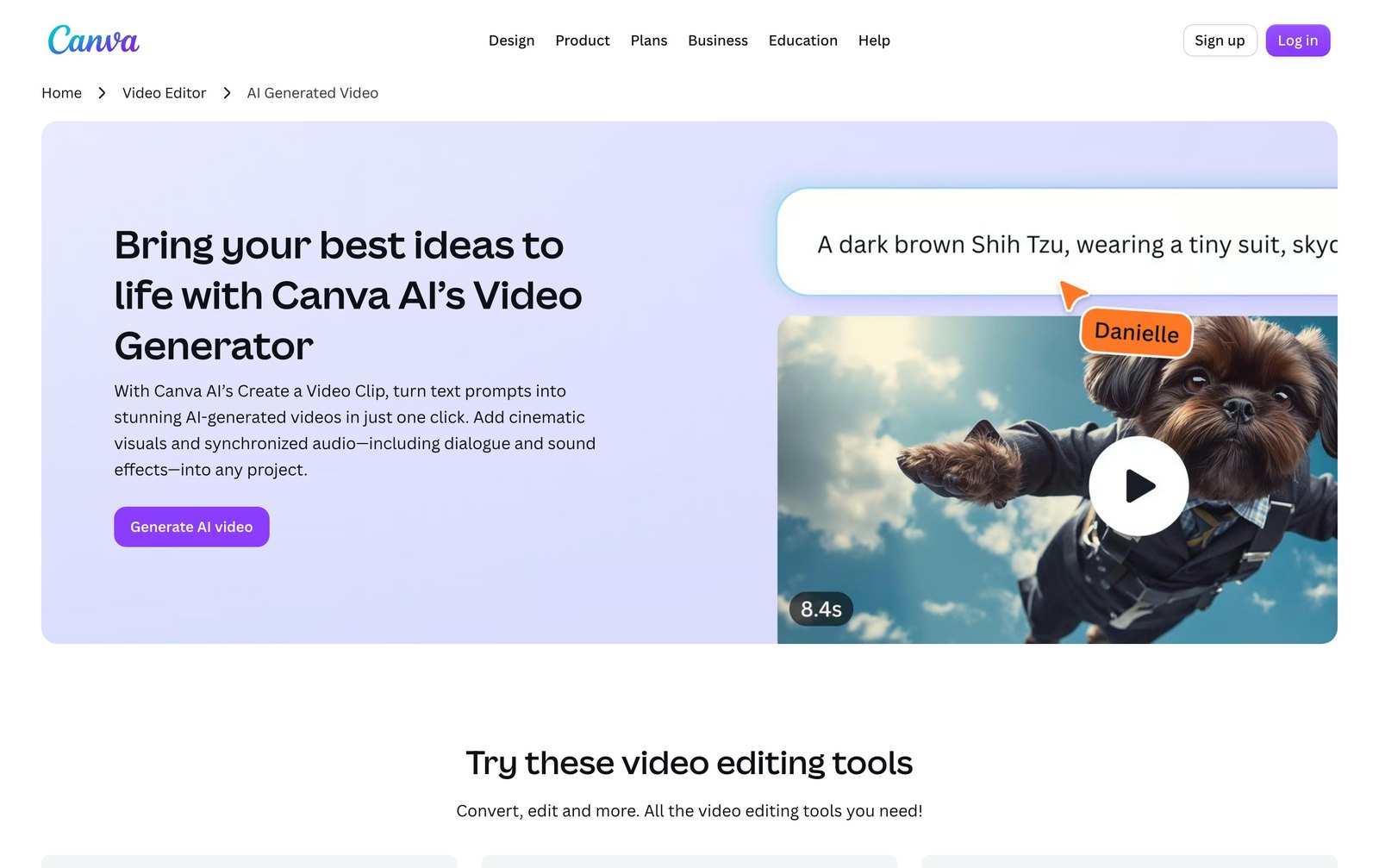
These are the two first answers Google returns on this query, and for good reason: they are the only generators built inside an editor that millions of people already use. Canva offers an AI video generator that turns a text prompt into a clip with sound, and the demo on its page runs 8.4 seconds. CapCut serves the Seedance model from its free AI video generator page.
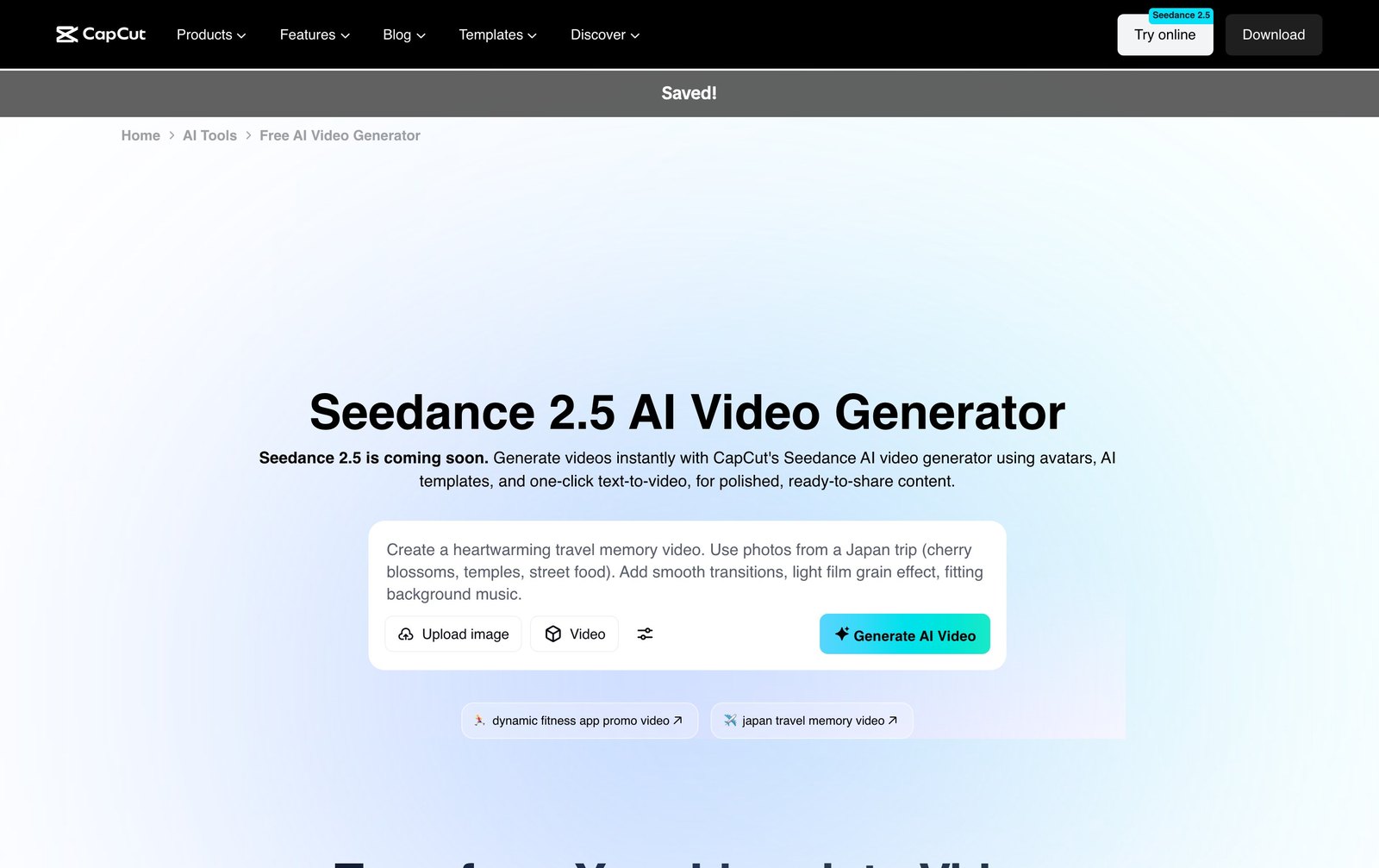
Their appeal is not raw quality, it is the chain: generate, edit, caption and export in one place. If what you need is a 20-second social video, that is almost always the shortest path. For everything involving your own footage, our guide to free AI video editing tools covers the alternatives, watermarks and quotas included.
Free, unlimited, no sign-up: what those words are worth
Google autocomplete tells a clear story. After “ai video generator” come, in order: “free”, “free no sign up”, “from image”, “from text”, “from text free”, “from image free”. Let us hold each expectation against the grids we read.
- Free, yes, but capped. Google is the most generous with 50 Flow credits a day and no subscription. HeyGen grants 3 one-minute videos a month. Synthesia, 10 minutes. Runway, 125 credits one time. Vidu, 10 monthly references. Kling, nothing automatic at all.
- Unlimited, no. None of the seven vendors surveyed offers unlimited video generation on a free plan. The word does appear in the grids, applied to something else: at Vidu, to image generation on the most expensive tier, at Runway, to an upscaling tool.
- No sign-up, almost never. Generation ties up GPUs for tens of seconds per clip. No serious vendor opens that tap without an account, if only to limit abuse.
- Commercial use, the line to check. This is the costliest trap. Kling explicitly bars commercial use on its free plan. Vidu lists it as a paid-plan benefit. At Synthesia, downloading the file at all is reserved for subscribers.
- The watermark. Runway advertises removal as a Standard perk (“No watermarks”), and so does HeyGen (“Watermark removal” on Creator). On a free plan, assume there is one.
“From an image”, the cheapest route
Starting from a still rather than from text slashes the number of attempts, and therefore the bill: you validate framing, colors and subject before spending a single credit. We detailed that family’s quotas in our article on animating an image with AI, and the Nation AI image generator exists precisely to produce that starting frame.
Since August 2, 2026, your AI video has to be marked
This is the change the search results have not caught up with, and it landed the day before yesterday. The European artificial intelligence regulation, Regulation (EU) 2024/1689, phases in over several dates. Its Article 113 sets August 2, 2026 as the day the rest of the text applies, with the exception of Article 6(1). Article 50, on transparency, is part of that block.

Two obligations coexist, and they do not fall on the same shoulders.
- The technical marking, on the provider. Article 50(2) requires providers of AI systems generating synthetic audio, image, video or text content to ensure the outputs are marked “in a machine-readable format” and detectable as artificially generated or manipulated. In practice: invisible watermark, metadata, fingerprint. That is Runway’s, Google’s or Kling’s job, not yours.
- The visible disclosure, on whoever publishes. Article 50(4) targets deployers of a system that generates or manipulates image, audio or video content constituting a deep fake: they must disclose that the content has been artificially generated or manipulated. If you are the one publishing the video, that duty is yours.
- Bounded exceptions. The text allows for carve-outs, notably for uses authorized by law for criminal investigation and for artistic or creative works, where transparency must not hamper the display of the work.
This is European law, and it reaches beyond Europe: it bites as soon as your video is put on the market or used inside the Union, wherever you publish from. In practice the operational takeaway is the same three reflexes: do not strip metadata on export, add a readable disclosure when the video depicts a plausible person or event, and keep a record of which engine you used. That last one is for your own protection, since it is the only way to prove later what you generated and with what.
General information
This summary is not legal advice. The exact marking methods, the penalties and how the rule meshes with national law are still being spelled out, and obligations in the United States come from a separate patchwork of state law and platform policy. For professional use with real exposure, have your setup reviewed by a lawyer.
The video prompt, the real cost driver
Since the bill depends on the number of attempts, the skill that pays best is not picking the engine, it is writing the instruction. A video prompt is not an image prompt with “make it move” tacked on: it has to describe one motion, and only one.
Before
A woman walks down a street in New York, cinematic mood, really beautiful.
After
Static wide shot, cobbled downtown street at dawn, low golden raking light. A figure seen from behind walks slowly away toward the back of the frame. Slight forward dolly, 8 seconds, no cuts, subtle film grain.
Five ingredients are enough, and they map onto the parameters the models actually read:
- The framing: wide shot, medium shot, close-up, high angle.
- The camera move: static, forward dolly, pan, orbit. One per shot.
- The action: one continuous action, no chaining. A model cannot tell two stories in 8 seconds.
- Light and mood: time of day, direction of the light, weather, image texture.
- Duration and format: 4, 6, 8 or 10 seconds depending on the engine, plus the aspect ratio.
Writing all of that cleanly, in the language the model understands best, is exactly an assistant’s job. It holds for video as much as for images: our image prompt examples to copy rest on the same framing-and-light mechanics.
Frequently asked questions
Is there a free and unlimited AI video generator?
No. Of the seven vendors whose grids we read on August 3, 2026, none offers unlimited video generation for free. The most generous is Google, with 50 Google Flow credits granted every day without a subscription. The word “unlimited” does show up in the grids, but applied to something else, such as image generation or upscaling, and on the priciest tiers.
Can you generate an AI video with no sign-up?
In practice, no. One generation ties up expensive hardware for tens of seconds, and no vendor in the top 10 opens that access without an account. Sites promising otherwise almost always redirect to a sign-up at export time, or resell another engine’s API.
What is the best AI video generator in 2026?
It depends on what you produce. For a short, polished shot with sound, Runway and Google Flow lead the field, at a premium. For volume on a small budget, Kling and Vidu offer ten to fifty times more generations for the same fee. For a spoken video several minutes long, only avatar tools like Synthesia and HeyGen have workable economics. Be wary of frozen roundups: Sora, still listed in several of them, shut down on April 26, 2026.
Can you make an AI video from a photo?
Yes, and it is the most cost-effective route. Every engine mentioned accepts a starting image and animates it. You validate the subject and the framing before spending a credit, which cuts the number of attempts. Google documents an image-to-video mode for Veo 3.1 with first and last frame.
Can you use an AI-generated video commercially?
It depends on the plan, and it is written in black and white in the grids. Kling states “Generated content is not for commercial use” on its free plan and reserves commercial use for subscribers. Vidu presents “Generated content can be used commercially” as a Standard perk. At Synthesia, downloading the file at all is limited to paid plans. Check that line before you produce, not after.
Is Sora still available?
No. OpenAI’s help center states that the Sora web and app experiences were discontinued on April 26, 2026, and that the API will be discontinued on September 24, 2026. Third-party platforms still advertising “Sora 2” access route through that API, whose shutdown is already dated.
Do you have to disclose that a video was AI-generated?
Since August 2, 2026, Article 50 of the European AI regulation applies. It imposes two distinct things: on the provider of the generator, machine-readable marking of synthetic content; on whoever distributes a deep fake, a disclosure that the content was artificially generated or manipulated. Exceptions exist, notably for artistic works. This answer is general information and does not replace legal advice.
How long is an AI-generated video?
One shot, not one video. Google documents 4, 6 and 8 seconds for Veo 3.1, and up to 10 seconds with Gemini Omni Flash. Vidu advertises 3 to 16 seconds on its English page. A longer video comes from cutting several shots together, or extending an existing shot where the engine allows it. That is exactly why the budget is computed in shots, not in minutes.
Where to start, concretely
If you are new to this, the cheapest sequence is always the same. Write your shot as one precise sentence first. Then produce the starting image, because a validated frame is worth three saved attempts. Only then generate the motion, at the vendor whose grid matches your volume, and not at the one today’s roundup puts on top.
For the rest of the chain, all of the group’s tools sit on the AI tools page, and the prompt generator remains where the money is saved, because it drives down the only number that truly matters: the count of attempts.
Write the prompt before you burn the credits
Nation AI does not make the video. It does the cheap part with the highest return: turning your idea into a precise instruction, framing, motion, light and duration included, so the generator lands it on the first or second try.
Sources and readings. Every price grid was opened and captured on August 3, 2026: Runway (runway.com/pricing), Kling AI (kling.ai), Vidu (vidu.com, English version), Google Flow help and the Google AI plans page (United States), Synthesia, HeyGen, Luma. Sora shutdown: OpenAI help center, article “What to know about the Sora discontinuation”. Legal framework: Regulation (EU) 2024/1689, Articles 50 and 113. Prices are quoted in the currency each vendor displays.