The short version

Yes, you can make music with AI for free, and the free quotas are genuinely generous. Suno gives you 50 credits refreshed every day, Canva 900 credits a month, Stable Audio 10 tracks a month.
The catch is not the quota, it is the rights. On the pricing pages we checked on July 29, 2026, Suno’s free plan says it in plain text: “No commercial use”. Stable Audio only grants a personal license, AIVA keeps the copyright and requires credit, and Canva will not let you download the track on its own.
Two names that keep coming up: Soundraw has no free plan at all on its pricing page, and Mubert’s free Ambassador plan caps you at 5 MP3 downloads a month with mandatory attribution.
Every number on this page comes from the vendors’ official pricing pages, checked on July 29, 2026, with screenshots to back it up.
- The real catch with free AI music
- Does a free plan cover your use case?
- Free AI music generator limits, service by service
- The “free generators” that fill page one
- What royalty free does and does not mean
- How to make AI music in 4 steps
- AI songs with vocals vs background music
- Mistakes that waste your time
- Frequently asked questions
Type a sentence, wait thirty seconds, get a full track with vocals, lyrics and a chorus. AI generated music is past the novelty stage. The question is no longer whether it works, it is what you are actually allowed to do with the file.
We opened the official pricing pages of ten services on July 29, 2026 and recorded, line by line, what each free plan really includes. The result looks very different from what the first page of Google promises.
The real catch with free AI music: the quota is not the problem
With image or video generation, free tiers are stingy: a few seconds, a watermark, a quota that evaporates. Music is the opposite. Free quotas are generous, often daily, and the audio quality is usually identical to the paid tiers.
What changes between the free plan and the paid plan is almost never the sound. It is the legal line underneath.

The line to look for on every pricing page
“Commercial use”, “commercial license”, “monetization”. On nearly every music generator, that line is crossed out or simply missing from the free column. You can create, listen, and play the track for friends. Publishing a monetized video, an ad for a client or a single on Spotify with that file puts you outside the terms of service.
This is not a theoretical distinction. A monetized YouTube channel, a sponsored story, hold music for a small business, a game sold in a store: all of it counts as commercial use in these vendors’ vocabulary. And the subscription that unlocks those rights rarely costs more than $10 a month, which makes it a strange thing to get wrong for nothing.
Does a free plan cover your use case?
Answer the three questions below. The tool cross-references your answers with the actual terms recorded on the pricing pages and tells you whether a free offer covers your need, or whether you are in a case where only a paid plan is legitimate.
The rights test: which generator fits your use?
Three questions, one verdict, based on the real terms of each free plan.
Suno, free plan
The most complete song generator, and the one whose free tier gives you the most room to explore.
What free really gets you: 50 credits refreshed every day, access to the v4.5-all model, a shared queue with 4 concurrent generations, no option to buy extra credits and, spelled out on the pricing table, no commercial use.
Suno, free plan
The most complete song generator, and the one whose free tier gives you the most room to explore. Vocals, lyrics, verse and chorus structure: it is the only one that hands you something that actually sounds like a song on the first try.
What free really gets you: 50 credits refreshed every day (they do not roll over), access to the v4.5-all model, a shared queue with 4 concurrent generations, no extra credit purchases, no stem separation, and the explicit line “No commercial use”.
Udio, free plan
The other big name in AI song generation. The vocal rendering is excellent, but the free tier is narrower than it looks and the fate of the audio file is a real issue.
What free really gets you: 10 credits per day, but above all a ceiling of 100 credits per month that overrides the daily counter, 3 long tracks (2 minutes 10 seconds) per day, 4 tracks in parallel. The terms of service limit you to personal, non-commercial use and exclude downloading tracks from the app.
Stable Audio, free plan
The best pick when you need a pad, a loop or a clean instrumental bed, with a comfortable length and no vocals to worry about.
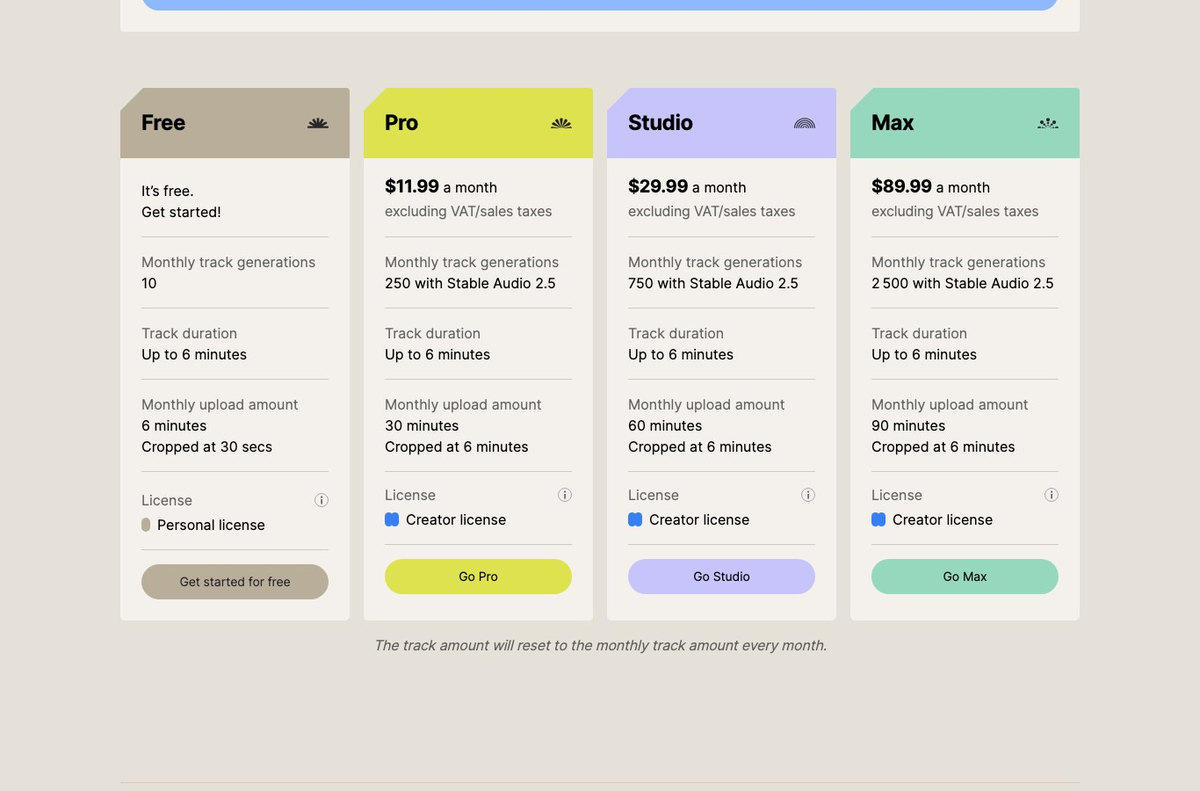
What free really gets you: 10 generations per month, tracks up to 6 minutes, 6 minutes of monthly upload capped at 30 seconds per file. The license attached to the free plan is the “Personal license”, which the vendor describes as limited to personal, non-commercial projects.
Canva, AI music generator
The pragmatic choice when music is just one ingredient: you generate the track right inside the document that already holds your video, your copy and your export.
What free really gets you: 900 credits per month and up to 10 tracks per day, with a 180 second cap. The trade-off is spelled out: on the free plan, the music is for personal use only, and you can neither download the track on its own nor use it outside the platform.
Soundraw, from €5.83 a month
For a client project, an ad or a game, the question is no longer price, it is legal safety. Soundraw trains its model only on music produced in house and grants a worldwide, perpetual license.
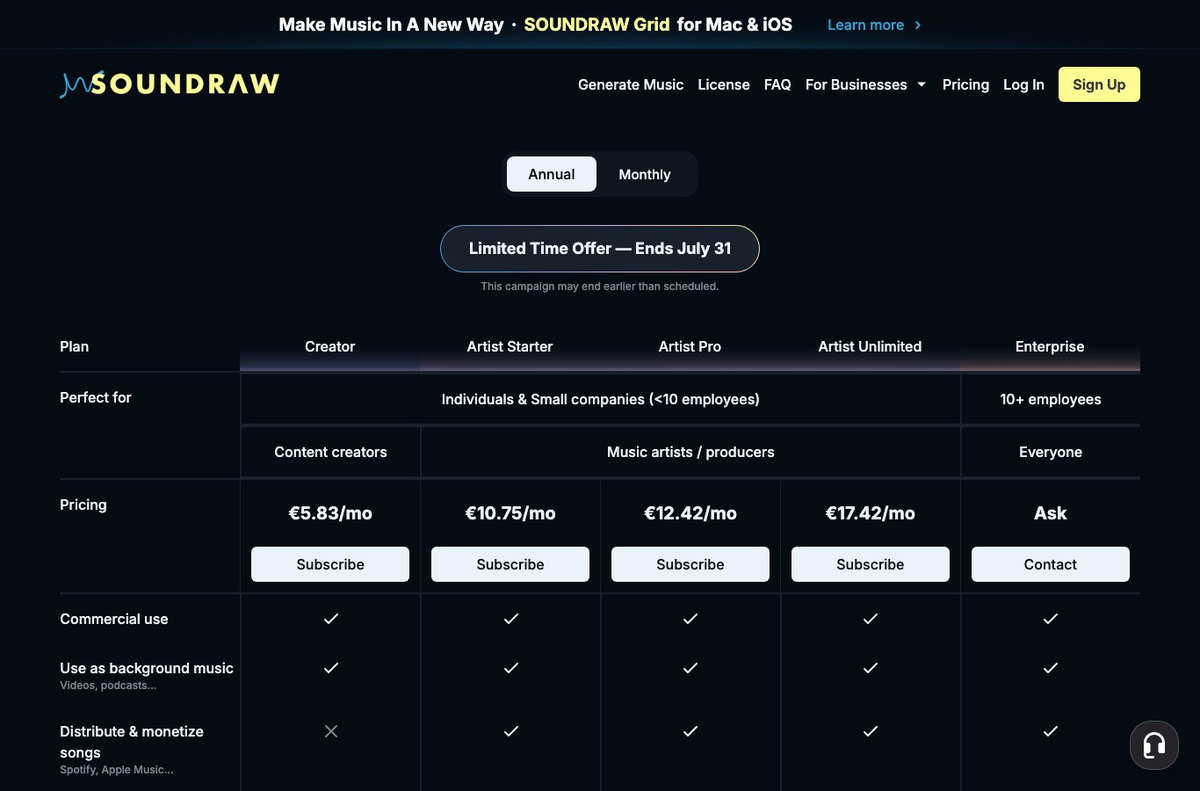
What free really gets you: nothing, there is no free tier. The pricing section is titled “Paid Plans” and has no free column at all. The entry plan, Creator at €5.83 a month, allows commercial use and background music, but not distributing or monetizing a track on streaming platforms.
No free plan covers this use
As soon as the track sits under monetized content, a brand or a client, you are outside the scope of every free offer we recorded on July 29, 2026. This is not a quota question, it is written into the terms.
The cheapest honest tier: Suno Pro at $8 a month (2,500 credits and commercial rights on new songs), ElevenLabs Starter at $6 a month (commercial license and commercial use of the music), Stable Audio Pro at $11.99 a month (Creator license). Budget $6 to $12 a month to be in the clear.
Streaming release: the hardest case
Distributing a track on Spotify, Apple Music or Amazon Music requires two things almost no free plan grants: exploitation rights over the recording, and the right to register it under your name with a distributor.
What to aim for: at Suno, commercial rights start at the Pro plan. At Soundraw, distributing and monetizing a track requires an Artist plan, from €10.75 a month. At AIVA, you need the Pro plan at €33 a month to hold the copyright. And Mubert explicitly rules out independent releases on streaming platforms, on every one of its subscriptions.
A good track starts with what you type. Nation AI does not generate the music, but it writes the lyrics in English and the style description that Suno, Udio or Stable Audio are asking for, which is exactly where the gap opens up between a generic track and one that sounds like you.
Free AI music generator limits, service by service
Here is the full record. Every line comes from the vendor’s official pricing page, checked on July 29, 2026.
| Service | Real free quota | Max length | Audio file | Commercial use on free |
|---|---|---|---|---|
| Suno | 50 credits per day, no rollover | Not published on the pricing page | Downloadable | No, stated explicitly |
| Udio | 10 credits per day and 100 per month | 2 minutes 10 seconds, 3 times a day | No, excluded by the terms | No |
| Google Flow Music (formerly Riffusion) | Daily credit refill, 2 concurrent generations | Not published | Depends on the plan | Not specified on the pricing page |
| Stable Audio | 10 generations per month | 6 minutes | Downloadable | No, personal license |
| Canva | 900 credits per month, 10 tracks per day | 180 seconds | No, not on its own | No, personal use |
| ElevenLabs Music | 10,000 credits per month | 5 minutes | Downloadable | No, starts at $6 a month |
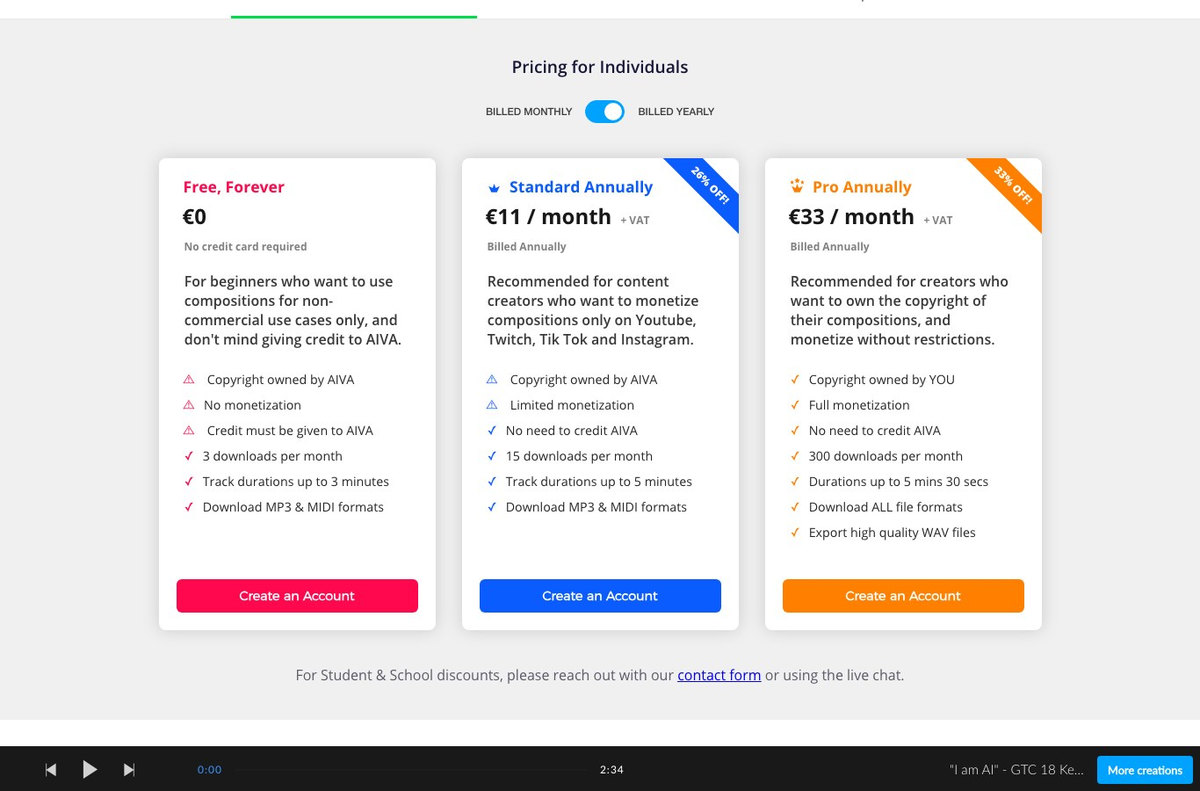
| AIVA | 3 downloads per month | 3 minutes | MP3 and MIDI | No, AIVA holds the copyright and credit is required |
| Soundraw | No free plan | Not applicable | From €5.83 a month | Not applicable |
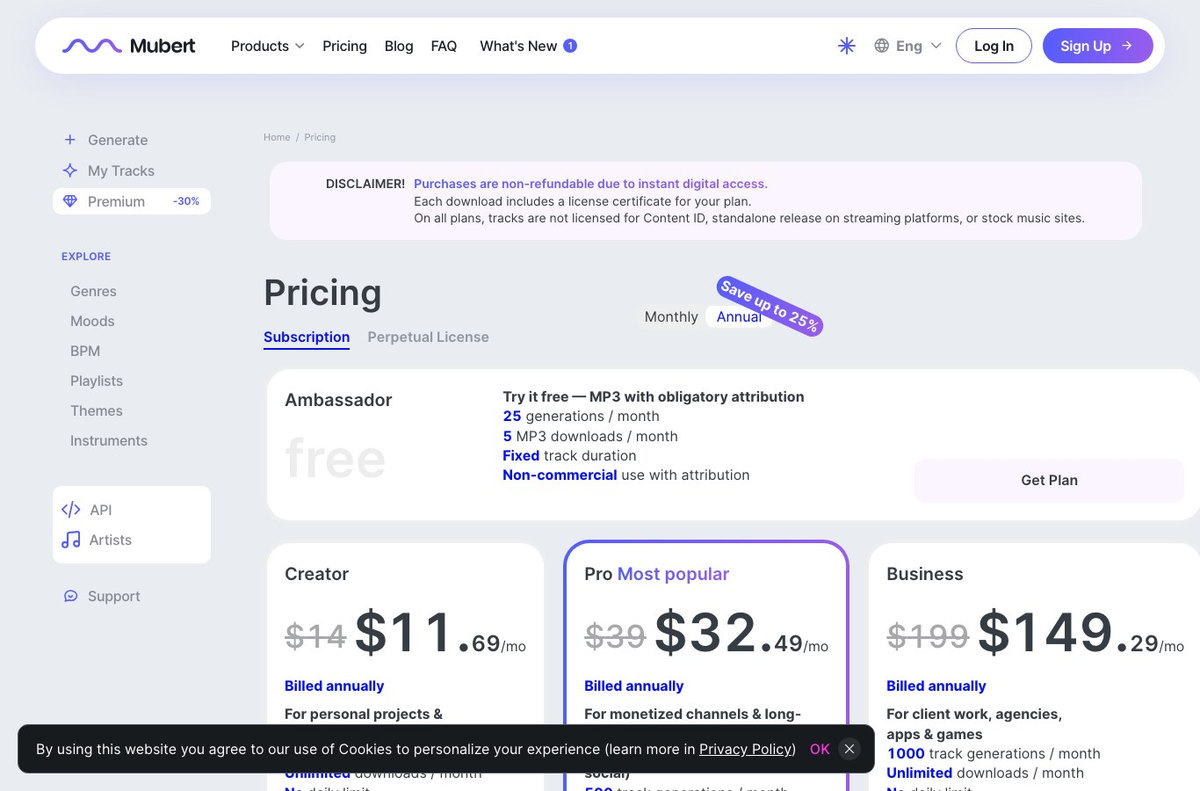
| Mubert | Ambassador plan: 25 generations a month | Fixed track duration | 5 MP3 downloads a month | No, and attribution is required |
| AISong | 10 credits per day, tracks kept 7 days | Not published | Not in high quality | No |
Suno: the most generous free tier, and the clearest about what it forbids
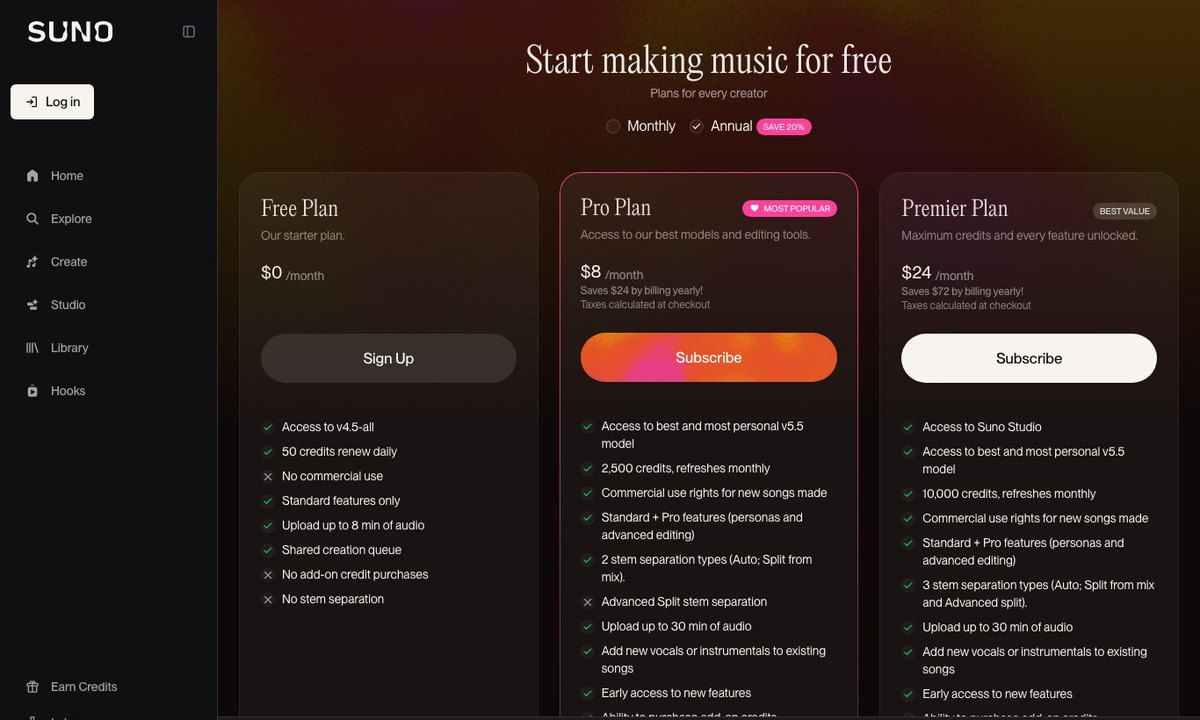
Suno is the only one whose free plan hands you a track you can play right away, with vocals, lyrics and structure. Its pricing table advertises 50 credits refreshed daily, access to the v4.5-all model and a shared queue capped at 4 concurrent generations. The credit cost of a single generation is not published on that page, which makes it impossible to honestly convert the quota into a number of songs.
What leaves no room for doubt is the third line of the free column: “No commercial use”, marked with a cross. Commercial use rights only show up starting with the Pro plan, at $8 a month.
Udio: the monthly cap that cancels out the daily counter
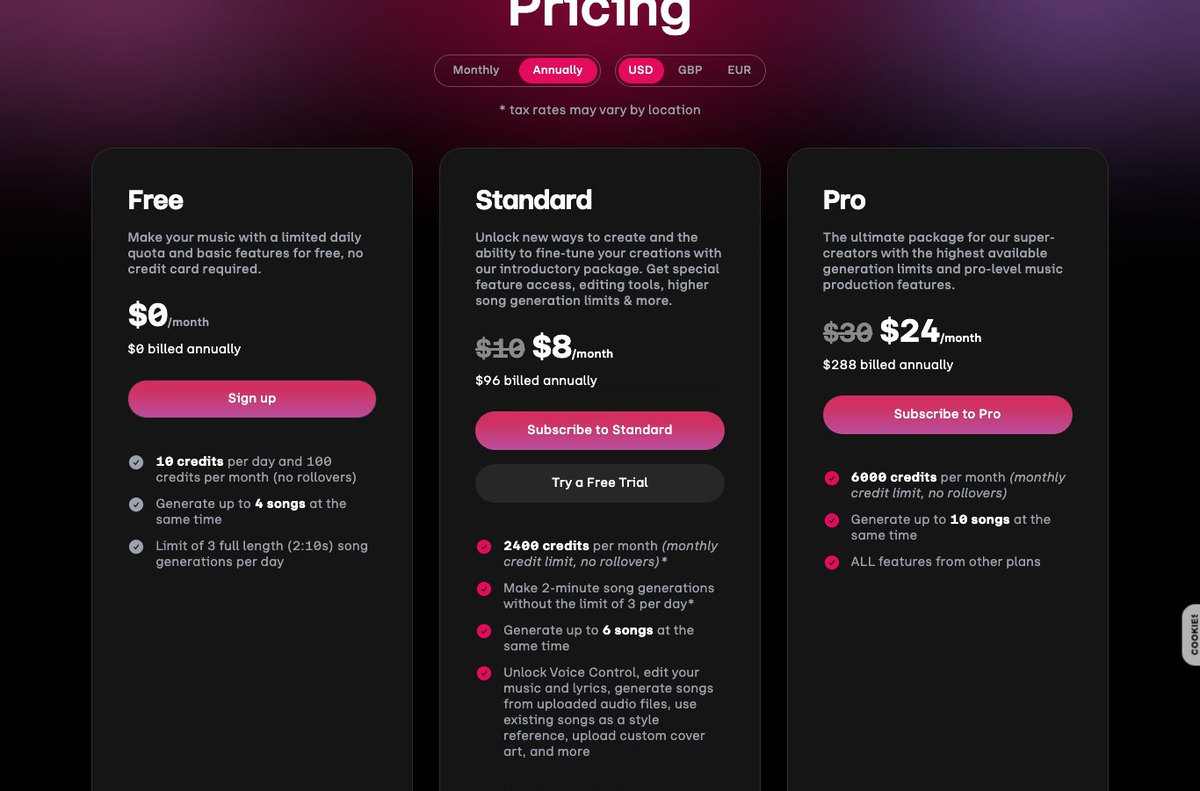
This is the textbook example of a quota that reads wrong. Udio’s free card advertises “10 credits per day and 100 credits per month”. Ten credits a day would mean three hundred credits over a month. The monthly ceiling of one hundred credits wins: by day ten, the counter is empty for three weeks.
On top of that, you get 3 long tracks (2 minutes 10 seconds) per day. Short 32 second formats stay available, but editing, custom voices, audio import and artist styles are reserved for paid plans. Finally, Udio’s terms of service describe personal, non-commercial use and exclude downloading tracks from the app, a clause consistent with the absence of any download line in the plan comparison.
Stable Audio: ten tracks a month, personal license
Stable Audio plays it straight. The Free plan gives 10 generations per month, tracks up to 6 minutes, and a license named without any ambiguity: “Personal license”, which the vendor defines as the right to generate audio for personal, non-commercial projects. You have to move to the Pro plan at $11.99 a month to get the “Creator license”, the one that allows commercial projects and music releases.
Ten tracks a month looks thin next to Suno’s 50 daily credits. For podcast background music or an ambient bed, it is actually plenty: nobody changes their theme music every week.
AIVA: three downloads a month, and the copyright stays with the vendor
AIVA specializes in orchestral and cinematic music. Its “Free, Forever” plan at €0 is the most restrictive in the group, and it says so without hedging: copyright held by AIVA, no monetization, mandatory credit to AIVA, 3 downloads per month, tracks capped at 3 minutes, MP3 and MIDI export.
You need the Standard plan at €11 a month for monetization limited to YouTube, Twitch, TikTok and Instagram, and the Pro plan at €33 a month to own the copyright to your own compositions.
Canva: the biggest free quota, but the track never leaves
Canva is the good surprise of this survey. The FAQ on its AI music generator page puts numbers on the free plan: 900 credits per month and up to 10 tracks per day, with a maximum length of 180 seconds. No other service in this group offers that much at $0.
The trade-off is clear, and Canva writes it down: on the free plan, the generated music is for personal use, you can add it to your videos, presentations and designs, but you can neither download the track on its own nor use it outside the platform. In other words, Canva lends you a soundtrack inside its own editor.
Soundraw and Mubert: the free tier is gone, or nearly
These two names show up in almost every roundup of free AI music generators. Their pricing pages say something else.
At Soundraw, the pricing section is titled “Paid Plans” and starts at €5.83 a month for the Creator plan. There is no free column. You can generate and listen on the site without paying, but the pricing table has no $0 tier, and the Creator plan itself does not let you distribute or monetize a track on streaming platforms.
Mubert does keep a free tier, but you have to look for it. The Ambassador plan is listed as “free” above the paid columns: 25 generations a month, 5 MP3 downloads a month, fixed track duration, and “Non-commercial use with attribution”, meaning you must credit Mubert. Paid plans start at $14 a month, or $11.69 billed annually, and the entry Creator plan is itself labeled “Non-commercial use only”. For commercial use, including YouTube, you need the Pro plan at $39 a month. A warning at the top of the page adds that, on every subscription, the tracks are not cleared for Content ID, for an independent release on streaming platforms, or for stock music sites. Worth noting: the Ambassador plan is displayed only on the English version of that page, and is absent from the French and Spanish ones.
Riffusion is now Google Flow Music
Riffusion still appears in plenty of lists of free AI music generators. As of July 29, 2026, riffusion.com redirects to producer.ai, which in turn redirects to flowmusic.app, whose home page reads “Welcome to Google Flow Music” and highlights the Lyria 3 model. The site’s terms of service are Google’s.
The service keeps a Free plan, described as a daily credit refill with 2 concurrent generations. Paid plans start at $6 a month for 3,000 monthly credits, presented as roughly 600 songs. The pricing page does not spell out the usage rights attached to the free plan.
The “free generators” that fill page one of Google
Search for a free AI music generator and the top results are rarely Suno, Udio or Stable Audio. They are optimized landing pages, often built on the same templates as the big players, all promising “free” and “royalty free” in their title.
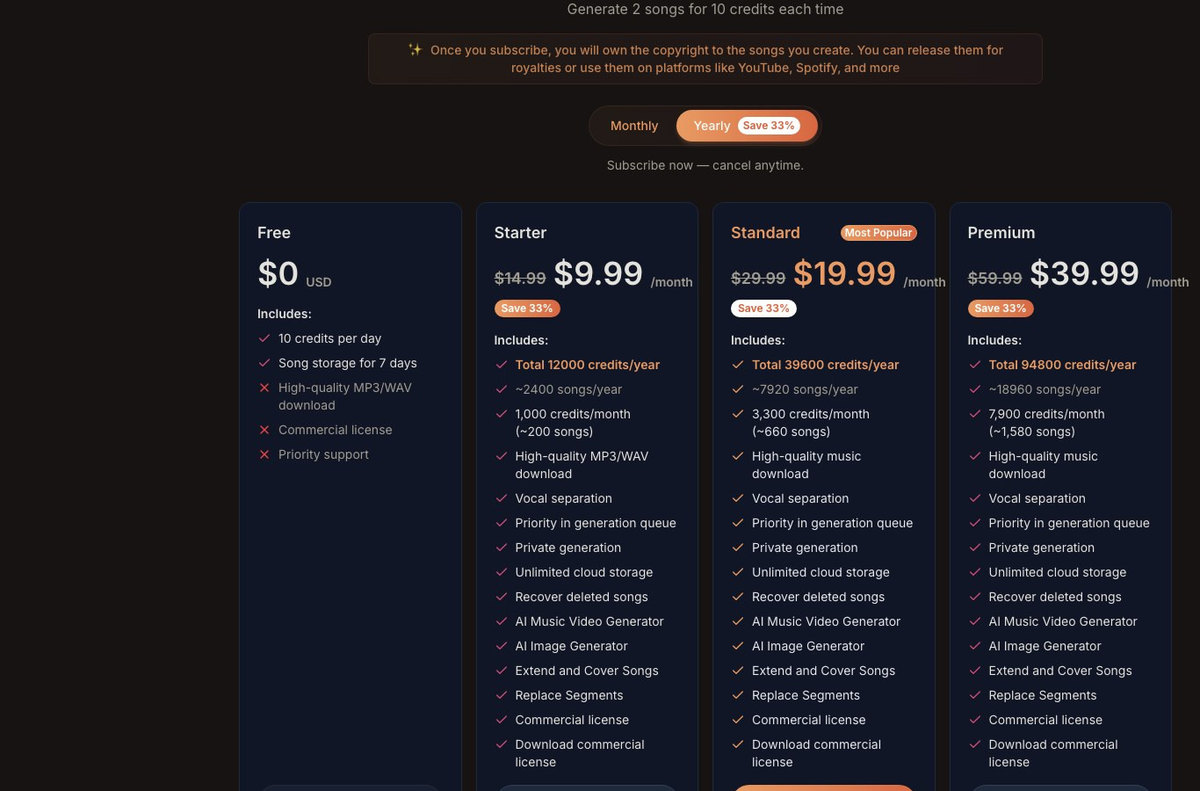
Take AISong, one of the sites that ranks near the top for this query. Its pricing page is instructive. The Free plan at $0 gives 10 credits per day, knowing that one generation costs 10 credits and produces 2 tracks: the counter allows exactly one generation a day. Three lines are crossed out in that column: high quality MP3 and WAV download, the commercial license, and priority support. A fourth line deserves attention: songs are only kept for 7 days.
The ten second sanity check
On any site promising free AI music, open the pricing page and look at the $0 column. Look for three things: the word “commercial”, the word “download”, and a retention period. A royalty free promise splashed across the home page is worth nothing if the free column crosses out the commercial license.
What “royalty free” does and does not mean

“Royalty free” is a marketing phrase, not a legal category. It only means you will not pay a fee every time the track is played. It says nothing about what you are allowed to do with the file. Three questions to ask, in this order.
Who owns the track?
At AIVA, the free plan states that the copyright belongs to AIVA. At Suno, commercial rights on new songs are a paid-plan line item. Holding a file is not owning a work.
What am I allowed to do with it?
Listening, publishing without monetizing, monetizing on social, selling to a client, releasing to streaming: those are five separate rights, and vendors often sell them separately.
Can I protect it?
Under US copyright law, a work requires human authorship. A track produced from a single sentence sent to a model does not meet that bar. The more you actually contribute (lyrics you wrote, an arrangement you reworked, a recording you layered in), the more seriously the question can be asked.
General information, not legal advice
The status of AI generated work is moving fast and depends on the country as much as on each vendor’s contract. For a professional use with real exposure (advertising, a game, a commercial release), have the service’s terms reviewed by a professional. This page describes what the vendors publish, not what a court would decide.
One practical point gets overlooked a lot: disclosure. YouTube asks you to flag realistic content that was generated or altered by AI at upload time, and that requirement applies worldwide. Separately, if your content reaches an audience in the European Union, article 50 of the EU AI Act starts applying on August 2, 2026 and requires artificially generated audio, image and video content to be identifiable as such. Checking the box has never cost anyone a view. Skipping it can cost you a channel.
How to make AI music in 4 steps
- Choose by use case, not by brand name. A song with vocals calls for Suno or Udio. Background music calls for Stable Audio, Canva or Soundraw. Doing both with the same tool is a guaranteed way to get mediocre results.
- Write a style description, not a theme. Models respond to genres, instruments, tempo and mood, not to intentions. “A sad song” means nothing to them. “Piano folk ballad, 70 BPM, hushed female vocal, wide reverb” turns into sound.
- Write the lyrics separately. This is the single biggest difference between a usable track and a generic one. Write the verse, chorus and bridge, mark the sections, then paste the text into the dedicated field instead of letting the generator improvise.
- Regenerate, then trim. The first two attempts are for calibrating direction. Keep the best version, cut the intro that runs long, and do not hesitate to keep only 30 seconds: that is often all a video needs.
Happy music for my vacation video
Summery indie pop, 118 BPM, clean electric guitar with reverb, light acoustic drums, round bass, sunny and laid-back mood, no vocals, gradual build over the last twenty seconds
The difference is not the length, it is the nature of the information: a genre, a tempo, named instruments, a mood, and a structural cue. That is exactly the kind of description Nation’s prompt generator can build from a vague sentence, and that Nation AI can round out with lyrics written for you.
AI songs with vocals vs background music: not the same tool

Mixing them up costs a lot of time. The two families only look alike on their home pages.
- Song generators (Suno, Udio, Google Flow Music, AISong) produce vocals, lyrics and structure. They aim at the track you listen to for its own sake. Their free quotas are daily and generous, their commercial rights almost always paid.
- Background music generators (Stable Audio, Soundraw, Mubert, AIVA, Beatoven) produce instrumentals tuned to sit under a voiceover or footage. They sell a license first, not a quota, and many have dropped their free tier entirely.
- Creative suites (Canva, video editors) build a generator into an editing tool. The free quota is comfortable, but the music stays locked inside the platform.
If your goal is scoring a video you are already editing, the third family will save you an hour. Our guide to free AI video editing tools details which ones ship with a sound library, and our ranking of the best AI music generators compares the top five on output quality rather than price.
Mistakes that waste your time
Confusing quota with rights
The quota decides how much you produce. The license decides what you do with it. The two are unrelated, and the second one is where the trouble is.
Trusting a page title
“Free royalty free AI music generator” is an SEO title. The $0 column on the pricing page is a commitment. Read the second one.
Ignoring the retention window
Some free plans delete your tracks after a few days. Download whatever you want to keep right away, when the plan allows it.
Letting the AI write the lyrics
This is what gives AI tracks their family resemblance. Two minutes spent rewriting the chorus changes the result completely.
Generating too long
Artifacts pile up as the track runs. A clean 30 second loop beats a 3 minute piece that falls apart in the second verse.
Skipping the AI disclosure
Flagging AI generated content on the platforms takes five seconds, and it becomes a legal requirement for anything distributed in the European Union on August 2, 2026.
Frequently asked questions
How do I make a song with AI for free?
Create an account on Suno, switch to custom mode, paste your lyrics into the dedicated field and describe the style in one sentence (genre, tempo, instruments, type of voice). The free plan gives you 50 credits refreshed every day. The track is downloadable, but it stays limited to non-commercial use until you subscribe.
What is the best free AI music generator?
It depends on the need. For a full song with vocals, Suno is still the most complete and the most generous on its free tier. For instrumental background music, Stable Audio gives 10 tracks a month up to 6 minutes. For scoring a video without leaving your editor, Canva offers 900 credits a month and 10 tracks a day. None of the three allows commercial use on its free plan.
Can I generate AI music without signing up?
Not with the serious players. Because the free quota is tied to an account, all of them require registration, including the ones whose home page says “no sign up”. What you find without an account are demos that play a snippet but let you neither choose the style nor download the file.
Can I use my own lyrics, or does the AI write them?
You can, and you should. Suno and Udio both accept lyrics you paste in, and the result is noticeably better than letting them invent the words. Pronunciation is still the weak spot on unusual names and rare words: spell the problem word phonetically, then regenerate.
Can I use free AI music on YouTube or TikTok?
On a channel that is not monetized, most terms tolerate it as personal use. The moment the channel or account is monetized, you are in commercial use, which the free plans of Suno, Stable Audio, AIVA, Canva and ElevenLabs all exclude. The cheapest paid tier that settles the question runs $6 to $12 a month.
Can you monetize AI generated music?
Technically yes, as long as you have a subscription that grants commercial rights, and you check that a streaming release is not excluded somewhere else in the terms. Mubert, for example, forbids independent streaming releases on all of its subscriptions. At Soundraw, you need an Artist plan. At AIVA, only the Pro plan makes you the copyright owner.
Is AI generated music protected by copyright?
Under US law, protection requires human authorship, and a plain description sent to a model generally does not qualify. A track where your contribution is real (lyrics you wrote, an arrangement you reworked, a recording you added) stands on much firmer ground. This is general information: on a project with real stakes, have your case reviewed.
Are unlimited free AI music sites legit?
Their pricing page answers better than they do. On AISong, one of the top-ranking results for this query, the free column crosses out high quality download and the commercial license, and keeps your tracks for only 7 days. The word “unlimited” almost always applies to listening, not to downloads or rights.
Do you need music skills to use AI music generators?
No, but a minimal vocabulary changes everything. Knowing three or four genres, knowing that tempo is given in BPM and being able to name two instruments is enough to escape generic output. That vocabulary is exactly what a prompt generator can supply on your behalf.
The bottom line
Making music with AI for free is not only possible, it is one of the areas where free goes the furthest: 50 credits a day at Suno, 900 a month at Canva, 10 monthly tracks of up to 6 minutes at Stable Audio. The sound you get without paying is the same sound you get when you pay.
The wall is somewhere else. It is the commercial use line, crossed out on nearly every free plan we recorded on July 29, 2026. As long as your track stays private or sits under content you do not monetize, free is plenty. The moment it touches a monetized channel, a client or a streaming release, the only honest path costs $6 to $12 a month.
That leaves the real lever, the one that costs nothing: what you type. A genre, a tempo, instruments, a mood and lyrics you wrote rather than improvised do more for a track’s quality than moving from a free plan to a paid one.
Write the prompt and the lyrics before you generate
Nation AI does not produce the music, but it turns a vague idea into a usable style description and writes your lyrics, verse, chorus and bridge included. That is where the difference is decided between a generic track and yours.
Sources. Official pricing pages of Suno (suno.com/pricing), Udio (udio.com/pricing and terms of service), Stable Audio (stableaudio.com/pricing), AIVA (aiva.ai), Soundraw (soundraw.io), Mubert (mubert.com/render/pricing), ElevenLabs (elevenlabs.io/pricing and the Eleven Music documentation), Google Flow Music (flowmusic.app/pricing), AISong (aisong.io/pricing), and the FAQ of Canva’s AI music generator. All checked on July 29, 2026. Pricing in this sector changes fast: check the vendor’s page before you subscribe. On the European side, Regulation (EU) 2024/1689 on artificial intelligence, article 50, applicable from August 2, 2026.